Chart position — tracked daily by LaunchShots
Screenshot style breakdown
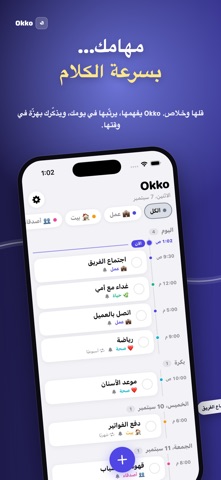
Sampled from 5 of Okko's App Store screenshots — background, accent and theme, measured by LaunchShots (not something Apple publishes).
#1C1C4C bg
#3B3B65
#4C4CA4 accent
#FFFFFF text
Screenshots


Icon palette
About this app
Okko منظّم مهام شخصي بُني على فكرة وحدة: إضافة المهمة لازم تكون بسرعة الكلام. قل «اتصل بالعميل بكرة الساعة 5 العصر» وخلاص. Okko يطلّع العنوان والوقت والوسم لحاله، وما يسألك إلا إذا ناقص شي. بالعربي أو الإنجليزي. مع فريقك - أنشئ فريقًا وادعُ الناس برمز QR أو رابط — بدون حسابات ولا كلمات مرور. - أسند المهام لأعضاء الفريق من شاشة المهمة، وتابع مين خلّص ومين تعذّر عليه. - القائد يقدر يفوّض عضوًا يسند نيابةً عنه. أضف بصوتك من أي مكان - سيري: «يا سيري، ضيف مهمة في أوكو». - أمازون أليكسا: اربط حسابك برمز اقتران، وقل «أليكسا، اطلبي من أوكو أضيفي…». هزّة، مو إزعاج - تنبيه بالاهتزاز الصامت في وقت المهمة، بدون صوت. - يعيد التنبيه كل 2 أو 5 أو 10 دقايق (أنت تختار) لمدة تحددها، لين تضغط «تم» أو «إيقاف». - تم / غفوة / إيقاف من الإشعار نفسه بدون فتح التطبيق. يومك خط زمني - مهام اليوم مرتّبة بالساعة مع خط «الآن». - أفق 30 يوم: المهام المتكررة تظهر تكراراتها القادمة، والمتأخرة لها قسم واضح. - وسوم …
App details
What you can learn from Okko
Every shipping app on the App Store has gone through the same decisions you're working through right now: which screenshot goes first, what caption sits over it, which device frame to show, what color the background should be. The 5 screenshots above are Okko's answers to those questions — they're public, they're real, and they made it through Apple's review.
What the numbers say: Okko runs a mixed light-and-dark set where the background shifts from screenshot to screenshot (first shot #1C1C4C) — each image has to stand on its own, so the captions carry more of the story. The accent colour we picked up, #4C4CA4, is the one to reuse for badges, arrows and highlighted words if you borrow this look. Hit Use this style to open the editor with these exact colours and drop your own screenshot in.
Notice the first screenshot in particular. It's the one users see in search results and on the product page, and it's where most apps spend their best caption and tightest design. Look at the proportion of background to phone, where the text sits, what one thing the image is trying to communicate.
Want to see how other Productivity apps approach the same problem? Browse more Productivity apps in the showcase.
Take what works into your own screenshots
Open LaunchShots and design your App Store & Google Play screenshots — pick a device frame, drop captions, ship in minutes. Free, in your browser.
Open the screenshot editor →Apps with a similar look
Closest background + accent colours among the listings we've analysed — useful when you want to see the same palette handled by a different team.