Chart position — tracked daily by LaunchShots
Screenshot style breakdown
Sampled from 4 of 画像診断cafe's App Store screenshots — background, accent and theme, measured by LaunchShots (not something Apple publishes).
#F4F4F4 bg
#D6D6D6
#AC7464 accent
#111111 text
Screenshots


Icon palette
About this app
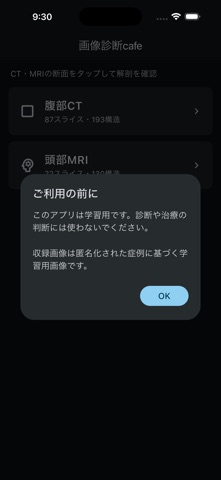
読影の合間や通勤中に、実際のCT・MRI・X線で解剖を確かめたい。 画像診断cafeは、医師・診療放射線技師・看護師・医学生などのための、タップして解剖名を覚えるアプリです。 イラストではなく実画像。しかも通信なしで動きます。 ■ 収録内容(23画面) 【頭部】頭部MRI(130構造)/頭部MRA 脳動脈(前方循環・後方循環)/側頭骨CT(横断・冠状断)/顔面骨X線(正面・側面) 【頸部】頸部MRI 横断像(143構造) 【胸部】胸部CT(横断・冠状断・矢状断/縦隔・肺野・骨条件・最大258構造)/胸部X線 正面 【腹部】腹部CT(横断・冠状断・矢状断/軟部・骨条件・193構造) 【整形外科】肩MRI(冠状断・矢状断)/膝MRI(冠状断・矢状断)/足関節MRI(横断・冠状断・矢状断)/腰椎MRI(横断・矢状断) ■ できること ・気になる場所をタップすると、その構造が色づき、日本語と英語の名前が表示されます。複数タップで見比べも可能 ・画面を上下にスワイプするとスライスが進みます。スライダーや矢印でも送れます ・横断・冠状断・矢状断は右上の丸ボタンで切り替え。胸部CT・腹部CTは条件(縦隔・…
App details
What you can learn from 画像診断cafe
Every shipping app on the App Store has gone through the same decisions you're working through right now: which screenshot goes first, what caption sits over it, which device frame to show, what color the background should be. The 4 screenshots above are 画像診断cafe's answers to those questions — they're public, they're real, and they made it through Apple's review.
What the numbers say: 画像診断cafe runs a mixed light-and-dark set where the background shifts from screenshot to screenshot (first shot #F4F4F4) — each image has to stand on its own, so the captions carry more of the story. The accent colour we picked up, #AC7464, is the one to reuse for badges, arrows and highlighted words if you borrow this look. Hit Use this style to open the editor with these exact colours and drop your own screenshot in.
Notice the first screenshot in particular. It's the one users see in search results and on the product page, and it's where most apps spend their best caption and tightest design. Look at the proportion of background to phone, where the text sits, what one thing the image is trying to communicate.
Want to see how other Medical apps approach the same problem? Browse more Medical apps in the showcase.
Take what works into your own screenshots
Open LaunchShots and design your App Store & Google Play screenshots — pick a device frame, drop captions, ship in minutes. Free, in your browser.
Open the screenshot editor →Apps with a similar look
Closest background + accent colours among the listings we've analysed — useful when you want to see the same palette handled by a different team.