Chart position — tracked daily by LaunchShots
Screenshot style breakdown
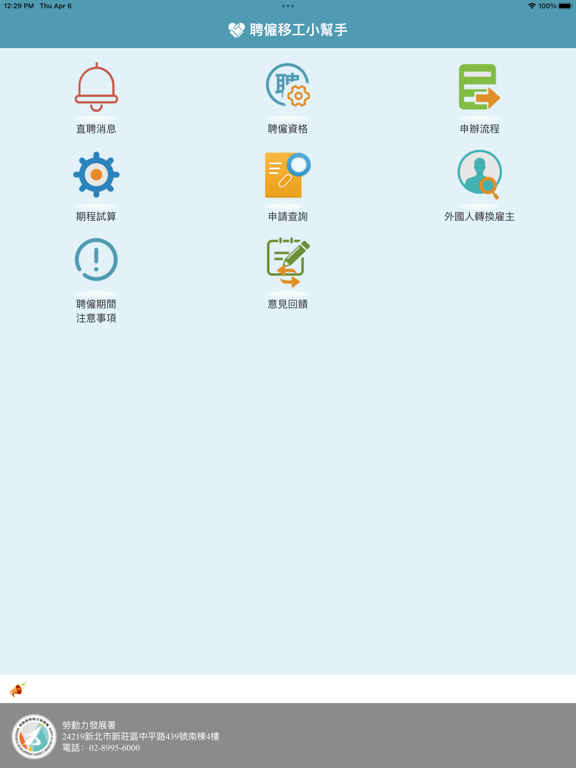
Sampled from 3 of 聘僱移工小幫手's App Store screenshots — background, accent and theme, measured by LaunchShots (not something Apple publishes).
#E4F4FC bg
#C8D6DD
#549CB4 accent
#111111 text
Reading the caption text from the screenshots in your browser…
Screenshots


iPad screenshots
Icon palette
About this app
勞動部勞動力發展署行動應用(聘僱移工小幫手)服務,提供下列資訊: 直聘消息:提供聘僱外國人最新資訊及消息。 聘僱資格:提供雇主申請各工作類別時,應如何取得聘僱資格 申辦流程:雇主聘僱外國人之各項申辦流程說明。 期程試算:外國人聘僱後管理應辦事項之辦理時間試算。 申請查詢:外國人申請案件進度查詢(可查詢透過勞動力發展署申請及透過直聘中心申請案件進度)。 外國人轉換雇主:提供外國人轉出應辦理的流程,另提供印尼文、英文、越南文、泰文語言說明。 聘僱期間注意事項:提供雇主瞭解聘僱外國人後,在聘僱期間注意事項 意見回饋:提供使用者回饋各項意見園地。 隱私權保護政策 ※隱私權保護宣告的適用範圍 以下的隱私權宣告,適用於您在使用本APP時,所涉及的個人資料蒐集、運用及保護,但不適用於與本APP內功能顯示之其它機關單位。 凡經由「聘僱移工小幫手APP」連結之機關單位,各均有其專屬之隱私權政策,本APP不負任何連帶責任。當您連結這些時,關於個人資料的保護,適用各該單位的隱私權政策。 ※個人資料之蒐集及使用方式 一、利用「聘僱移工小幫…
App details
What you can learn from 聘僱移工小幫手
Every shipping app on the App Store has gone through the same decisions you're working through right now: which screenshot goes first, what caption sits over it, which device frame to show, what color the background should be. The 4 screenshots above are 聘僱移工小幫手's answers to those questions — they're public, they're real, and they made it through Apple's review.
What the numbers say: 聘僱移工小幫手 runs a mixed light-and-dark set where the background shifts from screenshot to screenshot (first shot #E4F4FC) — each image has to stand on its own, so the captions carry more of the story. The accent colour we picked up, #549CB4, is the one to reuse for badges, arrows and highlighted words if you borrow this look. Hit Use this style to open the editor with these exact colours and drop your own screenshot in.
Notice the first screenshot in particular. It's the one users see in search results and on the product page, and it's where most apps spend their best caption and tightest design. Look at the proportion of background to phone, where the text sits, what one thing the image is trying to communicate.
Want to see how other News apps approach the same problem? Browse more News apps in the showcase.
Take what works into your own screenshots
Open LaunchShots and design your App Store & Google Play screenshots — pick a device frame, drop captions, ship in minutes. Free, in your browser.
Open the screenshot editor →Apps with a similar look
Closest background + accent colours among the listings we've analysed — useful when you want to see the same palette handled by a different team.