Chart position — tracked daily by LaunchShots
Screenshot style breakdown
Sampled from 5 of BIGEMAP卫星地图-实景三维地球,路径规划和北斗定位导航's App Store screenshots — background, accent and theme, measured by LaunchShots (not something Apple publishes).
#040C24 bg
#272E42
#0C247C accent
#FFFFFF text
Screenshots


iPad screenshots


Icon palette
About this app
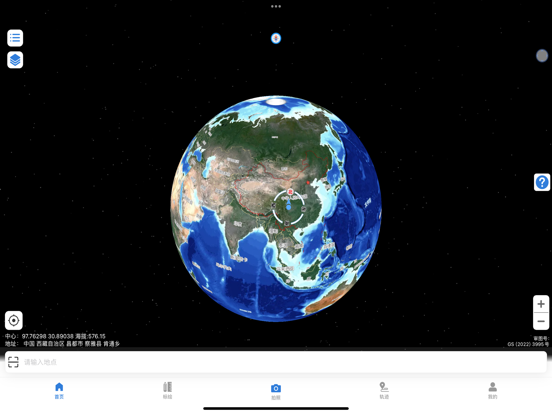
BIGEMAP 是一款专为户外出行、野外勘测与工程巡检打造的专业级实景地图工具。基于卫星影像与三维数字地球,提供全球高清街景、历史卫星影像回放及精确等高线地形图,让您在无网络环境下也能使用离线地图进行导航定位。 核心功能,一应俱全: 1、 高清卫星地图 浏览高清卫星影像,历史影像回放。同时可根据需要自行添加其他在线公开地图(自定义),包括卫星地图、历史地图、电子地图以及等高线地形图及其他专属地图,如地质图、气象地图、海图等待,对于各行业的户外作业提供有效帮助。 2、户外调查、规划设计标绘 可基于不同地图标会出图斑、河流、林业、土地及其他外业作业,可实现测距离、测面积、测角度等待,BIGEMAP提供了丰富的图斑标注工具。 3、 水印相机 外业拍照记录,自动生成水印:时间、地点、任务记录;同时提供多水印样式可选,水印防篡改外业从业者的优选。 4、 路劲规划 无人机飞行路劲规划、户外运动路径规划、野外路径导航、旅游路径规划,您可以在地图直接做各种规划设计:标点、画线、画笔、多边形、圆形、设计图纸现场查验等待。 5、轨迹…
App details
What you can learn from BIGEMAP卫星地图-实景三维地球,路径规划和北斗定位导航
Every shipping app on the App Store has gone through the same decisions you're working through right now: which screenshot goes first, what caption sits over it, which device frame to show, what color the background should be. The 9 screenshots above are BIGEMAP卫星地图-实景三维地球,路径规划和北斗定位导航's answers to those questions — they're public, they're real, and they made it through Apple's review.
What the numbers say: BIGEMAP卫星地图-实景三维地球,路径规划和北斗定位导航 runs a dark set with one background colour (#040C24) carried across every screenshot — the listing reads as a single poster when the shots sit side by side in search results. The accent colour we picked up, #0C247C, is the one to reuse for badges, arrows and highlighted words if you borrow this look. Hit Use this style to open the editor with these exact colours and drop your own screenshot in.
Notice the first screenshot in particular. It's the one users see in search results and on the product page, and it's where most apps spend their best caption and tightest design. Look at the proportion of background to phone, where the text sits, what one thing the image is trying to communicate.
Want to see how other Navigation apps approach the same problem? Browse more Navigation apps in the showcase.
Take what works into your own screenshots
Open LaunchShots and design your App Store & Google Play screenshots — pick a device frame, drop captions, ship in minutes. Free, in your browser.
Open the screenshot editor →Apps with a similar look
Closest background + accent colours among the listings we've analysed — useful when you want to see the same palette handled by a different team.