Screenshot changes — detected by LaunchShots
Screenshot style breakdown
Sampled from 6 of Noji: Karteikarten Lernen's App Store screenshots — background, accent and theme, measured by LaunchShots (not something Apple publishes).
#04A4FC bg
#27B0FC
#64C4FC accent
#FFFFFF text
Screenshots

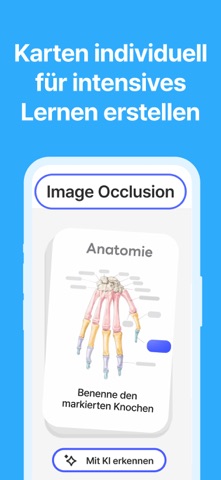


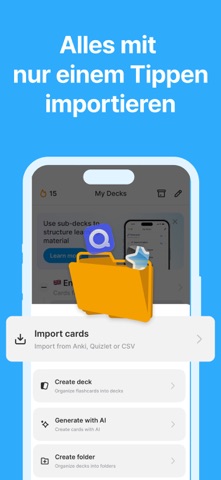

iPad screenshots


Icon palette
About this app
Hol dir Noji und meister die Karteikarten unterwegs. Noji basiert sich in einem beabstandete Wiederholungsalgorythmus, der dir erlaubt, das beste vom Lernen und Lernmaterialien zu bekommen. Auf der App erstellst du Karteikarten, und der eingerichtete Lernalgorythmus macht den Rest. Er lernt was du vielleicht bald vergessen könntest, und zeigt dir dir Karten rechtzeitig wieder. Für Jahrzehnten haben Menschen die beabstandete Wiederholung benutzt um neue Vokabeln zu lernen, Prüfungen vorzubereiten, oder sich einfach neue Informationen zu merken. Noji spart dir die Mühe mit Karteikarten umzugehen, jetzt ist diese Lernerfahrung digital. Die App ist klar und simpel, aber gleichzeitig möchtig. Du kannst damit tausende von Karteikarten verwalten ohne Zeit dabei zu verlieren. Du kannst Karten am Handy, oder MacBook mit M1 erstellen. WAS UNSERE NUTZER ÜBER NOJI DENKEN: "Endlich …
App details
What you can learn from Noji: Karteikarten Lernen
Every shipping app on the App Store has gone through the same decisions you're working through right now: which screenshot goes first, what caption sits over it, which device frame to show, what color the background should be. The 12 screenshots above are Noji: Karteikarten Lernen's answers to those questions — they're public, they're real, and they made it through Apple's review.
What the numbers say: Noji: Karteikarten Lernen runs a mixed light-and-dark set with one background colour (#04A4FC) carried across every screenshot — the listing reads as a single poster when the shots sit side by side in search results. The accent colour we picked up, #64C4FC, is the one to reuse for badges, arrows and highlighted words if you borrow this look. Hit Use this style to open the editor with these exact colours and drop your own screenshot in.
Notice the first screenshot in particular. It's the one users see in search results and on the product page, and it's where most apps spend their best caption and tightest design. Look at the proportion of background to phone, where the text sits, what one thing the image is trying to communicate.
Want to see how other Education apps approach the same problem? Browse more Education apps in the showcase.
Take what works into your own screenshots
Open LaunchShots and design your App Store & Google Play screenshots — pick a device frame, drop captions, ship in minutes. Free, in your browser.
Open the screenshot editor →Apps with a similar look
Closest background + accent colours among the listings we've analysed — useful when you want to see the same palette handled by a different team.