Chart position — tracked daily by LaunchShots
Screenshot style breakdown
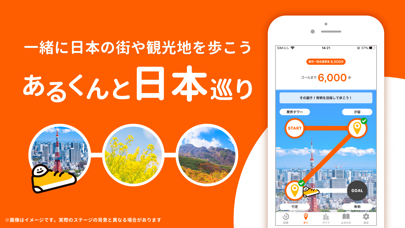
Sampled from 2 of 歩数計あるくん〜シンプルなウォーキングアプリ's App Store screenshots — background, accent and theme, measured by LaunchShots (not something Apple publishes).
#FC5C04 bg
#FC7227
#FCBC04 accent
#FFFFFF text
Screenshots

Icon palette
About this app
血圧改善や脂肪燃焼の改善効果が期待できるウォーキングなら、シンプルな歩数計アプリ「あるくん」がおすすめです。 あるくんは、iPhoneのApple Health(ヘルスケア)内の歩数データを使用し、自動で毎日の歩数や歩数の履歴を表示しています。 iPhoneを持って歩くだけで、自動的に歩数が記録されるため、電池バッテリーを消費することなく簡単に歩数を記録することができます。 また、一定以上の速さで行われる健康的な早歩き「サッサ歩き」の計測も可能です。 あなたの歩く速度に合わせて「サッサ歩き」の難易度の変更が可能です。 「イージー」「スタンダード」「ハード」の3種類からご自分に合った難易度を選択してサッサ歩きを あるくん日本巡りという楽しい歩数ゲーム機能も搭載されています。 シンプルで見やすい画面で誰でも簡単に使える機能が好評なおすすめの歩数計アプリです。 さらに、「あるくん」にはグラフ機能も備わっており、ダイエットやウォーキングに活用したい方にもピッタリです。 ■こんな方におすすめの歩数計アプリです■ ・血圧改善を…
App details
What you can learn from 歩数計あるくん〜シンプルなウォーキングアプリ
Every shipping app on the App Store has gone through the same decisions you're working through right now: which screenshot goes first, what caption sits over it, which device frame to show, what color the background should be. The 2 screenshots above are 歩数計あるくん〜シンプルなウォーキングアプリ's answers to those questions — they're public, they're real, and they made it through Apple's review.
What the numbers say: 歩数計あるくん〜シンプルなウォーキングアプリ runs a dark set with one background colour (#FC5C04) carried across every screenshot — the listing reads as a single poster when the shots sit side by side in search results. The accent colour we picked up, #FCBC04, is the one to reuse for badges, arrows and highlighted words if you borrow this look. Hit Use this style to open the editor with these exact colours and drop your own screenshot in.
Notice the first screenshot in particular. It's the one users see in search results and on the product page, and it's where most apps spend their best caption and tightest design. Look at the proportion of background to phone, where the text sits, what one thing the image is trying to communicate.
Want to see how other Health & Fitness apps approach the same problem? Browse more Health & Fitness apps in the showcase.
Take what works into your own screenshots
Open LaunchShots and design your App Store & Google Play screenshots — pick a device frame, drop captions, ship in minutes. Free, in your browser.
Open the screenshot editor →Apps with a similar look
Closest background + accent colours among the listings we've analysed — useful when you want to see the same palette handled by a different team.