launchshots / showcase / education / ポーカー学習&gtoトレーナー poker q'z

ポーカー学習&GTOトレーナー POKER Q'z

by CLOViZ, Inc.
Education 4.6 (1,487) 無料 12+ 62.7 MB

Chart position — tracked daily by LaunchShots

#62 of 100
Top Free Education · Argentina
best #48 · 5 days tracked · as of Sep 22
▲ 9 / 7d
#70 of 100
Top Free Education · Italy
best #70 · 1 day tracked · as of Sep 7
— / 7d
#96 of 100
Top Free Education · Thailand
best #63 · 5 days tracked · as of Sep 18
▲ 1 / 7d

Screenshot changes — detected by LaunchShots

Sep 9, 2026
ポーカー学習&GTOトレーナー POKER Q'z added 4 iPhone screenshots (6 → 10); switched from a mixed to a dark theme; moved to captions above the phone (was full-bleed screens without captions); changed the background colour from #047C2C to #0C0C0C; unified every screenshot on one background colour.

Screenshot style breakdown

Sampled from 6 of ポーカー学習&GTOトレーナー POKER Q'z's App Store screenshots — background, accent and theme, measured by LaunchShots (not something Apple publishes).

Use this style →
10 iPhone screenshots · 10 iPad Dark theme One background colour across the set
#0C0C0C bg #2E2E2E #042464 accent #FFFFFF text

Reading the caption text from the screenshots in your browser…

vs. Education apps we've analysed (3642): 50% use a light theme — ポーカー学習&GTOトレーナー POKER Q'z goes dark; 31% put the caption above the phone (same here); the average set has 6.1 screenshots — ポーカー学習&GTOトレーナー POKER Q'z ships 10. Full Education benchmark →

Screenshots

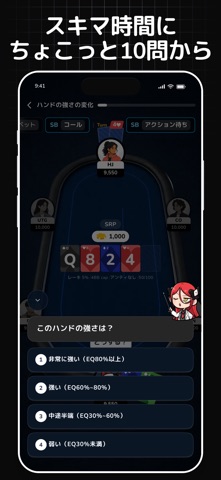
#1 ポーカー学習&GTOトレーナー POKER Q'z iPhone screenshot 1
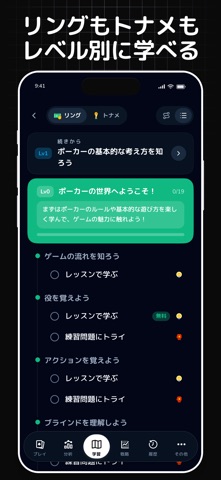
#2 ポーカー学習&GTOトレーナー POKER Q'z iPhone screenshot 2
#3 ポーカー学習&GTOトレーナー POKER Q'z iPhone screenshot 3
#4 ポーカー学習&GTOトレーナー POKER Q'z iPhone screenshot 4
#5 ポーカー学習&GTOトレーナー POKER Q'z iPhone screenshot 5
#6 ポーカー学習&GTOトレーナー POKER Q'z iPhone screenshot 6
#7 ポーカー学習&GTOトレーナー POKER Q'z iPhone screenshot 7
#8 ポーカー学習&GTOトレーナー POKER Q'z iPhone screenshot 8
#9 ポーカー学習&GTOトレーナー POKER Q'z iPhone screenshot 9
#10 ポーカー学習&GTOトレーナー POKER Q'z iPhone screenshot 10

iPad screenshots

#1 ポーカー学習&GTOトレーナー POKER Q'z iPad screenshot 1
#2 ポーカー学習&GTOトレーナー POKER Q'z iPad screenshot 2
#3 ポーカー学習&GTOトレーナー POKER Q'z iPad screenshot 3
#4 ポーカー学習&GTOトレーナー POKER Q'z iPad screenshot 4
#5 ポーカー学習&GTOトレーナー POKER Q'z iPad screenshot 5
#6 ポーカー学習&GTOトレーナー POKER Q'z iPad screenshot 6
#7 ポーカー学習&GTOトレーナー POKER Q'z iPad screenshot 7
#8 ポーカー学習&GTOトレーナー POKER Q'z iPad screenshot 8
#9 ポーカー学習&GTOトレーナー POKER Q'z iPad screenshot 9
#10 ポーカー学習&GTOトレーナー POKER Q'z iPad screenshot 10

Icon palette

extracting…
Dominant colors sampled from the icon — click any swatch to copy the hex.

About this app

スキルが身につけば、ポーカーはもっと面白くなる。 POKER Q'z(ポーカーキューズ)は、GTOとAIで「なんとなくプレー」を卒業できるポーカー学習アプリ。あなた専用のポーカートレーナーとして、 クイズ形式で楽しく学びながら、オンラインでも海外でも戦える実力を身につけましょう。 東大発のポーカー研究から生まれたカリキュラムで、実戦で使える戦略を体系的に学べます。 【主な特徴】 • 基礎からGTO思考まで、体系的に学べるレッスンモード • 10万問以上の実戦形式クイズで、判断力を超効率的にトレーニング • 「なぜそのプレイが正解なのか」がわかる丁寧な解説つき • AIにハンドや戦略を質問して、その場で疑問を解消できるチャット機能 • 苦手傾向を分析し、あなた専用のおすすめ問題を自動提案 • プリフロップで迷わない、簡易レンジ表(ハンドレンジ)を収録 • オッズ・エクイティ計算など、実戦でも使える便利ツール • ブラックジャックやビデオポーカーなど、学習を続けやすいミニゲームも搭載 【学習コンテンツ】 • 役やルールなど、完全初心者向け…

App details

Bundle ID
app.pokerqz
Latest version
2.0.9
Released
Dec 3, 2024
Last updated
Aug 24, 2026
Languages
17 (EN, FR, DE, HI, ID…)
Genres
教育, ゲーム, ボード, ストラテジー

What you can learn from ポーカー学習&GTOトレーナー POKER Q'z

Every shipping app on the App Store has gone through the same decisions you're working through right now: which screenshot goes first, what caption sits over it, which device frame to show, what color the background should be. The 20 screenshots above are ポーカー学習&GTOトレーナー POKER Q'z's answers to those questions — they're public, they're real, and they made it through Apple's review.

What the numbers say: ポーカー学習&GTOトレーナー POKER Q'z runs a dark set with one background colour (#0C0C0C) carried across every screenshot — the listing reads as a single poster when the shots sit side by side in search results. The accent colour we picked up, #042464, is the one to reuse for badges, arrows and highlighted words if you borrow this look. Hit Use this style to open the editor with these exact colours and drop your own screenshot in.

Notice the first screenshot in particular. It's the one users see in search results and on the product page, and it's where most apps spend their best caption and tightest design. Look at the proportion of background to phone, where the text sits, what one thing the image is trying to communicate.

Want to see how other Education apps approach the same problem? Browse more Education apps in the showcase.

Take what works into your own screenshots

Open LaunchShots and design your App Store & Google Play screenshots — pick a device frame, drop captions, ship in minutes. Free, in your browser.

Open the screenshot editor →

Apps with a similar look

Closest background + accent colours among the listings we've analysed — useful when you want to see the same palette handled by a different team.

NoiseFit: Health & Fitness
#0C0C0C #042464
Prompts for Midjourney AI: MLX
#0C0C0C #04346C
Auric Vesper
#14040C #042464
Smart Alexa : Echo Dot App
#04040C #042464
Keeper: Crypto Wallet
#0C0C14 #0C2C6C
Jump Jump VPN
#04040C #04246C

More Education apps

Latest from the blog

ASO
Screenshot Mistakes That Quietly Cost Installs: 10 Fixes
Sep 23, 2026
Guides
Claude Code Weekly Limit vs 5-Hour Lockout: Complete Usage & Reset Guide
Sep 22, 2026
Guides
When Does Claude Code Usage Reset? Complete Reset Schedule Guide
Sep 22, 2026
News
Google Play Policy Updates: A Monthly Compliance Routine
Sep 22, 2026
1 / 1
copied