Chart position — tracked daily by LaunchShots
Screenshot changes — detected by LaunchShots
Screenshot style breakdown
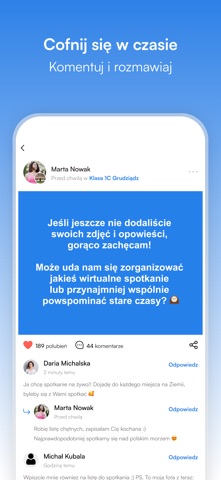
Sampled from 6 of NaszaKlasa's App Store screenshots — background, accent and theme, measured by LaunchShots (not something Apple publishes).
#3484E4 bg
#5095E7
#84B4F4 accent
#FFFFFF text
Screenshots




Icon palette
About this app
Przywróć magię szkolnych lat dzięki nowoczesnej i niezależnej aplikacji mobilnej NaszaKlasa. Teraz możesz szybko odnaleźć kolegów i koleżanki z dawnych lat, ponownie dołączyć do wirtualnych klas i szkół oraz powrócić do beztroskich wspomnień z dzieciństwa i młodości czy też lat studenckich. W aplikacji czeka na Ciebie prosty w obsłudze czat – odpisuj znajomym jednym kliknięciem i nadążaj za tym, co u nich słychać. Zakładaj klasy i dodawaj zdjęcia, filmy oraz historię swoich szkolnych czy studenckich lat. Przeglądaj ulubione archiwa: stare zdjęcia klasowe, zabawne anegdoty i wspólne podróże – to wszystko gromadzą Twoi znajomi w zakładkach klas, grup i wydarzeń. - Znajdź dawnych znajomych: Błyskawiczna wyszukiwarka pozwala odnaleźć koleżanki i kolegów z podstawówki, gimnazjum, liceum czy studiów według szkoły, klasy lub imienia czy nazwiska panieńskiego. - Klasy, szkoły i grupy: Dołąc…
App details
What you can learn from NaszaKlasa
Every shipping app on the App Store has gone through the same decisions you're working through right now: which screenshot goes first, what caption sits over it, which device frame to show, what color the background should be. The 6 screenshots above are NaszaKlasa's answers to those questions — they're public, they're real, and they made it through Apple's review.
What the numbers say: NaszaKlasa runs a mixed light-and-dark set where the background shifts from screenshot to screenshot (first shot #3484E4) — each image has to stand on its own, so the captions carry more of the story. The accent colour we picked up, #84B4F4, is the one to reuse for badges, arrows and highlighted words if you borrow this look. Hit Use this style to open the editor with these exact colours and drop your own screenshot in.
Notice the first screenshot in particular. It's the one users see in search results and on the product page, and it's where most apps spend their best caption and tightest design. Look at the proportion of background to phone, where the text sits, what one thing the image is trying to communicate.
Want to see how other Social Networking apps approach the same problem? Browse more Social Networking apps in the showcase.
Take what works into your own screenshots
Open LaunchShots and design your App Store & Google Play screenshots — pick a device frame, drop captions, ship in minutes. Free, in your browser.
Open the screenshot editor →Apps with a similar look
Closest background + accent colours among the listings we've analysed — useful when you want to see the same palette handled by a different team.