Chart position — tracked daily by LaunchShots
Screenshot changes — detected by LaunchShots
Screenshot style breakdown
Sampled from 4 of 喫煙所ナビ -タバコ・吸える・分煙・タバコミュニケーション-'s App Store screenshots — background, accent and theme, measured by LaunchShots (not something Apple publishes).
#040404 bg
#272727
#FC5C1C accent
#FFFFFF text
Reading the caption text from the screenshots in your browser…
Screenshots


iPad screenshots

Icon palette
About this app
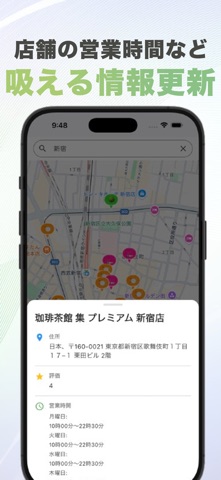
吸える場所、見つけよう。 気持ちよくタバコが楽しめるお店を探す、希望が送れる喫煙スポットマップ タバコを吸いたいとき、どこならマナーを守って吸えるのか―― そんな疑問に応えるのがこのアプリです。 喫煙可能な飲食店やカフェ、バーなどのリアルな情報を地図で検索でき、営業時間や評価などもひと目でチェック。 さらに、「実は吸えなかった…」という情報は通報機能で修正を提案できたり、調査してほしい場所をリクエストすることも可能です。 【アプリの主な機能】 ■ 喫煙可能な店舗の検索 地図上に表示された「ピン」をタップすると、店舗の営業時間・評価・レビューなど詳しい情報を確認できます。 ■ 通報機能 もし「喫煙可」と記載されていても実際には吸えなかった場合は、通報機能から報告可能。 ユーザーの力で地図の正確性が向上します。 ■ リクエスト機能 「このお店が喫煙できるか調べてほしい」などの調査依頼も可能です。 アプリ運営や他ユーザーが調査して情報を追加します。 ■ 位置情報・ルート案内機能 現在地から喫煙可能な店舗までのル…
App details
What you can learn from 喫煙所ナビ -タバコ・吸える・分煙・タバコミュニケーション-
Every shipping app on the App Store has gone through the same decisions you're working through right now: which screenshot goes first, what caption sits over it, which device frame to show, what color the background should be. The 5 screenshots above are 喫煙所ナビ -タバコ・吸える・分煙・タバコミュニケーション-'s answers to those questions — they're public, they're real, and they made it through Apple's review.
What the numbers say: 喫煙所ナビ -タバコ・吸える・分煙・タバコミュニケーション- runs a mixed light-and-dark set where the background shifts from screenshot to screenshot (first shot #040404) — each image has to stand on its own, so the captions carry more of the story. The accent colour we picked up, #FC5C1C, is the one to reuse for badges, arrows and highlighted words if you borrow this look. Hit Use this style to open the editor with these exact colours and drop your own screenshot in.
Notice the first screenshot in particular. It's the one users see in search results and on the product page, and it's where most apps spend their best caption and tightest design. Look at the proportion of background to phone, where the text sits, what one thing the image is trying to communicate.
Want to see how other Navigation apps approach the same problem? Browse more Navigation apps in the showcase.
Take what works into your own screenshots
Open LaunchShots and design your App Store & Google Play screenshots — pick a device frame, drop captions, ship in minutes. Free, in your browser.
Open the screenshot editor →Apps with a similar look
Closest background + accent colours among the listings we've analysed — useful when you want to see the same palette handled by a different team.