Chart position — tracked daily by LaunchShots
Screenshot changes — detected by LaunchShots
Screenshot style breakdown
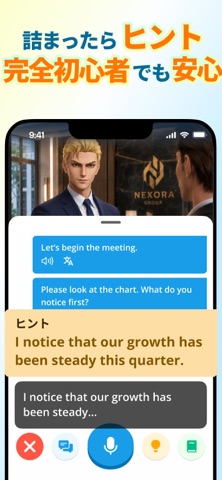
Sampled from 6 of モチスピ-英会話/AI添削/英語/韓国語/中国語/フランス語's App Store screenshots — background, accent and theme, measured by LaunchShots (not something Apple publishes).
#FCFCFC bg
#DDDDDD
#FC7404 accent
#111111 text
Screenshots




Icon palette
About this app
「先生、聞いて。今日はこんなことがあったんだ。」 うれしかったことも、ちょっと聞いてほしいことも。 モチスピは、個性豊かな先生たちと話しながら学べる英会話・多言語会話アプリです。 英語・韓国語・中国語・フランス語・ドイツ語・スペイン語。6言語で、あなたの話を聞いてくれる先生がいます。 言葉に詰まっても、言い方を教えてもらって、もう一度。伝わったら、今度はその先も話してみる。 英会話を始めたい人にも、気になる言語に挑戦したい人にも、「自分にも話せた」と思える時間を届けたいんです。 ■ 昨日の話の続きから、始めよう 好きな映画、最近あったこと、いつか行ってみたい場所。フリートークでは、あなたの話したいことを先生に伝えられます。 先生は以前話したことも覚えてくれるので、前の話の続きをしたり、新しい出来事を伝えたり。会うたびに、話題を少しずつ広げていけます。 ジョニー、レックス、みゆなど、先生ごとの個性も会話の楽しみ。予約はいりません。話したくなったときに会いに来てください。 先生は、あなたのレベルに合…
App details
What you can learn from モチスピ-英会話/AI添削/英語/韓国語/中国語/フランス語
Every shipping app on the App Store has gone through the same decisions you're working through right now: which screenshot goes first, what caption sits over it, which device frame to show, what color the background should be. The 10 screenshots above are モチスピ-英会話/AI添削/英語/韓国語/中国語/フランス語's answers to those questions — they're public, they're real, and they made it through Apple's review.
What the numbers say: モチスピ-英会話/AI添削/英語/韓国語/中国語/フランス語 runs a mixed light-and-dark set where the background shifts from screenshot to screenshot (first shot #FCFCFC) — each image has to stand on its own, so the captions carry more of the story. The accent colour we picked up, #FC7404, is the one to reuse for badges, arrows and highlighted words if you borrow this look. Hit Use this style to open the editor with these exact colours and drop your own screenshot in.
Notice the first screenshot in particular. It's the one users see in search results and on the product page, and it's where most apps spend their best caption and tightest design. Look at the proportion of background to phone, where the text sits, what one thing the image is trying to communicate.
Want to see how other Education apps approach the same problem? Browse more Education apps in the showcase.
Take what works into your own screenshots
Open LaunchShots and design your App Store & Google Play screenshots — pick a device frame, drop captions, ship in minutes. Free, in your browser.
Open the screenshot editor →Apps with a similar look
Closest background + accent colours among the listings we've analysed — useful when you want to see the same palette handled by a different team.