Chart position — tracked daily by LaunchShots
Screenshot style breakdown
Sampled from 6 of ビデオ通話で大きさ見せ合い Bigvege's App Store screenshots — background, accent and theme, measured by LaunchShots (not something Apple publishes).
#CC9CFC bg
#B389DD
#FC5CC4 accent
#111111 text
Reading the caption text from the screenshots in your browser…
Screenshots





Icon palette
About this app
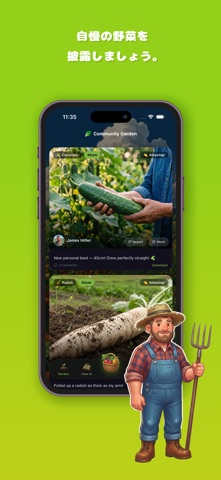
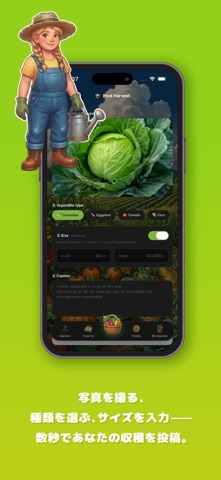
ビデオ通話やチャットで大きさ自慢をしちゃおう!! 特大のきゅうり、太い茄子などなど。 おうちで育てたおっきな野菜の写真を投稿して、みんなに褒めてもらいましょう。 ■ 大きさ自慢をする 写真を撮って、野菜の種類を選んで、大きさを記録するだけ。 自信作は「みんなの菜園」フィードの主役になります。 ■ 褒めてもらう ほかのユーザーから「すごい!」「お見事!」「おいしそう!」「いいね!」の褒めスタンプと、あたたかいコメントが届きます。 育てる楽しみが、ぐんと大きくなります。 ■ ビデオチャットで見せ合う 写真だけでは伝わりきらない大きさは、リアルタイムのビデオ動画で見せ合いましょう。 テレビ電話のようにカメラを野菜に向ければ、その場でリアルタイムに反応が返ってきます。 「実物はもっとすごいんです」を、そのまま届けられます。 顔を出したくない日は音声通話に切り替えられますし、声を出しにくい場所ではチャットでやりとりできます。 ビデオチャット・音声通話・チャットを、そのときどきで自由に選べます。 ■ 大きさを見せる 長さや…
App details
What you can learn from ビデオ通話で大きさ見せ合い Bigvege
Every shipping app on the App Store has gone through the same decisions you're working through right now: which screenshot goes first, what caption sits over it, which device frame to show, what color the background should be. The 7 screenshots above are ビデオ通話で大きさ見せ合い Bigvege's answers to those questions — they're public, they're real, and they made it through Apple's review.
What the numbers say: ビデオ通話で大きさ見せ合い Bigvege runs a light set where the background shifts from screenshot to screenshot (first shot #CC9CFC) — each image has to stand on its own, so the captions carry more of the story. The accent colour we picked up, #FC5CC4, is the one to reuse for badges, arrows and highlighted words if you borrow this look. Hit Use this style to open the editor with these exact colours and drop your own screenshot in.
Notice the first screenshot in particular. It's the one users see in search results and on the product page, and it's where most apps spend their best caption and tightest design. Look at the proportion of background to phone, where the text sits, what one thing the image is trying to communicate.
Want to see how other Entertainment apps approach the same problem? Browse more Entertainment apps in the showcase.
Take what works into your own screenshots
Open LaunchShots and design your App Store & Google Play screenshots — pick a device frame, drop captions, ship in minutes. Free, in your browser.
Open the screenshot editor →Apps with a similar look
Closest background + accent colours among the listings we've analysed — useful when you want to see the same palette handled by a different team.