Chart position — tracked daily by LaunchShots
Screenshot changes — detected by LaunchShots
Screenshot style breakdown
Sampled from 6 of Joyn | deine Streaming App's App Store screenshots — background, accent and theme, measured by LaunchShots (not something Apple publishes).
#348C9C bg
#509CA9
#84C4CC accent
#FFFFFF text
Reading the caption text from the screenshots in your browser…
Screenshots


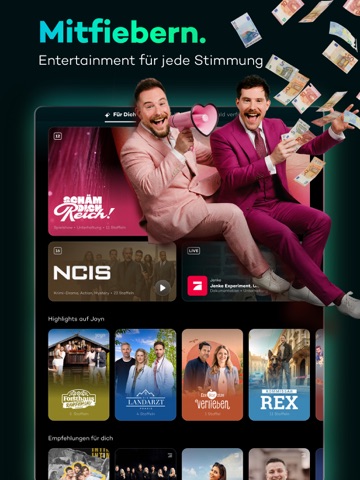
iPad screenshots



Icon palette
About this app
Joyn bietet dir Live TV und Mediathek in einer App. Das Basisangebot von Joyn ist kostenlos – einfach herunterladen und losstreamen. Mit Joyn kannst du über 100 Sender live schauen, wie ARD, ZDF, ProSieben und DMAX. Live TV ist aber nur ein Teil von Joyn. Der andere große Teil ist unsere Mediathek. Dort findest du jede Menge Shows, exklusive Serien und Originals wie Promis unter Palmen, Germanys Next Topmodel, Wer stiehlt mir die Show oder The Race. Außerdem Previews, also komplette Serienfolgen noch vor Ausstrahlung im TV. Schau wann und wo du willst. Und mit welchem Gerät du willst, Joyn läuft nämlich auf Smartphones, Tablets, auf dem Fernseher und im Webbrowser. Wenn du das komplette kostenlose Angebot von Joyn nutzen möchtest, musst du dich registrieren, (natürlich gratis); dann hast du über 100 Sender, jede Menge Shows und Serien und viele zusätzliche Funktionen, wie z.B. eine Mer…
App details
What you can learn from Joyn | deine Streaming App
Every shipping app on the App Store has gone through the same decisions you're working through right now: which screenshot goes first, what caption sits over it, which device frame to show, what color the background should be. The 16 screenshots above are Joyn | deine Streaming App's answers to those questions — they're public, they're real, and they made it through Apple's review.
What the numbers say: Joyn | deine Streaming App runs a dark set where the background shifts from screenshot to screenshot (first shot #348C9C) — each image has to stand on its own, so the captions carry more of the story. The accent colour we picked up, #84C4CC, is the one to reuse for badges, arrows and highlighted words if you borrow this look. Hit Use this style to open the editor with these exact colours and drop your own screenshot in.
Notice the first screenshot in particular. It's the one users see in search results and on the product page, and it's where most apps spend their best caption and tightest design. Look at the proportion of background to phone, where the text sits, what one thing the image is trying to communicate.
Want to see how other Entertainment apps approach the same problem? Browse more Entertainment apps in the showcase.
Take what works into your own screenshots
Open LaunchShots and design your App Store & Google Play screenshots — pick a device frame, drop captions, ship in minutes. Free, in your browser.
Open the screenshot editor →Apps with a similar look
Closest background + accent colours among the listings we've analysed — useful when you want to see the same palette handled by a different team.