Screenshot changes — detected by LaunchShots
Screenshot style breakdown
Sampled from 5 of Ehliyet 2026 Çıkmış Sorular's App Store screenshots — background, accent and theme, measured by LaunchShots (not something Apple publishes).
#FCFCFC bg
#DDDDDD
#142C4C accent
#111111 text
Screenshots

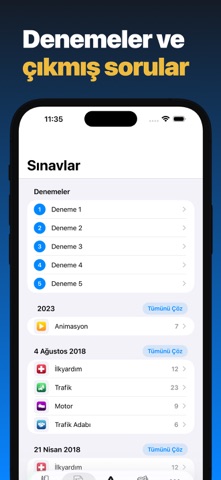


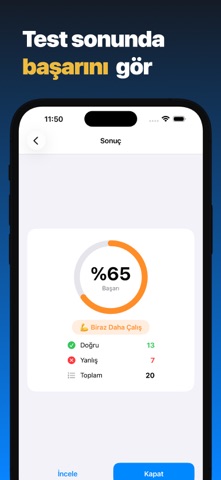
iPad screenshots


Icon palette
About this app
Ehliyet sınavına hazırlığın en kolay yolu! Güncel sınav sistemiyle uyumlu uygulamamız, ehliyet (e-sınav) adaylarına tüm kategorilerde kapsamlı bir hazırlık sunar. Çıkmış sorular, konu anlatımları, trafik levhaları ve yapay zeka destekli testlerle dilediğin an, dilediğin yerde pratik yap. TÜM KATEGORİLER İlk Yardım, Trafik ve Çevre, Motor ve Araç Tekniği, Trafik Adabı ÇIKMIŞ SINAV SORULARI Geçmiş ehliyet sınavlarında çıkan gerçek soruları çöz. İster 20'şer soruluk pratik testlerle hızlıca çalış, ister tüm sınavı tek seferde tamamla. AI İLE ÇALIŞMA Yapay zeka her seferinde tüm kategorilerden dengeli, 20 soruluk yepyeni bir test üretir. Sürekli taze sorularla pratik yap. ANİMASYONLU SORULAR 2023 animasyonlu soru tipleriyle gerçek sınav deneyimine hazırlan. TRAFİK İŞARETLERİ VE LEVHALAR Yüzlerce trafik levhasını kartlarla öğren, kategori kategori çalış ve karışık testlerle kendini sın…
App details
What you can learn from Ehliyet 2026 Çıkmış Sorular
Every shipping app on the App Store has gone through the same decisions you're working through right now: which screenshot goes first, what caption sits over it, which device frame to show, what color the background should be. The 8 screenshots above are Ehliyet 2026 Çıkmış Sorular's answers to those questions — they're public, they're real, and they made it through Apple's review.
What the numbers say: Ehliyet 2026 Çıkmış Sorular runs a mixed light-and-dark set where the background shifts from screenshot to screenshot (first shot #FCFCFC) — each image has to stand on its own, so the captions carry more of the story. The accent colour we picked up, #142C4C, is the one to reuse for badges, arrows and highlighted words if you borrow this look. Hit Use this style to open the editor with these exact colours and drop your own screenshot in.
Notice the first screenshot in particular. It's the one users see in search results and on the product page, and it's where most apps spend their best caption and tightest design. Look at the proportion of background to phone, where the text sits, what one thing the image is trying to communicate.
Want to see how other Education apps approach the same problem? Browse more Education apps in the showcase.
Take what works into your own screenshots
Open LaunchShots and design your App Store & Google Play screenshots — pick a device frame, drop captions, ship in minutes. Free, in your browser.
Open the screenshot editor →Apps with a similar look
Closest background + accent colours among the listings we've analysed — useful when you want to see the same palette handled by a different team.