Screenshots
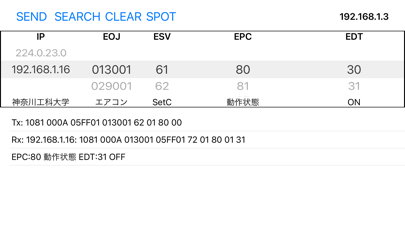
iPad screenshots

Icon palette
About this app
SSNG は ECHONET Lite の任意のコマンドを送受信するツールです。ECHONET Lite は HOME ENERGY MANAGEMENT SYSTEM (HEMS) における国際標準の通信規格(ISO/IEC 14543-4-3) で、エアコン・照明・給湯器・蓄電池などさまざまな機器が ECHONET Lite をサポートしています。Picker View上に表示されたデータを選択することで容易にECHONET Liteデータを作成・送信できます。受信したデータを表示する機能もあります。 以下の機能、特徴があります。 - 制御対象機器のIP Address, EOJ, ESV, EPC, EDTをPicker Viewで選択し、ECHONET Liteのパケットを作成・送信する機能 - 送信したパケットデータを表示する機能 - 受信したパケットの送信元IP Addressを表示する機能 - 受信したパケットデータを表示する機能 - ネットワーク内のECHONET Lite機器の探索機能 - EOJとESVに対応するEPCの値をPicker Viewに表示する機能 - EPCに対応するEDTの値をPicker Viewに表示する機能 - 選択したIP Addressに対応する機器のメーカーコードとメーカー名を表示する機能 - 選択したEOJの…
App details
What you can learn from SSNG
Every shipping app on the App Store has gone through the same decisions you're working through right now: which screenshot goes first, what caption sits over it, which device frame to show, what color the background should be. The 2 screenshots above are SSNG's answers to those questions — they're public, they're real, and they made it through Apple's review.
Notice the first screenshot in particular. It's the one users see in search results and on the product page, and it's where most apps spend their best caption and tightest design. Look at the proportion of background to phone, where the text sits, what one thing the image is trying to communicate.
Want to see how other Developer Tools apps approach the same problem? Browse more Developer Tools apps in the showcase.
Take what works into your own screenshots
Open LaunchShots and design your App Store & Google Play screenshots — pick a device frame, drop captions, ship in minutes. Free, in your browser.
Open the screenshot editor →