Chart position — tracked daily by LaunchShots
Screenshot changes — detected by LaunchShots
Screenshot style breakdown
Sampled from 6 of Mealia - AI Grocery Assistant's App Store screenshots — background, accent and theme, measured by LaunchShots (not something Apple publishes).
#942C4C bg
#A24965
#D46C74 accent
#FFFFFF text
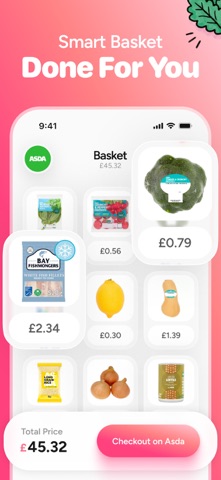
- #1Smarter Grocery Shopping
- #2recipes available to shop.
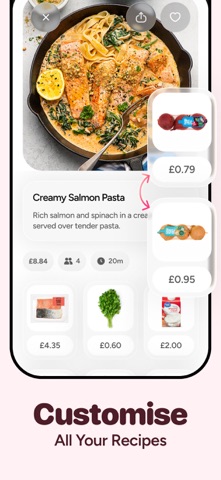
- #3Hundreds of Recipes Budget Friendly She ing’s icker, we'
- #4EER £0.30 £1.39 Checkout on Asda £45.32
- #5Connect To Your Favorite Supermarket
- #6www.recipe.com/123456 Thank you, this will take a few seconds to import...
Captions read from the screenshots (OCR, may contain small errors): 6 headlines, 6.5 words on average (longest 11).
Screenshots




iPad screenshots


Icon palette
About this app
Meet Mealia, your new grocery assistant here to help you save money and time on your weekly meals and grocery shopping from Tesco, Asda, Sainsbury's or Morrisons. Why Mealia? Smarter Meal Planning Say goodbye to decision fatigue. Just tell Mealia what you’re in the mood for, and it takes care of the rest—from finding recipes that match your diet and tastes to calculating exactly what you need. Each meal plan is designed to keep you on track with healthy, home-cooked meals that fit your goals, family size, and budget. Grocery Shopping Simplified No more wandering aisles or overbuying. Mealia connects with major supermarkets like Tesco and Asda, allowing you to build your shopping list so you only buy what’s needed. Save money, time, and effort while still enjoying high-quality ingredients from your supermarket. Why Mealia Beats Recipe Boxes Recipe boxes are expensive and lock you int…
App details
What you can learn from Mealia - AI Grocery Assistant
Every shipping app on the App Store has gone through the same decisions you're working through right now: which screenshot goes first, what caption sits over it, which device frame to show, what color the background should be. The 11 screenshots above are Mealia - AI Grocery Assistant's answers to those questions — they're public, they're real, and they made it through Apple's review.
What the numbers say: Mealia - AI Grocery Assistant runs a mixed light-and-dark set where the background shifts from screenshot to screenshot (first shot #942C4C) — each image has to stand on its own, so the captions carry more of the story. The accent colour we picked up, #D46C74, is the one to reuse for badges, arrows and highlighted words if you borrow this look. Hit Use this style to open the editor with these exact colours and drop your own screenshot in.
Notice the first screenshot in particular. It's the one users see in search results and on the product page, and it's where most apps spend their best caption and tightest design. Look at the proportion of background to phone, where the text sits, what one thing the image is trying to communicate.
Want to see how other Food & Drink apps approach the same problem? Browse more Food & Drink apps in the showcase.
Take what works into your own screenshots
Open LaunchShots and design your App Store & Google Play screenshots — pick a device frame, drop captions, ship in minutes. Free, in your browser.
Open the screenshot editor →Apps with a similar look
Closest background + accent colours among the listings we've analysed — useful when you want to see the same palette handled by a different team.