Screenshot style breakdown
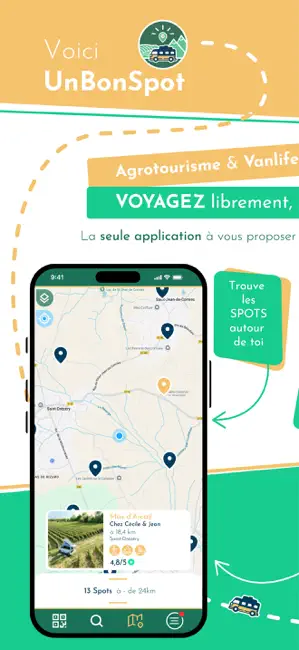
Sampled from 6 of unBonSpot - Vanlife & Domaines's App Store screenshots — background, accent and theme, measured by LaunchShots (not something Apple publishes).
#F4C46C bg
#D6AC5F
#1CCC8C accent
#111111 text
Screenshots


Icon palette
About this app
unBonSpot — Une app qui connecte les passionnés de nature VANLIFERS à ceux qui la cultivent AGRICULTEURS. Tu voyages en van, en camping-car ou sous une tente de toit ? unBonSpot te connecte à des agriculteurs qui ouvrent leurs portes pour que tu dormes autrement — seul au milieu des champs, des vignes ou des vergers, là où les applis classiques ne t’emmènent pas. Pour les voyageurs Fini les parkings gris et les aires bondées. Avec unBonSpot, tu réserves en un clic une nuit dans un domaine agricole, entouré de nature, loin des foules. Sur place, tu découvres les produits du terroir directement chez le producteur. • Des spots confidentiels, absents des autres cartes • Une nuit à 15 € — ou seulement 5 € si tu achètes à la boutique du domaine • 100 % nature, 100 % local Pour les agriculteurs Un espace inutilisé chez toi, c’est un spot qui dort. unBonSpot t’aide à le valoriser sans con…
App details
What you can learn from unBonSpot - Vanlife & Domaines
Every shipping app on the App Store has gone through the same decisions you're working through right now: which screenshot goes first, what caption sits over it, which device frame to show, what color the background should be. The 6 screenshots above are unBonSpot - Vanlife & Domaines's answers to those questions — they're public, they're real, and they made it through Apple's review.
What the numbers say: unBonSpot - Vanlife & Domaines runs a light set where the background shifts from screenshot to screenshot (first shot #F4C46C) — each image has to stand on its own, so the captions carry more of the story. The accent colour we picked up, #1CCC8C, is the one to reuse for badges, arrows and highlighted words if you borrow this look. Hit Use this style to open the editor with these exact colours and drop your own screenshot in.
Notice the first screenshot in particular. It's the one users see in search results and on the product page, and it's where most apps spend their best caption and tightest design. Look at the proportion of background to phone, where the text sits, what one thing the image is trying to communicate.
Want to see how other Travel apps approach the same problem? Browse more Travel apps in the showcase.
Take what works into your own screenshots
Open LaunchShots and design your App Store & Google Play screenshots — pick a device frame, drop captions, ship in minutes. Free, in your browser.
Open the screenshot editor →Apps with a similar look
Closest background + accent colours among the listings we've analysed — useful when you want to see the same palette handled by a different team.