Chart position — tracked daily by LaunchShots
Screenshot changes — detected by LaunchShots
Screenshot style breakdown
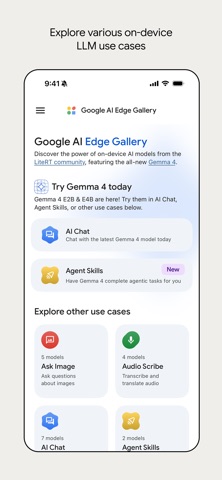
Sampled from 6 of Google AI Edge Gallery's App Store screenshots — background, accent and theme, measured by LaunchShots (not something Apple publishes).
#ECECEC bg
#CFCFCF
#4484F4 accent
#111111 text
- #1Ask Image Audio Scribe © Al Chat jent Skills.
- #2Keyboard shortcuts Map data ©2026 Google Terms 11 View in full screen
- #4selling coffee; we are selling a ritual—a moment of grounded, mindful escape, whether in a
- #5podria ir después del registro. Italian: Sto iniziando a avere un po’ di fame Aiutami a sc
- #6Turn off flashlight Create contact Send email Hold down to talk
Captions read from the screenshots (OCR, may contain small errors): 5 headlines, 12.8 words on average (longest 17).
Screenshots


Icon palette
About this app
AI Edge Gallery is the premier destination for running the world’s most powerful open-source Large Language Models (LLMs) on your mobile device. Experience high-performance Generative AI directly on your hardware—fully offline, private, and lightning-fast. Now Featuring: Gemma 4 This update brings official support for the newly released Gemma 4 family. As the centerpiece of this release, Gemma 4 allows you to test the cutting edge of on-device AI. Experience advanced reasoning, logic, and creative capabilities without ever sending your data to a server. Core Features - Agent Skills: Transform your LLM from a conversationalist into a proactive assistant. Use the Agent Skills tile to augment model capabilities with tools like Wikipedia for fact-grounding, interactive maps, and rich visual summary cards. You can even load modular skills from a URL or browse community contributions on Git…
App details
What you can learn from Google AI Edge Gallery
Every shipping app on the App Store has gone through the same decisions you're working through right now: which screenshot goes first, what caption sits over it, which device frame to show, what color the background should be. The 8 screenshots above are Google AI Edge Gallery's answers to those questions — they're public, they're real, and they made it through Apple's review.
What the numbers say: Google AI Edge Gallery runs a light set with one background colour (#ECECEC) carried across every screenshot — the listing reads as a single poster when the shots sit side by side in search results. The accent colour we picked up, #4484F4, is the one to reuse for badges, arrows and highlighted words if you borrow this look. Hit Use this style to open the editor with these exact colours and drop your own screenshot in.
Notice the first screenshot in particular. It's the one users see in search results and on the product page, and it's where most apps spend their best caption and tightest design. Look at the proportion of background to phone, where the text sits, what one thing the image is trying to communicate.
Want to see how other Productivity apps approach the same problem? Browse more Productivity apps in the showcase.
Take what works into your own screenshots
Open LaunchShots and design your App Store & Google Play screenshots — pick a device frame, drop captions, ship in minutes. Free, in your browser.
Open the screenshot editor →Apps with a similar look
Closest background + accent colours among the listings we've analysed — useful when you want to see the same palette handled by a different team.