Chart position — tracked daily by LaunchShots
Screenshot changes — detected by LaunchShots
Screenshot style breakdown
Sampled from 6 of 我嘞个豆-海量拼豆图纸与设计助手's App Store screenshots — background, accent and theme, measured by LaunchShots (not something Apple publishes).
#FCFCFC bg
#DDDDDD
#1C54BC accent
#111111 text
- #3O Alo 5 1156 *
- #6项 目 名 称 可 以 调整 图 像 大 小 图 像 尺 寸 (宽度 ) [SE aN:
Captions read from the screenshots (OCR, may contain small errors): 2 headlines, 12 words on average (longest 19).
Screenshots


iPad screenshots


Icon palette
About this app
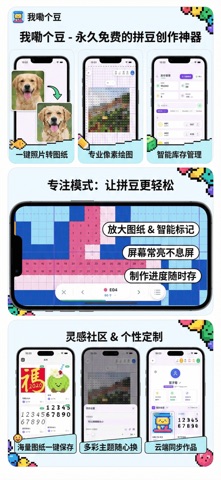
我嘞个豆 —— 专为拼豆和像素画爱好者打造的终极创作工具。功能强大且完全免费,只为热爱手工的你! 无论你是刚入门的新手,还是资深的拼豆艺术家,「我嘞个豆」都能为你提供从设计到制作的全流程支持。 【核心功能】 永久免费:所有功能统统免费!我们承诺无任何内购和隐形消费,只为给拼豆圈的朋友们提供最好用的工具,让你零成本享受创作乐趣。 辅助拼豆模式:专为手工制作过程打造的沉浸体验。支持图纸局部放大、智能进度标记和屏幕常亮。让你在制作过程中不再眼花缭乱,也不用担心看错行或数错格,心无旁骛地享受拼出的每一颗豆子。 图片转图纸:无需复杂的修图软件,导入照片即可一键生成拼豆图纸。支持自定义尺寸、调整颜色数量,智能匹配主流豆子色号,让复杂的照片瞬间变成可操作的图纸。 专业像素编辑器:内置强大的像素画绘制工具,支持自定义画布大小。无论是临摹还是原创,都能随心所欲地挥洒创意,轻松设计出独一无二的作品。 智能库存管理:总是忘记买了哪些颜色的豆子?用“库存管理”功能轻松记录。扫码或手动录入,随时查看现有色号,告别重复…
App details
What you can learn from 我嘞个豆-海量拼豆图纸与设计助手
Every shipping app on the App Store has gone through the same decisions you're working through right now: which screenshot goes first, what caption sits over it, which device frame to show, what color the background should be. The 15 screenshots above are 我嘞个豆-海量拼豆图纸与设计助手's answers to those questions — they're public, they're real, and they made it through Apple's review.
What the numbers say: 我嘞个豆-海量拼豆图纸与设计助手 runs a light set where the background shifts from screenshot to screenshot (first shot #FCFCFC) — each image has to stand on its own, so the captions carry more of the story. The accent colour we picked up, #1C54BC, is the one to reuse for badges, arrows and highlighted words if you borrow this look. Hit Use this style to open the editor with these exact colours and drop your own screenshot in.
Notice the first screenshot in particular. It's the one users see in search results and on the product page, and it's where most apps spend their best caption and tightest design. Look at the proportion of background to phone, where the text sits, what one thing the image is trying to communicate.
Want to see how other Graphics & Design apps approach the same problem? Browse more Graphics & Design apps in the showcase.
Take what works into your own screenshots
Open LaunchShots and design your App Store & Google Play screenshots — pick a device frame, drop captions, ship in minutes. Free, in your browser.
Open the screenshot editor →Apps with a similar look
Closest background + accent colours among the listings we've analysed — useful when you want to see the same palette handled by a different team.