Chart position — tracked daily by LaunchShots
Screenshot style breakdown
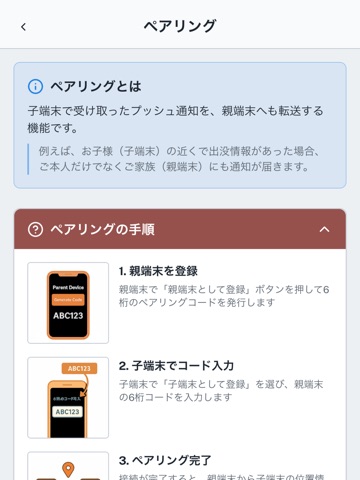
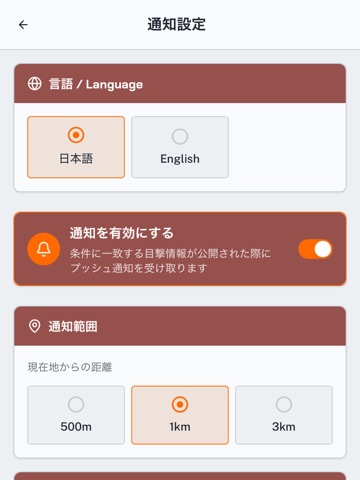
Sampled from 3 of クマダスアプリ's App Store screenshots — background, accent and theme, measured by LaunchShots (not something Apple publishes).
#FCFCFC bg
#DDDDDD
#94544C accent
#111111 text
Screenshots


iPad screenshots

Icon palette
About this app
【クマダスアプリとは】 (ご注意ください:ご利用可能開始日時は2026年8月5日午前9:00からとなります) クマダスアプリは、秋田県内のツキノワグマやイノシシなどの野生動物の出没情報をリアルタイムにマップ上で確認できる秋田県公式アプリです。 GPSを用いた現在地周辺の出没アラートや、家族の安全を見守るペアリング機能により、秋田県にお住まいの方や帰省する方、旅行・野外活動を楽しむ方、お子様の通学が心配な保護者の皆様をサポートします。 【主な機能】 ◆ リアルタイム出没マップ 野生動物の目撃・痕跡情報をマップ上のアイコンで確認できます。 ◆ GPS連動プッシュ通知 現在地周辺で野生動物の出没情報があった場合、プッシュ通知でいち早くお知らせします。ワンタッチで通知のON/OFFが切り替えられるほか、通知条件はカスタマイズ可能です。 ・通知範囲(出没地点から現在地の距離):半径500m / 1km / 3km ・通知対象の時間(出没時刻からの経過時間):30分 / 1時間 / 3時間以内 ・対象の獣種選択や、痕跡(フンや足跡など)の有無の設定 ・通知…
App details
What you can learn from クマダスアプリ
Every shipping app on the App Store has gone through the same decisions you're working through right now: which screenshot goes first, what caption sits over it, which device frame to show, what color the background should be. The 6 screenshots above are クマダスアプリ's answers to those questions — they're public, they're real, and they made it through Apple's review.
What the numbers say: クマダスアプリ runs a light set with one background colour (#FCFCFC) carried across every screenshot — the listing reads as a single poster when the shots sit side by side in search results. The accent colour we picked up, #94544C, is the one to reuse for badges, arrows and highlighted words if you borrow this look. Hit Use this style to open the editor with these exact colours and drop your own screenshot in.
Notice the first screenshot in particular. It's the one users see in search results and on the product page, and it's where most apps spend their best caption and tightest design. Look at the proportion of background to phone, where the text sits, what one thing the image is trying to communicate.
Want to see how other Navigation apps approach the same problem? Browse more Navigation apps in the showcase.
Take what works into your own screenshots
Open LaunchShots and design your App Store & Google Play screenshots — pick a device frame, drop captions, ship in minutes. Free, in your browser.
Open the screenshot editor →Apps with a similar look
Closest background + accent colours among the listings we've analysed — useful when you want to see the same palette handled by a different team.