Chart position — tracked daily by LaunchShots
Screenshot changes — detected by LaunchShots
Screenshot style breakdown
Sampled from 6 of Terminalko - SSH Terminal's App Store screenshots — background, accent and theme, measured by LaunchShots (not something Apple publishes).
#040404 bg
#272727
#6C4434 accent
#FFFFFF text
Reading the caption text from the screenshots in your browser…
Screenshots


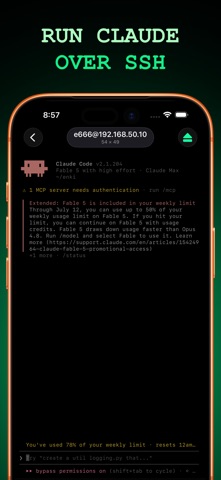


iPad screenshots


Icon palette
About this app
Terminalko - быстрый и аккуратный SSH-терминал для iPhone и iPad. Подключись к своему VPS, Raspberry Pi или любой линукс-машине, открой настоящий shell и сделай дело без ноутбука. Бесплатно и без аккаунта: добавил сервер - и через минуту ты в промпте. [ Настоящий терминал ] Честный xterm-256color PTY с цветами ANSI, скроллбэком и раскладкой, которая учитывает клавиатуру. htop, vim и tmux ведут себя ровно так, как должны. [ SSH, Mosh и Telnet ] SSH по паролю или ключу, jump-хосты через бастион в один прыжок. Mosh переживает переход с Wi-Fi на мобильную сеть, смену IP и долгий сон. Твой промпт будет на месте и через несколько часов. Telnet для старого железа: коммутаторы, роутеры, изредка попадающийся BBS. [ Правка файлов по SFTP ] Открой конфиг, поправь кривую строку и сохрани на место. Размер, права и дата у каждой строки. Загрузка, скачивание, переименование, удаление, новая па…
App details
What you can learn from Terminalko - SSH Terminal
Every shipping app on the App Store has gone through the same decisions you're working through right now: which screenshot goes first, what caption sits over it, which device frame to show, what color the background should be. The 12 screenshots above are Terminalko - SSH Terminal's answers to those questions — they're public, they're real, and they made it through Apple's review.
What the numbers say: Terminalko - SSH Terminal runs a dark set with one background colour (#040404) carried across every screenshot — the listing reads as a single poster when the shots sit side by side in search results. The accent colour we picked up, #6C4434, is the one to reuse for badges, arrows and highlighted words if you borrow this look. Hit Use this style to open the editor with these exact colours and drop your own screenshot in.
Notice the first screenshot in particular. It's the one users see in search results and on the product page, and it's where most apps spend their best caption and tightest design. Look at the proportion of background to phone, where the text sits, what one thing the image is trying to communicate.
Want to see how other Developer Tools apps approach the same problem? Browse more Developer Tools apps in the showcase.
Take what works into your own screenshots
Open LaunchShots and design your App Store & Google Play screenshots — pick a device frame, drop captions, ship in minutes. Free, in your browser.
Open the screenshot editor →Apps with a similar look
Closest background + accent colours among the listings we've analysed — useful when you want to see the same palette handled by a different team.