Screenshots

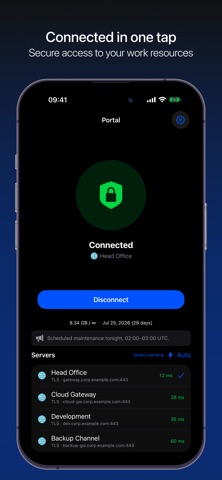
iPad screenshots


Icon palette
About this app
Portal — защищённый доступ к вашим рабочим ресурсам. Подключайтесь к корпоративным шлюзам и приватным сервисам по зашифрованному каналу — быстро и без сложной настройки. Импортируйте конфигурацию по защищённой ссылке или QR-коду и подключайтесь в один тап. Возможности: • Подключение в один тап и автоматический выбор шлюза с наименьшей задержкой • Список профилей с пингом и статусом подключения в реальном времени • Гибкая маршрутизация: весь трафик или только выбранные ресурсы • Виджеты на экране «Домой» и переключатель в Пункте управления • Обзор трафика и срока действия доступа • Конфигурация по защищённой ссылке или QR — без ручного ввода • Тёмная тема Portal не ведёт историю посещений и не показывает рекламу. Подключение выполняется напрямую к вашим серверам по вашей конфигурации. Portal не предоставляет серверы и не является средством обхода ограничений — приложение работает тол…
App details
What you can learn from Portal - Connect
Every shipping app on the App Store has gone through the same decisions you're working through right now: which screenshot goes first, what caption sits over it, which device frame to show, what color the background should be. The 4 screenshots above are Portal - Connect's answers to those questions — they're public, they're real, and they made it through Apple's review.
Notice the first screenshot in particular. It's the one users see in search results and on the product page, and it's where most apps spend their best caption and tightest design. Look at the proportion of background to phone, where the text sits, what one thing the image is trying to communicate.
Want to see how other Developer Tools apps approach the same problem? Browse more Developer Tools apps in the showcase.
Take what works into your own screenshots
Open LaunchShots and design your App Store & Google Play screenshots — pick a device frame, drop captions, ship in minutes. Free, in your browser.
Open the screenshot editor →