Screenshots


Icon palette
About this app
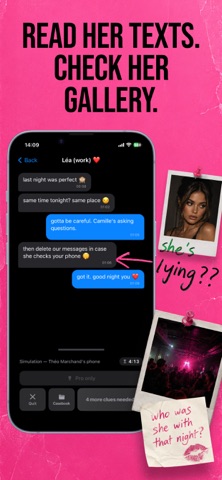
Someone's missing. You've got their phone. Everything they hid is still on it. Read the texts they deleted. Open the photos they hid. Follow the lies and name who's behind it before time runs out. Snitchy is a fictional detective game. Unlock a simulated smartphone, search messages, photos, emails, and social apps, collect clues, and accuse the culprit before the timer hits zero. All characters and evidence are invented for entertainment. HOW IT WORKS Unlock the phone and read the case briefing Dig through messages, photos, emails, and apps Long-press anything suspicious to analyze clues Build your case in the Casebook — then accuse Guess wrong or run out of time, and the round is over WHY YOU'LL BE HOOKED A real-feeling phone: Messages, Photos, Notes, Calls, Calendar, browser, maps, and more Deleted messages, hidden photos, fake names — the truth is buried, you dig it out Ficti…
App details
What you can learn from Snitchy - Detective Game
Every shipping app on the App Store has gone through the same decisions you're working through right now: which screenshot goes first, what caption sits over it, which device frame to show, what color the background should be. The 3 screenshots above are Snitchy - Detective Game's answers to those questions — they're public, they're real, and they made it through Apple's review.
Notice the first screenshot in particular. It's the one users see in search results and on the product page, and it's where most apps spend their best caption and tightest design. Look at the proportion of background to phone, where the text sits, what one thing the image is trying to communicate.
Want to see how other Entertainment apps approach the same problem? Browse more Entertainment apps in the showcase.
Take what works into your own screenshots
Open LaunchShots and design your App Store & Google Play screenshots — pick a device frame, drop captions, ship in minutes. Free, in your browser.
Open the screenshot editor →