Screenshots



Icon palette
About this app
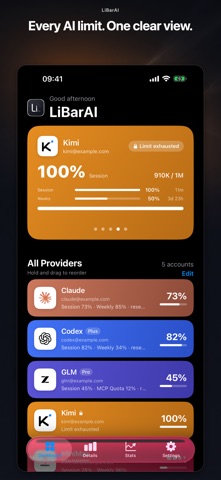
LibarAI keeps AI usage limits visible before they interrupt your work. Track session and weekly or monthly windows, exact reset times, and multiple provider accounts from one native iPhone dashboard. AT A GLANCE • Claude, Codex, GLM (Z.ai), Kimi, and MiniMax • Session and weekly or monthly usage with reset countdowns • Home Screen and Lock Screen widgets, StandBy, and a configurable Live Activity • Optional local alerts at 75%, 90%, and 100% • Provider details and recent usage history • Interface in English, Polish, Chinese, Spanish, German, Japanese, French, and Portuguese WITH LIBARAI PRO • Unlimited accounts • Cross-account limit health with at-risk windows and the next reset • Reset-aware session forecast • 14-day trend with a true 7-day moving average • Weekly insights and provider comparison • Custom 50% alert and provider service status where available Start with up to two a…
App details
What you can learn from LibarAI
Every shipping app on the App Store has gone through the same decisions you're working through right now: which screenshot goes first, what caption sits over it, which device frame to show, what color the background should be. The 10 screenshots above are LibarAI's answers to those questions — they're public, they're real, and they made it through Apple's review.
Notice the first screenshot in particular. It's the one users see in search results and on the product page, and it's where most apps spend their best caption and tightest design. Look at the proportion of background to phone, where the text sits, what one thing the image is trying to communicate.
Want to see how other Developer Tools apps approach the same problem? Browse more Developer Tools apps in the showcase.
Take what works into your own screenshots
Open LaunchShots and design your App Store & Google Play screenshots — pick a device frame, drop captions, ship in minutes. Free, in your browser.
Open the screenshot editor →