Chart position — tracked daily by LaunchShots
Screenshot changes — detected by LaunchShots
Screenshot style breakdown
Sampled from 6 of 小睡眠-睡眠监测、白噪音、深睡AI、助眠、冥想、放松、哄睡's App Store screenshots — background, accent and theme, measured by LaunchShots (not something Apple publishes).
#E4FCFC bg
#C8DDDD
#7CE4EC accent
#111111 text
Screenshots



iPad screenshots




Icon palette
About this app
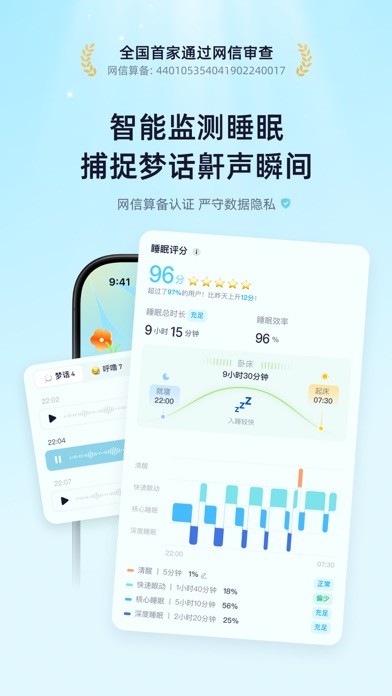
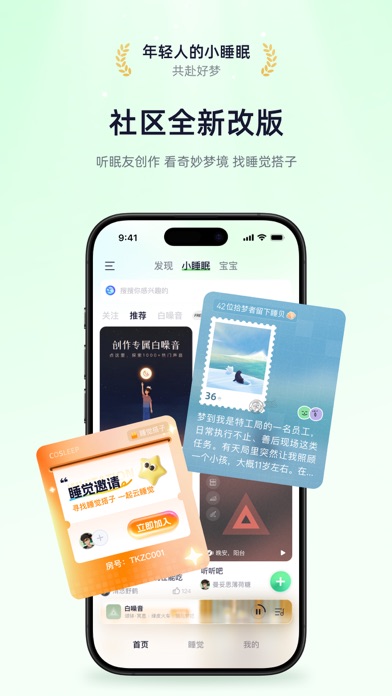
在小睡眠,做年轻的梦 小睡眠,8000万失眠星人口碑认证 ◎ iPhone装机必备|健康十佳应用 ◎ App Store编辑推荐|优质睡眠应用 每一个热爱生活的人,都值得拥有好睡眠,好睡眠就用小睡眠。十年专研睡眠情绪健康,多项国家授权发明专利,小睡眠为你精心准备白噪音、助眠冥想、每日梦境、自在正念、ASMR、治疗音乐、明星哄睡等丰富助眠内容,还提供功能强大的深睡AI、睡眠监测、鼾声记录、一键小憩、智能闹钟、数字疗法、睡觉搭子、梦境释义、心率监测、呼吸练习和沉浸自习等。 睡眠监测,场景全覆盖 ◎ 国内首家通过网信算备的睡眠算法,严守隐私安全 - 【睡眠监测】业内领先自研算法,专业判断睡眠阶段 - 【梦话打鼾】精准捕捉梦话呼噜与环境音,脱敏保存 - 【睡眠分析】智能合并一天睡觉与小憩数据,更科学 - 【一键小憩】独创四大小憩场景,专属入眠引导 - 【智能闹钟】支持纯净多闹钟模式,智能跳过节假日 - 【无痛唤醒】唤醒更轻柔更稳定,告别起床气 - 【智能唤醒】只在浅睡阶段唤醒,享受自然醒 - 【睡前仪式】一键衔接睡眠监测,仪式感拉满 - 【睡觉搭子】找…
App details
What you can learn from 小睡眠-睡眠监测、白噪音、深睡AI、助眠、冥想、放松、哄睡
Every shipping app on the App Store has gone through the same decisions you're working through right now: which screenshot goes first, what caption sits over it, which device frame to show, what color the background should be. The 18 screenshots above are 小睡眠-睡眠监测、白噪音、深睡AI、助眠、冥想、放松、哄睡's answers to those questions — they're public, they're real, and they made it through Apple's review.
What the numbers say: 小睡眠-睡眠监测、白噪音、深睡AI、助眠、冥想、放松、哄睡 runs a light set with one background colour (#E4FCFC) carried across every screenshot — the listing reads as a single poster when the shots sit side by side in search results. The accent colour we picked up, #7CE4EC, is the one to reuse for badges, arrows and highlighted words if you borrow this look. Hit Use this style to open the editor with these exact colours and drop your own screenshot in.
Notice the first screenshot in particular. It's the one users see in search results and on the product page, and it's where most apps spend their best caption and tightest design. Look at the proportion of background to phone, where the text sits, what one thing the image is trying to communicate.
Want to see how other Health & Fitness apps approach the same problem? Browse more Health & Fitness apps in the showcase.
Take what works into your own screenshots
Open LaunchShots and design your App Store & Google Play screenshots — pick a device frame, drop captions, ship in minutes. Free, in your browser.
Open the screenshot editor →Apps with a similar look
Closest background + accent colours among the listings we've analysed — useful when you want to see the same palette handled by a different team.