Chart position — tracked daily by LaunchShots
Screenshot style breakdown
Sampled from 6 of 涨球AI-台球教练瞄准发力杆法线路翻袋解球找点's App Store screenshots — background, accent and theme, measured by LaunchShots (not something Apple publishes).
#E4FCFC bg
#C8DDDD
#74F4FC accent
#111111 text
Screenshots

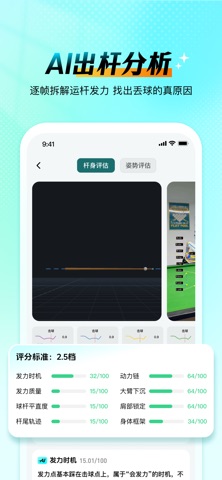


iPad screenshots


Icon palette
About this app
不想清台的球手,不是好球手。 涨球AI 把职业训练体系里的那套「拆解动作、量化问题、针对性修正」的方法,装进了你的手机。用一部手机拍下你的击球,AI 会在几秒内还原你的骨架结构、球杆轨迹与发力链条,告诉你这一杆到底差在哪,下一杆该怎么改。 科技练球,即刻涨球。 【为什么你练了很久,还是打不稳?】 球进不进,很少只是「手感不好」这么简单。绝大多数球手卡在同一个地方:动作错了,但自己看不见。 入位站歪了 3 度,趴下去视线就偏了;出杆时手腕多带了一点,白球就吃了不该吃的旋转;发力时大臂提前起身,力量全泄在了台面上。这些问题肉眼几乎无法察觉,靠自己练,只会把错误动作练得越来越熟练。 更麻烦的是,业余球手身边通常没有能长期盯着你动作的教练。教练看一眼说「你起身早了」,你点点头,回去还是照旧——因为你根本感觉不到自己起身早了多少、在哪一帧起的。 涨球AI 做的事,就是把这些「看不见的偏差」变成看得见的数据和曲线,让每一次修正都有据可依、有迹可循。 【实时骨骼跟踪 · 让动作无处遁形】 打开摄像头,AI 实时锁定你的头、…
App details
What you can learn from 涨球AI-台球教练瞄准发力杆法线路翻袋解球找点
Every shipping app on the App Store has gone through the same decisions you're working through right now: which screenshot goes first, what caption sits over it, which device frame to show, what color the background should be. The 16 screenshots above are 涨球AI-台球教练瞄准发力杆法线路翻袋解球找点's answers to those questions — they're public, they're real, and they made it through Apple's review.
What the numbers say: 涨球AI-台球教练瞄准发力杆法线路翻袋解球找点 runs a light set where the background shifts from screenshot to screenshot (first shot #E4FCFC) — each image has to stand on its own, so the captions carry more of the story. The accent colour we picked up, #74F4FC, is the one to reuse for badges, arrows and highlighted words if you borrow this look. Hit Use this style to open the editor with these exact colours and drop your own screenshot in.
Notice the first screenshot in particular. It's the one users see in search results and on the product page, and it's where most apps spend their best caption and tightest design. Look at the proportion of background to phone, where the text sits, what one thing the image is trying to communicate.
Want to see how other Sports apps approach the same problem? Browse more Sports apps in the showcase.
Take what works into your own screenshots
Open LaunchShots and design your App Store & Google Play screenshots — pick a device frame, drop captions, ship in minutes. Free, in your browser.
Open the screenshot editor →Apps with a similar look
Closest background + accent colours among the listings we've analysed — useful when you want to see the same palette handled by a different team.