App store localization: the highest-ROI growth lever most developers skip
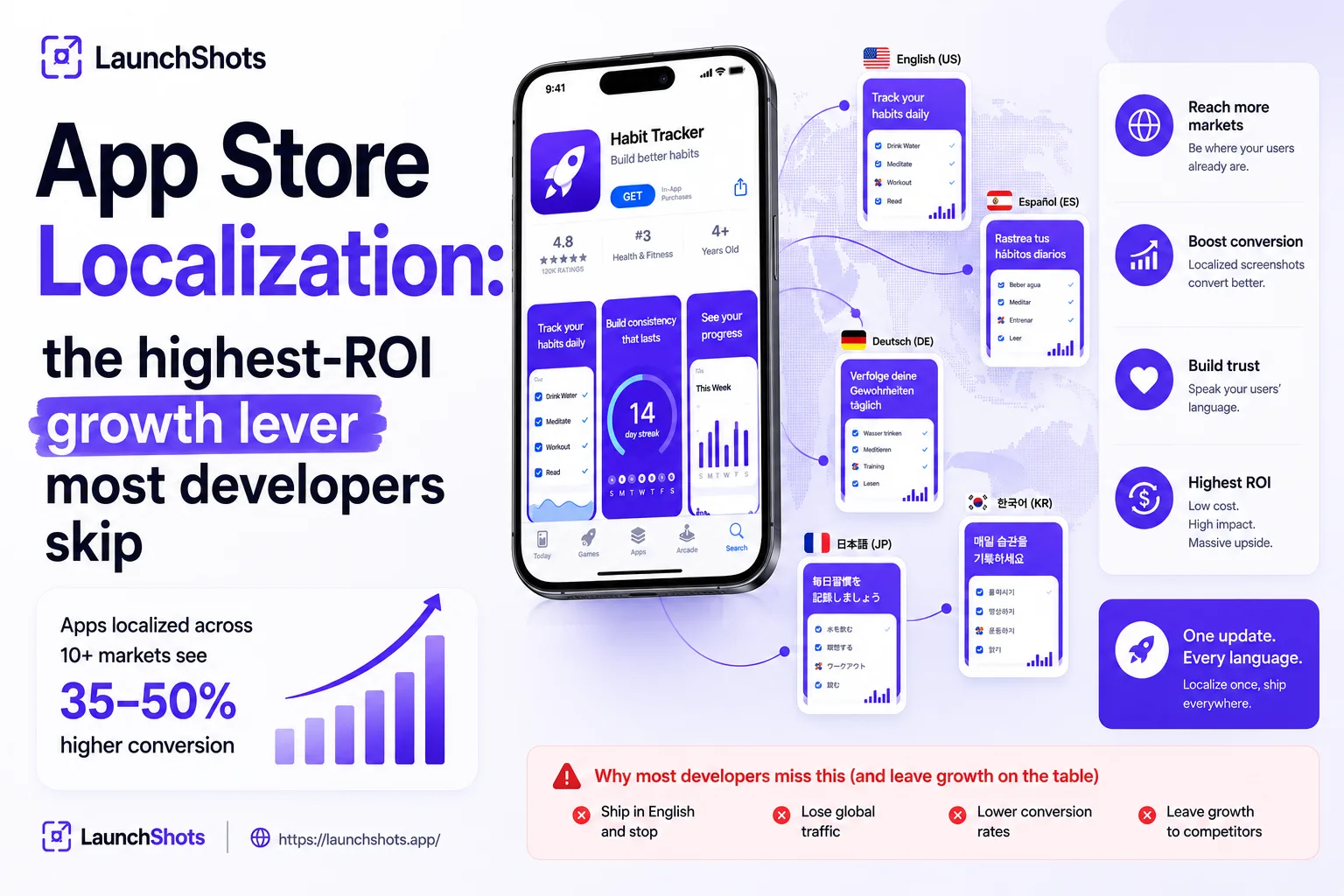
Here's a number most indie developers don't act on: apps localized across ten or more markets see 35–50% higher conversion than single-market apps, and full localization can drive a 10–25% organic install increase per market. Yet most apps ship in English and stop there, leaving a huge share of the world unable to find — or understand — their listing. App store localization is one of the highest-ROI, lowest-cost growth levers available to a solo developer. This guide covers what it actually means, why it works, and how to do it without boiling the ocean.
Localization isn't translation
This is the distinction that trips people up. Translation converts words; localization adapts your entire listing — title, subtitle, keywords, description, and screenshots — to how real people in a specific market search and think. It accounts for search behavior, cultural context, and the fact that someone in Tokyo doesn't look for your app the same way someone in Berlin does.
The reason it matters so much technically: Apple and Google maintain separate search indexes for each country-and-language combination. Your English (US) keywords simply do not help you rank in Spanish (Mexico) searches unless you add that localization. Skipping localization doesn't just lose you polish — it makes you invisible in entire markets.
The hidden keyword bonus
There's a trick most US-focused developers miss. On the App Store, a single country can index multiple language locales in parallel. If you add a Spanish (Mexico) localization to your US listing, those Spanish keywords also surface your app for the many Spanish speakers searching inside the US — expanding your keyword coverage in one market without a second listing. Localization isn't only about other countries; it can grow your reach in your home market too.
The mistake that quietly kills conversion
If you take one thing from this guide: don't translate your text and leave your screenshots in English. This is the single most common localization mistake, and in markets with lower English proficiency it noticeably hurts conversion — sometimes erasing the benefit of localizing the text at all. Screenshots are the most influential conversion element on your product page, so localizing them isn't optional. That means translating the captions and headlines, and ideally showing your app's UI in the target language too.
Which markets to start with
You don't need all 50 languages Apple now supports. Go phased: pick two or three priority markets, localize fully, measure the impact, then expand. For most apps, the highest-ROI languages are English, Spanish, Portuguese, Japanese, Korean, German, French, Chinese (Simplified), Italian, and Russian. Start where your analytics already show interest — if you're getting installs from Germany or Brazil despite an English-only listing, those are obvious first targets.
A practical localization workflow
Here's a sane order of operations that doesn't require a localization agency:
- Localize the metadata first. Translate and adapt your title, subtitle, keyword field, and description per locale. Don't just run keywords through a translator — search habits differ, so use local terms real users would type.
- Then localize the screenshots. Translate every caption and headline. If your app supports the language, capture the UI in that language so the screenshots show what users will actually get.
- Adapt the details. Mind text direction for right-to-left languages like Arabic, and adjust date, currency, and cultural imagery where it matters.
- Build a modular template. Design your screenshot set with swappable text layers so producing the next language is a matter of dropping in new captions — not rebuilding from scratch.
That last point is where the work either stays manageable or spirals. Done by hand in a general design tool, every new language means duplicating and re-exporting every frame. Done with a template-based system, each new language is a quick pass.
Localize your screenshots without the grind
This is exactly what our screenshot editor is built for. You can produce your screenshot set once, swap captions per language, and export everything in the exact App Store and Google Play sizes — organized by language in a ZIP that drops straight into App Store Connect and Play Console. No rebuilding frames for every locale, no signup, free in your browser. The part of localization that usually scares people off — producing a clean, translated screenshot set for every market — becomes a few minutes of work.
Localization is the rare growth lever that's both high-impact and fully in your control. Start with two or three markets, localize the text and the screenshots together, and let the data tell you where to expand next. For the principles behind a screenshot set that converts in any language, see our guide on screenshots that convert.
Related posts

Make your App Store screenshots free
LaunchShots is a free, in-browser screenshot maker. No signup, no watermark.
Open the app →
Comments (0)