Apple Developer Program $99: Is It Worth It in 2026?
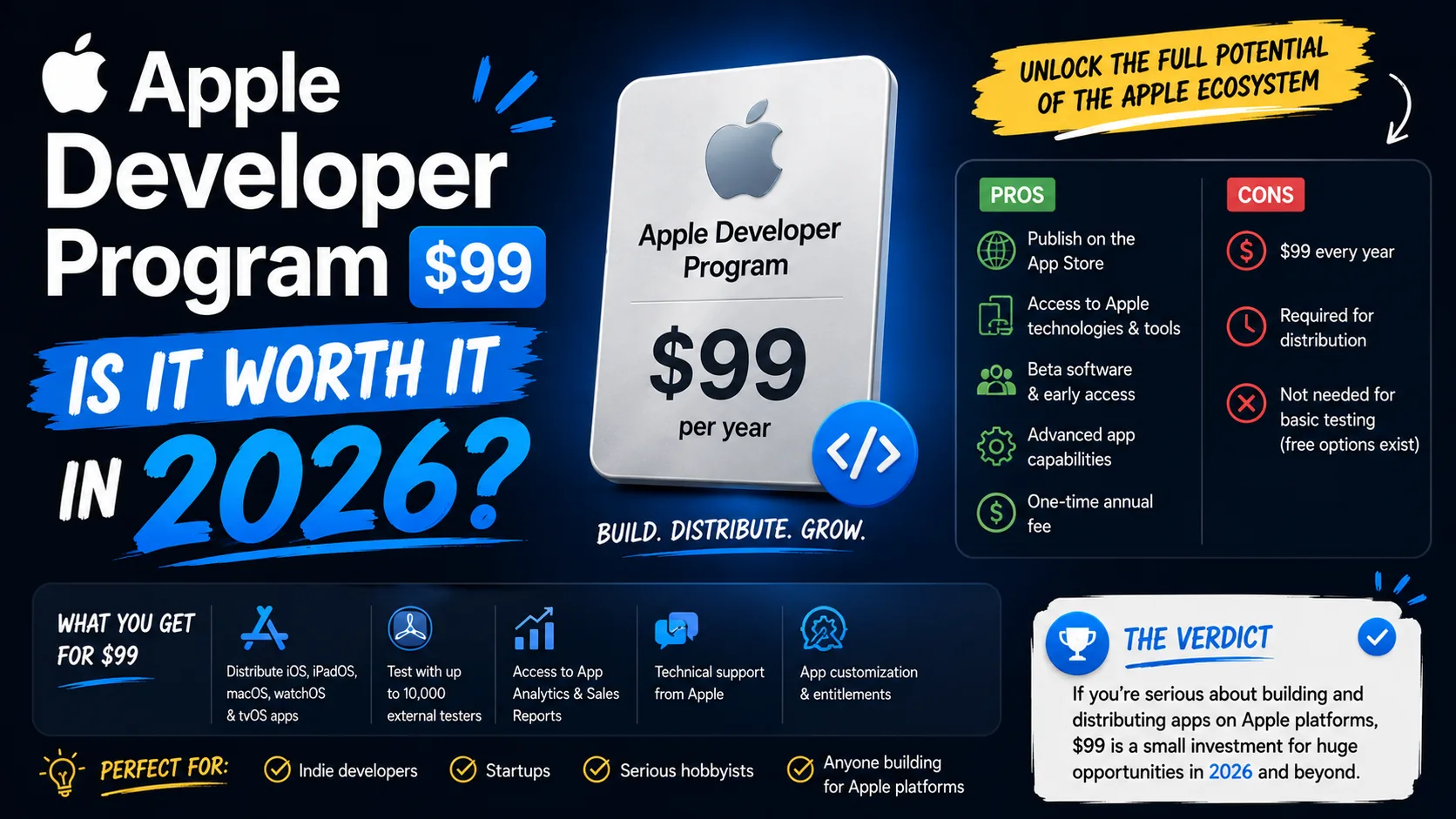
Apple's $99 annual Developer Program fee is the most misunderstood line item in indie iOS development. Some devs treat it as a no-brainer; others wait years to enroll because they're not sure it's worth it. Both are missing the actual ROI math. The fee works out to $8.25 a month — less than a Netflix subscription — but the real question isn't the price, it's what you're actually getting and how fast it pays back. Here's the operator-level breakdown of what the $99 buys you in 2026, what's available for free, and the specific scenarios where it pays for itself within weeks instead of months.
The real cost: $99/year is less than $0.30/day
Break the fee down by time and the sticker shock disappears:
- Per year: $99
- Per month: $8.25
- Per week: $1.90
- Per day: $0.27
For an indie developer, the question isn't whether you can afford $0.27 a day — it's whether the program returns more than that in value. For almost any developer who actually ships an app, it does, often by a factor of 50 to 100 within the first year.
What $99 actually buys you in 2026
The membership unlocks a long list of capabilities that aren't available any other way. The ones that matter most for indie developers:
- App Store distribution. The only legitimate way to publish a public iOS app to 1+ billion devices across 175 regions. No paid membership = no App Store presence. There is no free public distribution path for iOS.
- TestFlight with up to 10,000 external testers. Beta-testing tool integrated with Xcode, lets you ship pre-release builds to up to 10,000 external testers plus 10,000 internal team members. Worth $99 alone if you take feedback seriously before launch.
- Push Notifications. Without the paid membership, you cannot send push notifications. For most modern apps, this is the difference between a retained user and a churned one.
- In-App Purchases and subscriptions. Monetization through the App Store requires the program. Free Apple ID accounts cannot ship IAP-enabled apps.
- Apple Pay. If your app handles payments outside the standard IAP system, Apple Pay integration is gated behind the program.
- iCloud and CloudKit. Cross-device data sync, file storage, real-time collaboration. Not accessible to free-tier accounts.
- 200 GB of Apple-Hosted Background Assets. Free hosting and bandwidth for downloadable assets in your apps and games.
- 2 Technical Support Incidents per year. Direct code-level support from Apple engineers. If you're stuck on a thorny bug, this can save days of debugging time.
- App Analytics and App Store Connect. Sales reports, conversion data, A/B testing for store assets, the full marketing toolkit.
- Beta access to new OS releases. iOS, iPadOS, macOS, watchOS, visionOS betas, plus access to new SDKs months before public release.
What you get for free (and what you can't)
Since 2023, Apple has offered a free developer tier accessible to anyone with an Apple ID. It's useful for learning and experimentation, but it's not a substitute for the paid program. What the free tier includes:
- Xcode and the iOS Simulator.
- On-device testing of your own apps — but only on your personal devices, and the provisioning certificate expires after 7 days.
- Beta iOS/macOS/watchOS access.
- Apple Developer Forums and Feedback Assistant.
What the free tier does not include:
- App Store distribution (none).
- TestFlight distribution to external testers.
- Push notifications.
- In-App Purchases or subscriptions.
- Apple Pay, iCloud, CloudKit.
- Code-level technical support.
The free tier is fine if you're learning Swift or building toy projects for your own device. If you're shipping anything to actual users, you need the paid program. There's no middle path.
The ROI math at different scenarios
The fee pays back at very different speeds depending on what kind of app you ship. Here's what it actually takes to break even:
- One-time paid app at $2.99: You need 47 downloads to net $99 after Apple's 15% commission. Most apps that get any traction at all hit this in the first month.
- Free app with $4.99 IAP: 24 IAP conversions covers the fee. If you have 1,000 monthly active users with a 2.5% IAP rate, you hit this in your first month.
- Subscription app at $4.99/month: 24 monthly subscribers and the fee is covered for the year — and every additional subscriber is pure margin against your one-time $99.
- Subscription app at $9.99/month: 12 subscribers and you've covered the fee. If you have any retention at all, the fee is the cheapest line item in your business.
The pattern is clear: if your app gets even modest traction, the $99 fee is a rounding error against the revenue it enables. The scenarios where it doesn't pay back are scenarios where you're not actually shipping or monetizing — meaning the issue isn't the fee, it's the product.
When $99 is the wrong question
There are three situations where the fee actually deserves scrutiny:
- You haven't shipped yet and won't for 6+ months. If you're early in learning Swift and won't have a submittable app for half a year or more, the free tier covers everything you need. Don't pay until you're close to TestFlight or App Store submission.
- You're testing an idea that may never ship. Use the free tier to validate. Sign up for the paid program only when you're ready to invite beta testers or submit to review.
- You build for the App Store but the app is purely informational and unmonetized. If you're shipping a free, non-monetized app with no IAP, no subscriptions, no ads (rare), the $99 fee is still required to publish but doesn't generate direct revenue. The intangible benefits (TestFlight, push, App Store presence) still apply, but the ROI is harder to quantify.
In every other situation — any app that monetizes through paid downloads, IAP, subscriptions, or ads — the $99 is one of the highest-ROI line items in your entire business.
Standard ($99) vs Enterprise ($299): which one
The naming confuses people. The $99 program is what 99% of indie developers and even most companies need. The $299 Apple Developer Enterprise Program is a fundamentally different product:
- $99 Standard Program: Publish public apps on the App Store. Distribute via TestFlight, App Store, Custom Apps, or Unlisted Apps. This is what you want.
- $299 Enterprise Program: Distribute proprietary apps internally to your own employees through a Mobile Device Management (MDM) system. You cannot publish to the App Store with this program. It's for large organizations distributing internal-only software.
If you're building a consumer or B2B SaaS app for the public App Store, the $99 program is the only one you need. The $299 program is restrictive and aimed at corporate IT departments — most indie devs and small companies will never have a use for it.
Individual vs Organization enrollment
Within the $99 program, you choose between Individual and Organization enrollment. Both cost $99/year; the difference is how your apps appear on the App Store:
- Individual: Your apps publish under your personal name. Faster to enroll (no D-U-N-S number required), simpler tax setup, but less professional appearance.
- Organization: Apps publish under a company name. Requires a D-U-N-S number (free to obtain from Dun & Bradstreet, takes 5-7 business days), legal entity verification, and a few extra steps. Looks more legitimate to users and unlocks team-based access.
If you're a solo indie dev experimenting, start with Individual — you can switch to Organization later. If you've formed an LLC or run a company, Organization is worth the extra setup time for credibility.
Hidden costs the $99 doesn't cover
The membership fee is just the start. Realistic full cost of getting an iOS app into the store and earning revenue:
- $99/year Developer Program (required).
- Apple's commission on revenue: 15% if enrolled in the Small Business Program (proceeds under $1M annually), 30% otherwise. This is the largest ongoing cost, not the membership fee.
- D-U-N-S number for Organization enrollment: Free, but takes a week.
- App icon, screenshots, feature graphic, privacy policy: Visual assets and required text — can be done free with the right tools.
- Time cost of beta testing, app review, and launch: 2-4 weeks for first submission, accounting for review cycles and asset preparation.
The $99 is the entry ticket. The ongoing cost that matters is Apple's commission — which is why being aware of the Small Business Program rate (15% vs 30%) matters more than the membership fee itself.
Frequently asked questions
Can I publish to the App Store without paying $99?
No. The Apple Developer Program membership is required for any public App Store distribution. There is no free path, and there is no workaround.
Does the $99 fee renew automatically?
Yes. Apple auto-renews the membership annually unless you cancel. If your membership lapses, your apps are removed from the App Store within 90 days, which can be devastating for an established product. Set a reminder.
What happens if I don't renew?
Your apps stay live on customers' devices, but they're removed from the App Store search and new downloads become impossible. Push notifications stop. Existing users keep the app but updates become impossible. Renew before expiration.
Can I use TestFlight without the $99 membership?
No. TestFlight as a beta distribution tool requires the paid program. Users can install TestFlight without being developers, but the developer side requires membership.
Is the Apple Developer Program tax-deductible?
In most jurisdictions, yes — it's a legitimate business expense. Check with your local tax advisor, but in the US, UK, EU, and most major markets, this is a standard deductible expense for software businesses.
Can students or schools get the program for free?
Yes. Apple offers free Developer Program memberships to accredited educational institutions through the Apple Developer Enterprise Program for Education. Students at participating schools can publish apps without paying the fee.
Do I need a US address or business to enroll?
No. The Apple Developer Program is available globally — you enroll from your home country, pay in your local currency (or USD), and publish to all 175 App Store regions. Banking and tax setup happens during enrollment.
Can I switch from Individual to Organization later?
Yes, but it's a manual process that takes a few weeks. You'll need to obtain a D-U-N-S number, contact Apple Developer Support, and migrate your apps. If you're confident you'll incorporate within a year, starting with Organization saves the migration headache.
The bottom line
If you're shipping or planning to ship an iOS app that earns any revenue at all, the $99 fee is not the question. The question is how fast you can ship something good enough to start the clock on the ROI. At $8.25/month, the Apple Developer Program is the cheapest line item in nearly any indie iOS business — and the only one without which everything else is impossible.
The actually meaningful financial decision isn't the $99. It's whether you're enrolled in the Apple Small Business Program for the reduced 15% commission rate. If you haven't checked that, do it now — the savings dwarf the membership fee by orders of magnitude. Our complete guide to the Apple Small Business Program covers the eligibility rules, enrollment steps, and timing details. For the assets you'll need to ship — icon, screenshots, feature graphic — our visual assets checklist covers every required spec for 2026.
Related posts
Make your App Store screenshots free
LaunchShots is a free, in-browser screenshot maker. No signup, no watermark.
Open the app →
Comments (0)