App Store Review Process 2026: From Submission to Approval
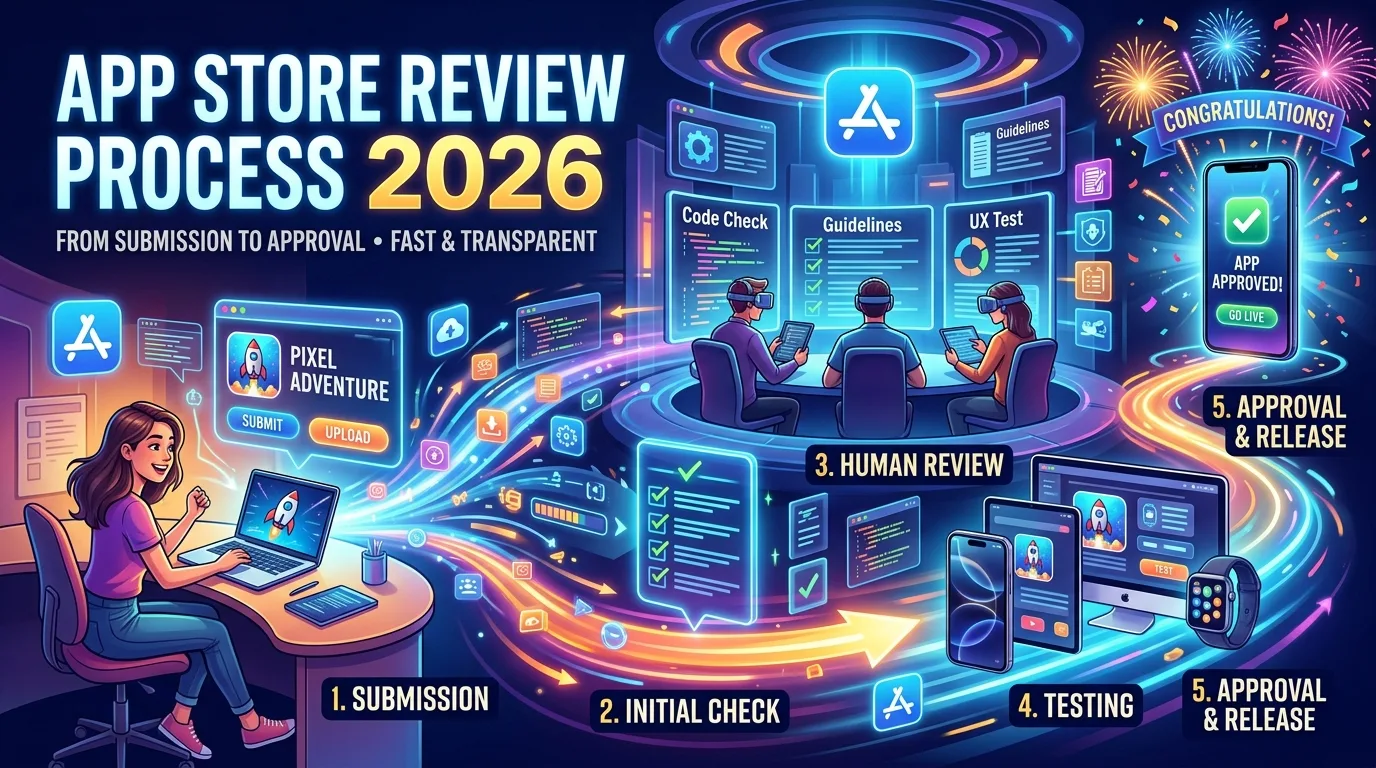
You just hit submit on your app, and the next 24–72 hours feel longer than the entire time you spent building it. App Store review is a black box for most indie developers — Apple gives you a status indicator, no progress bar, and no estimated completion time. In 2026, the situation got worse: submission volume jumped 60% year-over-year, and Apple's previously consistent 24-hour review turnaround has stretched to 2–5 days for new apps, with peak-period spikes of 7+ days. This is the operator-level guide to App Store review in 2026: every state your submission passes through, how long each one actually takes right now, what triggers delays, how expedited review really works, and what to do when your app gets stuck. The honest answer to "how long does App Store review take" is more complicated than it used to be — and knowing the details lets you plan your launch instead of refreshing App Store Connect every 15 minutes.
The 7 states your submission moves through
Every iOS app submission cycles through a fixed set of states in App Store Connect. Understanding what each one means tells you exactly where in the process you are:
- Prepare for Submission: Your version is being edited. You haven't submitted yet. Once you click "Submit for Review," this changes immediately.
- Waiting for Review: Apple has received your submission and it's queued. This is the longest-duration state in 2026, typically 1–3 days for new apps, sometimes much longer.
- In Review: A reviewer is actively looking at your app right now. This state usually lasts 1–24 hours. If your app passes, you move to Pending Developer Release or Ready for Sale.
- Pending Developer Release: Your app has been approved, but you set the version to release manually rather than automatically. It's not live until you click "Release This Version" in App Store Connect.
- Ready for Sale: Your app is live. It's on the App Store and downloadable. (For paid apps, "Ready for Sale" includes paid apps; the name predates the free-app era.)
- Rejected: Apple has rejected the submission. The Resolution Center in App Store Connect will have the specific reasons. You fix the issues and resubmit.
- Developer Rejected: You manually removed the submission from review (e.g., to fix something you noticed). The submission isn't reviewed; you have to resubmit when ready.
The state you'll spend the most time staring at is "Waiting for Review." That's where the 2026 backlog lives.
The 2026 timeline: what to actually expect
Apple historically targeted 24-hour review turnaround, and they hit that mark consistently through 2023 and 2024. In 2026, the picture changed. Real numbers from Q1 2026 industry data:
- New app submissions: 2–5 days typical, with spikes of 7+ days during peak periods.
- App updates: 24–72 hours typical, faster for minor updates from established developers.
- Expedited reviews (when approved): 6–24 hours from request to decision.
- Rejection and resubmission cycles: Each one adds a full review period to your timeline — typically 24–72 hours for the re-review, sometimes faster for minor fixes.
- Stuck submissions (rare but happening more): Some developers report 9–20+ days in "Waiting for Review" with no movement, even after expedited requests.
The cause is volume. App releases jumped 60% year-over-year across both stores in Q1 2026, with iOS specifically up 80%. AI-generated apps are also receiving additional scrutiny, which adds review time for any submission Apple's systems flag as potentially AI-built.
Practical implication: submit at least 2 weeks before your launch date. The old advice of "submit a few days before" no longer works reliably in 2026.
What actually affects how long your review takes
Apple's review queue isn't a strict first-in-first-out system. Several factors push submissions ahead or behind:
- Submission complexity. Apps with in-app purchases, subscriptions, sign-in requirements, health-related features, kid-targeted content, or payment integrations face longer reviews. A simple utility app reviews faster than a fintech app.
- Developer history. Established developers with clean submission histories often see faster reviews than first-time developers. Apple tracks reputation, and it matters.
- Time of year. Pre-holiday periods (late November through mid-December), back-to-school season, and major Apple events (WWDC, fall iPhone launch) all extend queue times. Plan around these.
- AI-generated content flags. Apple has been adding scrutiny to apps that appear to be AI-generated or rely heavily on third-party AI APIs. If your app uses AI prominently, expect longer review and more potential rejections.
- Region. Some App Store regions (particularly newly-launched markets) have less reviewer coverage and longer queues.
- Submission day. Submissions made Friday afternoon often wait through the weekend. Tuesday and Wednesday morning submissions historically clear fastest.
- App size. Larger app binaries take longer for Apple's systems to process before the human review even starts.
- Rejection history. A submission with prior rejections gets queued among other re-reviews, which sometimes (counter-intuitively) reviews slower than fresh submissions during peak periods.
None of these are fixed rules — Apple's queue is opaque — but they're real patterns observed across thousands of submissions.
Expedited review: when it works, when it doesn't
Apple offers Expedited App Review for submissions with genuine time-sensitive needs. When approved, expedited reviews complete in 6–24 hours instead of 2–5 days. The catch: Apple is more selective about granting them in 2026 than in previous years.
Legitimate reasons that get approved:
- Critical bug fix. Your live app has a crash, data loss, security flaw, or major broken feature affecting current users.
- Time-sensitive event. Your app is tied to a specific date — Olympics, election, product launch, conference, sports season opener.
- Regulatory or legal requirement. You need to ship a compliance fix for GDPR, COPPA, accessibility law, etc.
Reasons that don't work:
- "I really want to launch on this date." Your personal timeline isn't an emergency.
- "Investors are watching." Apple doesn't care about your funding round.
- Repeated requests. Apple tracks how often you request expedited review. Frequent requesters get denied or have requests deprioritized for the rest of the year.
The mechanics: go to developer.apple.com → Contact Us → App Review → Request Expedited Review. Fill out the form honestly. Apple typically responds within 24 hours with either approval (moves your submission to the front) or denial. There's no appeal of a denial.
The honest practical advice: don't plan around expedited review. Treat it as a safety net for true emergencies, not a routine launch tool. Build 2 weeks of buffer into your submission timeline and you'll never need it.
What to do when you get rejected
Apple rejects roughly 25–30% of first-time submissions. The rejection process:
- You'll get an email and the status changes to "Rejected" in App Store Connect. The Resolution Center has the specific guideline citations and issue descriptions.
- Read the rejection carefully. Apple cites specific App Store Review Guidelines (e.g., "2.3.10 Accurate Metadata" or "5.1.1 Data Collection"). Each citation links to the exact guideline.
- Decide: fix or appeal? If the issue is genuine — missing privacy policy, broken sign-in, misleading screenshots — fix it. If you believe Apple misunderstood your app, you can respond to clarify before resubmitting.
- Respond through the Resolution Center. Explain what you fixed (or why you believe the rejection was incorrect) in plain language. Apple reviewers read these responses.
- Resubmit. Once you've fixed the issues and noted them in the Resolution Center response, click "Submit for Review" again.
- Re-review timeline: Typically 24–72 hours, sometimes faster for minor fixes. Re-reviews are usually quicker than initial reviews because the reviewer has context from the first pass.
Common rejection patterns and quick fixes:
- Guideline 2.3.10 (Accurate Metadata): Screenshots don't match the app, description promises features that don't exist, or there's misleading copy. Fix the metadata, resubmit.
- Guideline 5.1.1 (Privacy): Missing privacy policy URL, App Privacy nutrition labels don't match actual data collection, or unauthorized data tracking. Update privacy disclosure and policy.
- Guideline 4.0 (Design) / 4.2 (Minimum Functionality): App is too simple, looks like a basic webpage wrapper, or doesn't provide enough native value. Add functionality.
- Guideline 2.1 (Performance): Crashes, broken features, sign-in that doesn't work for the reviewer. Test thoroughly on the latest iOS before resubmitting.
- Guideline 4.8 (Sign In with Apple): You offer Google/Facebook sign-in but not Sign In with Apple. Add Sign In with Apple as an option.
Most rejections are fixable within hours. A clean resubmission with a clear response in the Resolution Center typically clears in 1–3 days.
When your submission is genuinely stuck
Some 2026 submissions sit in "Waiting for Review" for 9, 14, or even 20+ days with no movement. If you're past 7 days with no status change:
- Don't panic-resubmit. Withdrawing and resubmitting puts you at the back of the queue. The clock doesn't reset to zero — it starts over.
- Check Apple's System Status page. developer.apple.com/system-status sometimes shows known App Store Connect issues affecting review.
- Request expedited review with a genuine reason. "Stuck for 14 days" alone won't get approved. "Stuck for 14 days and our app is tied to [specific event/regulatory deadline]" might.
- Contact Developer Support. developer.apple.com → Contact Us → App Review → Submission Status. Include your Apple ID, app name, submission date, and details. Response times in 2026 are 1–5 business days.
- Be patient and don't escalate aggressively. Apple's review team responds better to professional inquiries than to threats or social media campaigns. Tone matters.
If a submission is stuck longer than 30 days with no response, escalate via the Apple Developer Forums (developer.apple.com/forums) where Apple staff sometimes triage public posts that don't get private response. This is a last resort, not a first move.
What you can't do while in review
Once you submit, certain actions reset your queue position or cause complications:
- Don't withdraw and resubmit. The new submission goes to the back of the queue. You lose all your waiting time.
- Don't edit metadata mid-review. Changes to your app's name, description, or screenshots while In Review can reset the review.
- Don't upload a new build. A new build replaces the previous one in the queue, but it starts the review over.
- Don't change pricing or availability. These can be edited, but doing so during review sometimes causes the queue position to reset.
- Don't spam the Resolution Center. If you've already responded to a rejection, don't keep adding messages — it can push you behind submissions that are quieter.
The general rule: submit clean, then wait. Changes mid-review almost never help and often hurt.
How to reduce review time on your next submission
You can't make Apple review faster, but you can stop adding self-inflicted delays:
- Test on real devices, not just simulators. Most rejections for "Performance" come from crashes that only happen on physical hardware.
- Test on the most recent iOS version. Apple reviewers use the latest iOS, often the beta. If your app crashes on iOS beta, you'll get rejected even if it works on iOS 16.
- Provide a demo account if your app requires sign-in. "We couldn't test your app" is a common rejection driven entirely by missing demo credentials.
- Match your App Privacy labels to reality. The single most common 2026 rejection is mismatched privacy disclosure. Audit your label answers honestly.
- Pre-submit your privacy policy URL. Make sure the link works, loads quickly, and covers everything your app actually does. Broken links auto-reject. (Our privacy policy generator creates a compliant policy in seconds.)
- Make sure screenshots match the current app. Old screenshots showing features that no longer exist trigger "Misleading metadata" rejection.
- Submit Tuesday or Wednesday morning (Pacific Time). Empirically, these submissions clear faster than Friday afternoons or weekends.
- Don't submit during peak periods. Late November to mid-December and the week of major Apple events have measurably longer queues.
Frequently asked questions
How long does App Store review take in 2026?
For new apps, typically 2–5 days, with spikes of 7+ days during peak periods. App updates typically take 24–72 hours. Both are significantly longer than the 24-hour average Apple maintained in 2023–2024, due to a 60% year-over-year increase in submissions in Q1 2026.
Can I check my review status in real time?
Only via App Store Connect's status field. Apple doesn't provide a progress bar, estimated completion time, or queue position. Refreshing more than once an hour won't tell you anything new.
What happens if I submit a new build while In Review?
The new build replaces the previous one in the queue, but the review effectively restarts. Don't upload a new build unless you have to.
Does paying for App Store Connect Premium speed up review?
There's no "premium" tier — every developer pays the same $99/year and gets the same review treatment. Apple does not sell faster reviews.
Can I withdraw my submission and resubmit?
Yes, but you lose your queue position. The resubmission starts from scratch at the back of the queue. Only do this if your app has a serious issue you can't fix any other way.
What's the difference between "Pending Developer Release" and "Ready for Sale"?
"Pending Developer Release" means Apple approved your app, but you set the release to manual — it goes live only when you click "Release This Version." "Ready for Sale" means it's live on the App Store. Most developers use automatic release; manual release is useful for coordinating launches with marketing.
Why is my update review taking longer than my first submission was?
Updates that include significant new features, IAP changes, or new permissions get treated more like first submissions. Minor bug-fix updates from established developers review fastest. Major version updates can take as long as first submissions.
Can I get review status updates via email?
Yes. App Store Connect sends emails when your status changes — Waiting for Review confirmation, In Review notification, Approval or Rejection. Check your spam folder; Apple emails sometimes get filtered.
Does the time of day I submit matter?
Anecdotally yes. Submissions made Tuesday and Wednesday morning Pacific Time clear faster than Friday afternoons, weekends, or holidays. The official answer is "queue position depends on volume."
What if my expedited review request is denied?
There's no formal appeal of a denied expedited request. You can submit another one with stronger justification, but Apple tracks how often you request and may auto-deny future requests if they think you're abusing the system.
The bottom line
App Store review in 2026 is slower than it used to be, less predictable than developers want, and largely outside your control. The two things you can control: submit clean (test thoroughly, complete your metadata, match your privacy labels to reality) and submit early (at least 2 weeks before your launch date, ideally Tuesday or Wednesday morning, never on a Friday). Do those two things, and you'll absorb the queue volatility without missing your launch date. The developers who get burned in 2026 are the ones who submit 3 days before launch and assume the historical 24-hour average still applies. It doesn't.
Once your app is live, the next challenge is getting people to actually find and install it. Our guides on the 100-character keyword field, App Store screenshots that convert, and the 4,000-character description cover the post-approval ASO work. For the full submission flow from $99 enrollment to first build upload, the App Store Connect setup guide covers everything that happens before review even starts. And if you want to run a beta before going through full review, the TestFlight guide covers how to fill 10,000 beta tester slots in 30 days.
Related posts
Make your App Store screenshots free
LaunchShots is a free, in-browser screenshot maker. No signup, no watermark.
Open the app →
Comments (0)