App Store Promotional Text: The 170-Character Guide (2026)
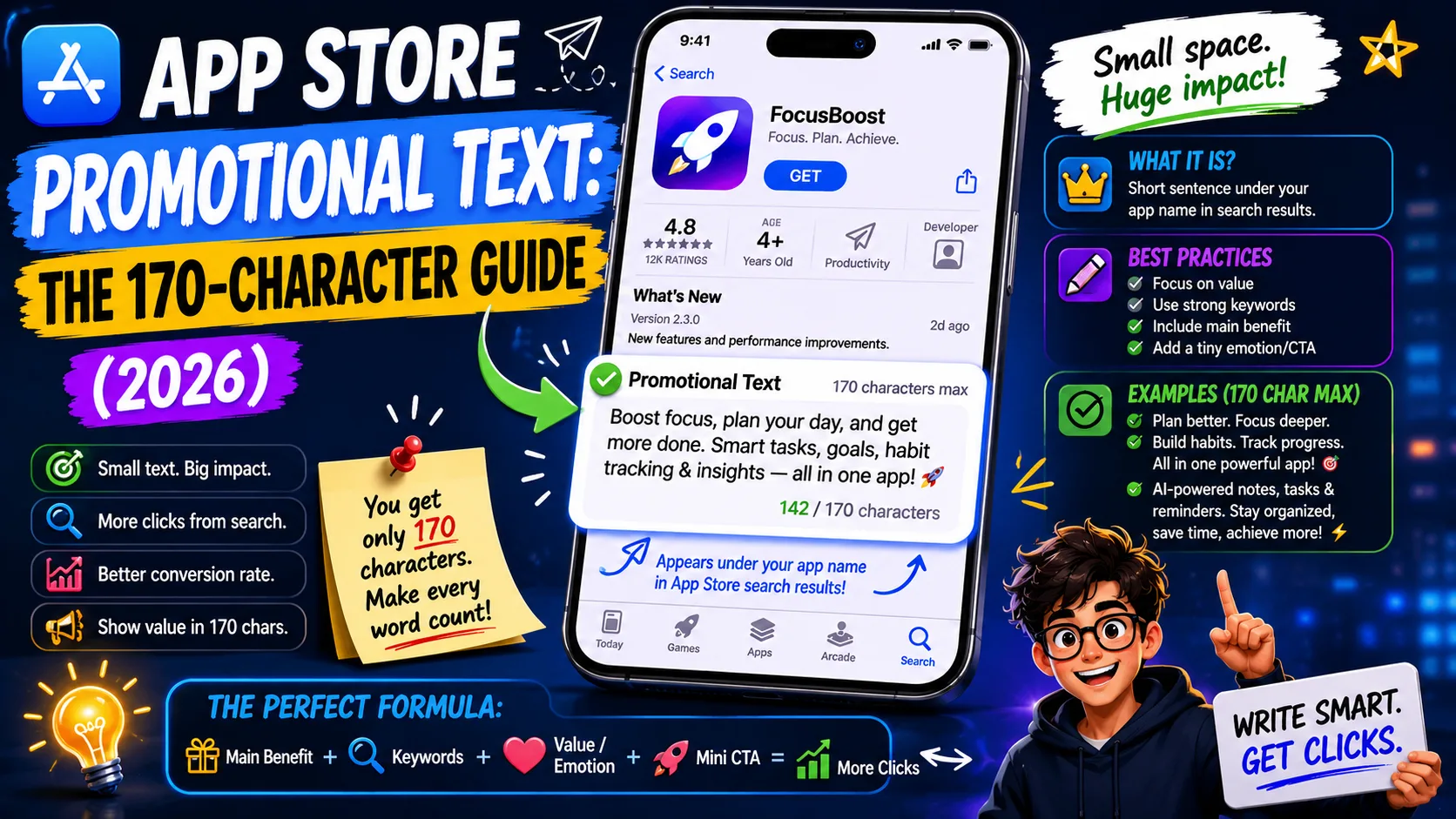
App Store promotional text is the most underused field in iOS ASO. Apple gives you 170 characters that appear above your description on every product page — and the field is updatable any time, without a new app version, without going through review. Most indie developers either leave it blank, fill it once and forget it for two years, or stuff it with keywords that do nothing because Apple doesn't index it for search. None of those approaches uses what promotional text is actually for: dynamic conversion. Done well, it boosts install rates by 15–30%; done badly, it sits as dead weight at the top of your listing. This is the operator-level guide to App Store promotional text in 2026 — what it does, when to change it, and the exact patterns that drive installs.
What promotional text actually is
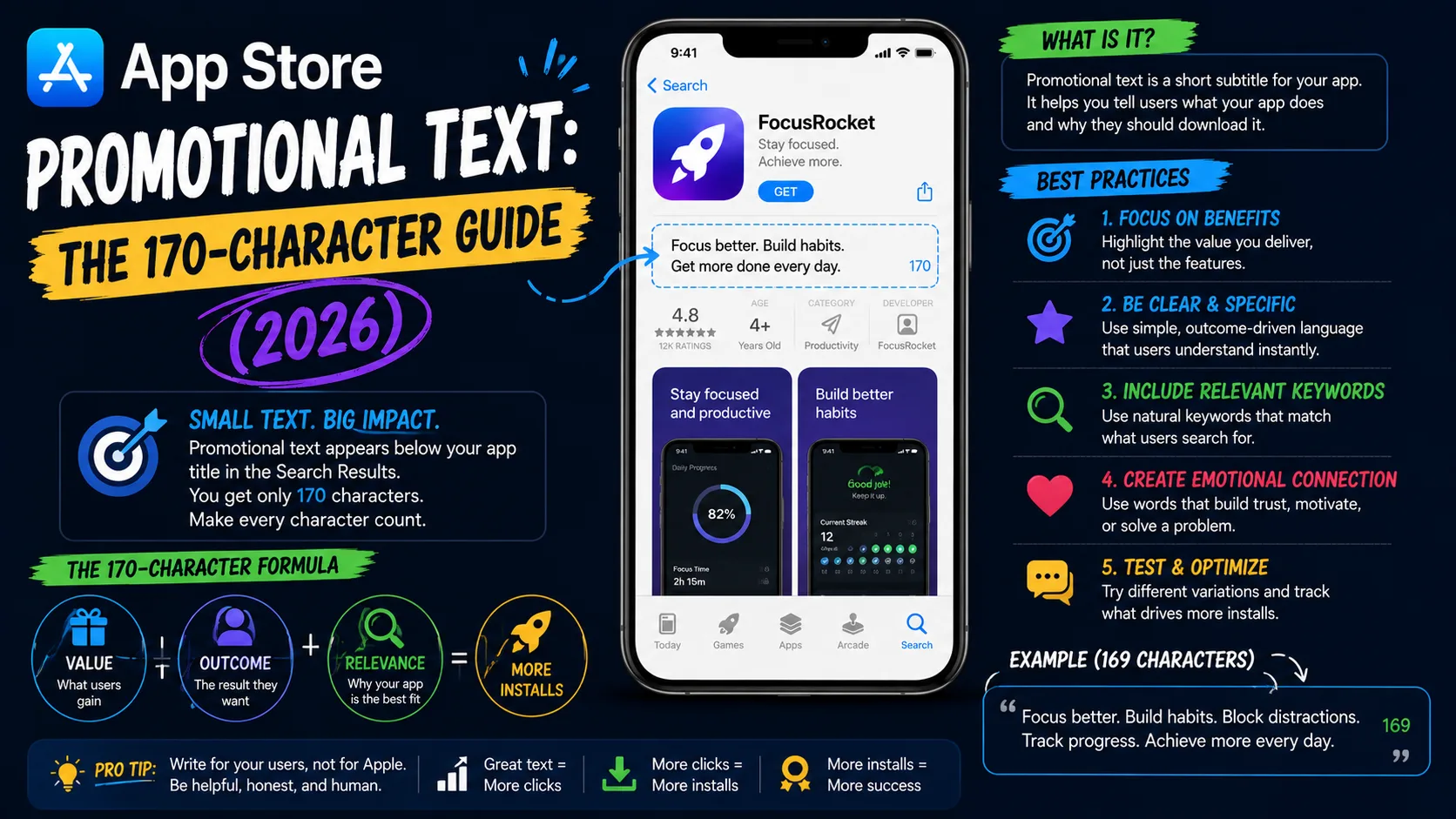
The promotional text is a 170-character field that appears at the top of your App Store description, above the rest of your listing copy. Apple introduced it with iOS 11 in 2017, and it has three properties that no other listing field has:
- Not indexed for search ranking. Keywords in the promotional text have zero impact on which queries surface your app. Stuffing it with ranking terms is wasted effort.
- Editable any time without an app update. You can change it through App Store Connect and it goes live within 2–48 hours (usually around 24 hours). No version submission, no review, no waiting for users to update.
- Highly visible. It sits above the description on your product page, often the first text users read after seeing your screenshots. Treat it as prime conversion real estate, not as an afterthought.
The combination of these three properties makes promotional text fundamentally different from every other field in your listing. Title, subtitle, keywords, and description all serve search and conversion together, locked behind app updates. Promotional text serves conversion alone, with full update freedom.
The first 70 characters do most of the work
On mobile, only the first 70–100 characters of your promotional text are visible before users have to expand. Even though the full field is 170 characters, the truncated preview is what most visitors see. That changes how you write it:
- Lead with the strongest message. The headline-quality sentence — the thing you'd say if you only had a tweet — goes first. Save context for later in the field.
- Use the remaining 70–100 characters for reinforcement. If your first 70 say "Flash sale: Pro is 50% off this week," the next 100 might say "Lifetime access, no auto-renewal. Sale ends Sunday."
- Don't waste characters on filler. "Welcome to our app!" or "Thanks for visiting" do nothing. Every character has to either move the user closer to installing or get cut.
The discipline of 170 characters forces clarity. Treat the constraint as a feature — it removes any temptation to ramble.
What to actually put there: five patterns that win
Across thousands of indie apps, five promotional text patterns consistently outperform the alternatives:
- Time-sensitive offer: "Black Friday: Pro features 50% off through Monday. Lifetime access, no subscription." Works when you have actual deadlines. Useless if "limited time" is a permanent fixture.
- New feature announcement: "Just launched: HealthKit integration. Sync your workouts automatically across all your devices." Highlights momentum and signals an actively developed app.
- Seasonal relevance: "New Year, new habits — start your daily streak today. No login, no subscription, just track." Ties your app to a moment users are already thinking about.
- Social proof: "Featured by Apple in 'Apps We Love' — join 200K users tracking habits the simple way." Works only if the claims are true and verifiable.
- Specific user-benefit hook: "Built for runners who hate spreadsheets. Track pace, distance, and routes in one tap." Works year-round when there's no special offer or event to feature.
Whichever pattern you use, the test is the same: does it give a visitor a specific reason to install now instead of later? If a user can read it and shrug, rewrite.
How often to actually update it
The unique power of promotional text is its update freedom. Indie devs who win with this field treat it as a living asset, not a set-and-forget field. The cadence:
- Major feature releases: Update within 24 hours of the release. New users landing on your page after seeing your launch announcement should see the launch reflected.
- Seasonal moments: Holiday seasons, back-to-school, summer vacation, New Year — any moment your category is relevant. Update 2–3 weeks before peak demand.
- Limited-time offers: Sales, anniversary discounts, beta openings. Set a calendar reminder to remove the offer when it ends — outdated "limited time" text reads as dishonest.
- Press features or awards: Got a write-up in TechCrunch, ProductHunt, or a major publication? Reference it within the next week while the credibility is fresh.
- Steady state: When nothing's happening, default to a strong user-benefit hook that works year-round. Don't leave the field blank or stale.
A reasonable rule of thumb: review your promotional text every 30–60 days. If it hasn't changed in 90 days and nothing seasonal applies, it probably needs a refresh.
The mistakes that quietly cost conversions
The patterns that consistently underperform across indie apps:
- Keyword stuffing. "Best habit tracker daily routine streak workout fitness goal app" reads as spam and does nothing for search (the field isn't indexed). It also makes your listing look amateurish.
- Leaving it permanent. A "Happy New Year!" promotional text still up in July is worse than no message at all. Outdated text actively erodes trust.
- Duplicating the description. Repeating the first lines of your description wastes the field's unique value. Promotional text should add something the description doesn't.
- Generic positivity. "We hope you enjoy our app!" or "The best app for your needs!" tells visitors nothing. Pick a specific value or moment instead.
- Vague urgency without a real deadline. "Limited time offer!" with no end date reads as a permanent fake sale and degrades trust over time.
- Ignoring localization. English promotional text in the Japanese App Store is a missed opportunity. Each locale gets its own 170-character field.
- Overstating what's there. "Now with AI!" when the AI feature is half-baked produces refunds and 1-star reviews. Match the promise to the product.
How promotional text fits with the rest of ASO
Promotional text doesn't replace any other field — it complements them. Each field has a distinct job:
- App name (30 chars, indexed): Highest-weight search signal + brand recognition.
- Subtitle (30 chars, indexed): Second-highest search weight + value clarification.
- Keyword field (100 chars, indexed): Hidden search field for terms not in title/subtitle.
- Promotional text (170 chars, NOT indexed): Dynamic conversion message above the description, updatable anytime.
- Description (4,000 chars, NOT indexed on iOS): Full conversion copy, the case for installing.
The right workflow: lock in title, subtitle, and keywords for search ranking. Lock in the description for conversion. Then use promotional text as the lever you actually pull when something changes — a new feature, a sale, a season, a press hit. It's the only field designed for that kind of agility.
Localization: 40+ promotional texts
Promotional text is localized per App Store region, just like every other listing field. The same content rules apply, but a few language-specific notes matter:
- Character count varies in meaning by language. 170 characters in English carries different information density than 170 in German, French, or Japanese. German often needs more characters for the same message; Japanese and Chinese pack more meaning per character.
- Don't machine-translate cultural references. "Black Friday sale" lands in the US and parts of Europe. It means little in Japan or Brazil. Use seasonal moments and offers that resonate locally.
- Update cadence per locale. If you're running a US Black Friday sale, the promotional text update is for US, UK, Canada, Australia, etc. — but not for regions where Black Friday isn't a thing.
- Prioritize the top markets. Maintaining fresh promotional text in 40 locales is unrealistic for a solo developer. Pick the 3–5 languages that drive the most installs and keep them current. Default the rest to English or a stable user-benefit message.
Frequently asked questions
Is promotional text indexed for App Store search?
No. It does not affect search ranking on iOS. Keywords in this field have no impact on which queries your app appears for. Its only job is conversion on the product page.
Can I update promotional text without releasing a new app version?
Yes. Promotional text is one of the few iOS listing fields that can be changed at any time through App Store Connect, without submitting a new app version. Updates go live within 2–48 hours, typically around 24 hours.
Does Google Play have a promotional text field?
No. Google Play doesn't have a direct equivalent. The closest field is the short description (80 characters), which serves a partly overlapping role but is indexed for search — unlike iOS promotional text.
What's the difference between promotional text and the description?
Promotional text (170 characters) is editable any time, not indexed, designed for dynamic conversion messages. Description (4,000 characters) requires a longer process to change, also not indexed on iOS, designed for the full pitch. Both serve conversion but at different time horizons.
Will leaving promotional text blank hurt my app?
Leaving it blank means visitors see your description text immediately above the screenshots, which is fine but loses an opportunity to highlight something dynamic. A blank field doesn't hurt rankings; it just leaves conversion on the table.
Can I include URLs or links in promotional text?
No. Apple strips URLs from promotional text. Reference your website or feature in plain text instead.
Should I A/B test promotional text?
Apple's Custom Product Pages allow A/B testing across the full listing, but for solo indie developers with low install volumes, testing promotional text variants statistically is rarely worth the effort. Better to use it as a dynamic conversion tool and update it based on what's happening in your app, not based on micro-optimizations.
How quickly do promotional text updates appear?
Usually within 24 hours, sometimes as fast as 2 hours, occasionally up to 48 hours. There's no Apple review step, but the App Store caches listings and changes propagate gradually.
Can I use emojis in promotional text?
Yes. Emojis count toward the 170-character limit but can add visual punch when used sparingly. One emoji per message is usually enough; more reads as cluttered.
The bottom line
Promotional text is the most flexible field in iOS ASO and the one most indie developers underuse. It's not for keywords — it's for moments. New feature, seasonal hook, time-limited offer, press mention, anything dynamic that gives a visitor a reason to install now. Set a recurring reminder to review it every 30–60 days. When something changes in your app or the calendar, update it within 24 hours. The same App Store traffic produces measurably better conversion when this field is treated as a living asset instead of a forgotten checkbox.
Promotional text is one of four ASO fields that work together to drive installs. For the supporting fields, see our complete guides on title vs subtitle, the 100-character keyword field, and the 4,000-character description. Writing all of them from scratch is a chore — but our ASO description generator handles the title, subtitle, and description in seconds, free and without signup.
Related posts
Make your App Store screenshots free
LaunchShots is a free, in-browser screenshot maker. No signup, no watermark.
Open the app →
Comments (0)