App Store Title vs Subtitle: What Goes Where (2026)
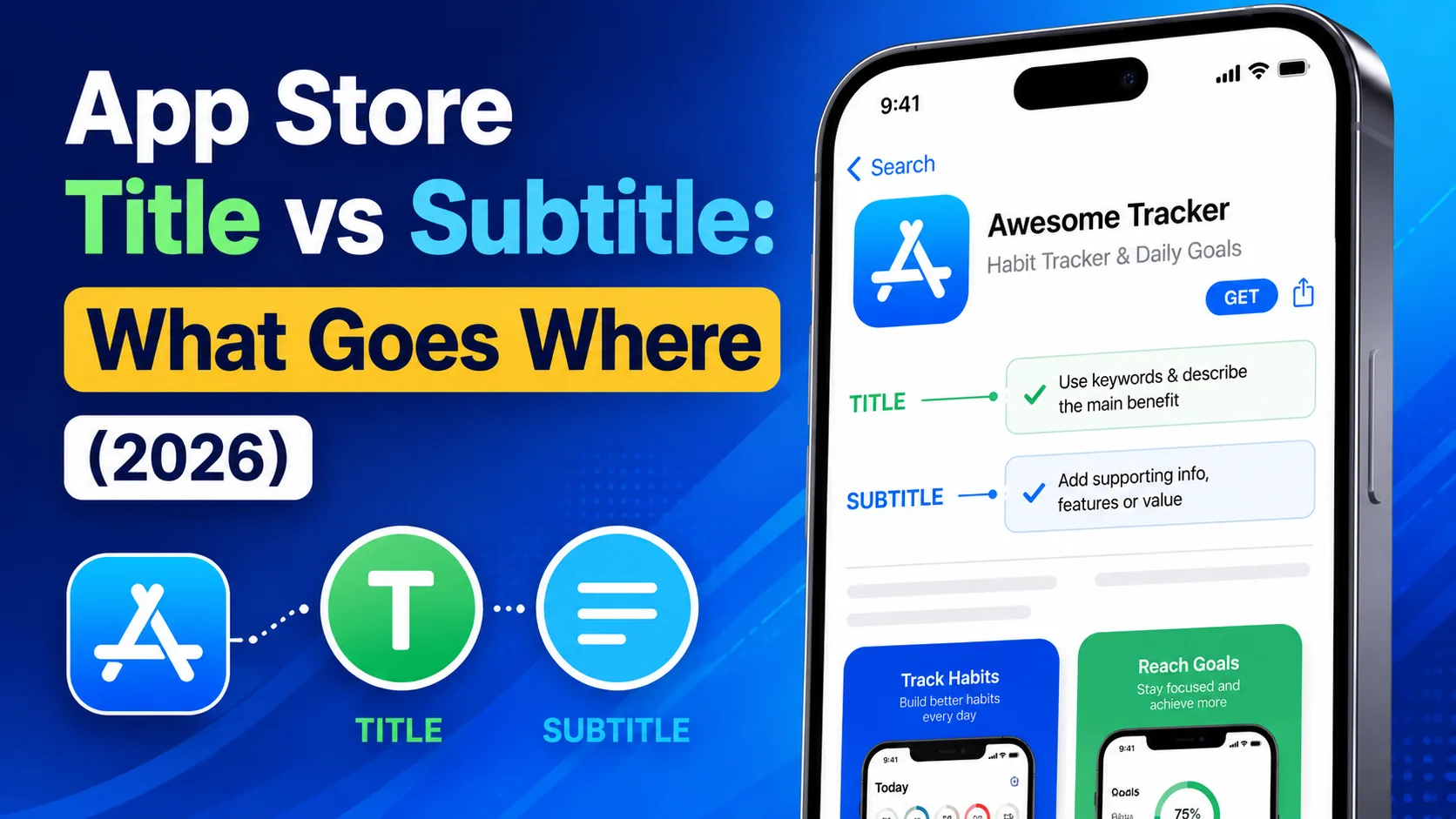
The App Store gives you exactly 30 characters for your title and another 30 for your subtitle. Together they're 60 characters that decide whether your app is findable, and what most indie developers get wrong is treating them as one field split in half. Title and subtitle have different roles, different weights in Apple's algorithm, and different rules for what should go where. Done well, they cover dramatically more keyword ground than the same 60 characters spent without a plan. Done poorly, they duplicate words and waste half of one of the most valuable signals Apple gives you. This is the operator-level guide to App Store title vs subtitle in 2026: what goes where, the rules that quietly cost rankings, and the exact patterns that top-ranking apps follow.
What each field actually does
The title and subtitle look similar — both are 30 characters, both appear at the top of your listing, both are indexed for search. But Apple treats them very differently:
- Title (30 characters): The highest-weight search signal Apple gives you. Keywords placed here index faster, rank higher, and carry more authority than the same words anywhere else. Visible everywhere — search results, product page, home screen, notifications. It's both an SEO field and a brand promise.
- Subtitle (30 characters): The second-highest search weight, sitting below your title in search results and on your product page. Apple's algorithm reads it as supporting context for the title — it expands your keyword footprint without competing for the same space.
- Keyword field (100 characters): Hidden, third-tier weight. The "everything else" field where remaining ranking signals go. Covered in detail in our 100-character keyword guide.
Research from major ASO platforms consistently shows that apps with keyword-optimized titles rank around 10% higher on average than apps with generic titles — and the subtitle effect compounds on top of that. Together, title and subtitle are the closest thing to a free ranking lever Apple offers.
What goes in the title
The title is where your single most important keyword belongs, paired with your brand name. The pattern that consistently wins:
[Brand Name] [Separator] [Primary Keyword]
Real examples from top-ranking apps across categories:
- Tempo: Workout Tracker — brand + primary keyword
- Streak — Habit Tracker — brand + primary keyword
- Notion: Notes & Productivity — brand + two keyword opportunities
- Strava: Run, Bike, Hike — brand + three category keywords
The rules for what belongs in the title:
- Your brand name comes first. Users look for your brand by name; the algorithm uses it as a strong signal; legibility matters. Even if your brand is short and your keyword is long, brand goes first.
- Your highest-volume relevant keyword goes second. Use Apple's search autocomplete to validate that real users actually search for it. "Habit Tracker" beats "Routine Builder" if users type "habit tracker" 10× more often.
- Use the full 30 characters. Leaving space unused is leaving keywords on the table. If your brand is 6 characters, you have 22–24 left for your keyword phrase (after a separator).
- Pick separators that minimize character cost. A colon with one space takes 2 characters; an em-dash with spaces takes 3; the pipe with spaces takes 3. Hyphens are usually fine:
App: Trackercosts 2 chars for the separator,App — Trackercosts 3. - Don't repeat what's in your subtitle. Words in the title and subtitle are both indexed; repeating them wastes one of the two fields. Each field should bring unique terms.
What goes in the subtitle
If the title is your primary keyword, the subtitle is your second-strongest keyword plus context that explains the app. It's where you cover terms that didn't fit in the title and clarify the value proposition.
Patterns that work:
- Secondary keyword + benefit: "Habit goals, daily streaks"
- Use case clarification: "For runners, cyclists, hikers"
- Audience-specific framing: "Made for indie developers"
- Adjacent category keyword: "Workout planner & logger"
The rules:
- Never repeat words from the title. If your title says "Tracker," don't use "tracker" again in the subtitle. The character is wasted. Apple already indexes "tracker" from the title.
- Use the full 30 characters. Same logic as the title — empty space is missed keyword opportunity.
- Write it as a complete thought. Unlike the keyword field, the subtitle is visible to users. It has to read naturally and sell the app, not just stuff keywords. "Habit, daily, goal, streak" looks like keyword salad; "Daily habits, real streaks" reads like a product.
- Avoid stop words and filler. Apple ignores "the," "and," "for," "with," "of," and similar words for ranking purposes. They're fine for readability if needed, but every stop word is a character that could be a keyword.
- Cover an angle the title doesn't. If your title nails the primary keyword, use the subtitle to capture a secondary use case, an audience, or a benefit angle that surfaces you for different searches.
How title and subtitle combine
The single most important piece of ASO knowledge for these two fields: Apple's algorithm automatically combines individual words from the title, subtitle, and keyword field to form multi-word search phrases. You don't write the phrases; Apple builds them from the words you provide.
Take an app titled "Streak — Habit Tracker" with the subtitle "Daily goals & routines." Apple's index now contains these words: streak, habit, tracker, daily, goals, routines. From those six words, it can match queries like:
- "habit tracker" (from title)
- "daily habit tracker" (title + subtitle)
- "daily goals" (from subtitle)
- "habit goals" (cross-field)
- "daily streak" (cross-field)
- "routine tracker" (cross-field)
- "daily routines" (subtitle only)
- …and dozens more permutations.
The point: every unique word you add to either field unlocks new combinations across the entire indexed set. Repeating a word in both fields does nothing extra. This is why "tracker" appearing in both title and subtitle is a waste — Apple already had it from one of them.
Real before-and-after examples
The difference between mediocre and well-optimized title/subtitle pairs is usually 5–10 wasted characters that could be productive.
Example 1: Habit tracker (poorly optimized)
- Title:
Habit Tracker - Daily Habits(28 chars) - Subtitle:
Track your daily habits(23 chars) - Waste: "habit," "tracker," "daily" all duplicated. "Your" is a stop word. Real productive new keywords: zero from the subtitle.
Example 1: Habit tracker (well optimized)
- Title:
Streak — Habit Tracker(22 chars) - Subtitle:
Daily routines & goal streaks(29 chars) - Result: 7 unique productive words across two fields: streak, habit, tracker, daily, routines, goal, streaks. Plus eligibility for "habit streak," "daily habit," "goal tracker," "routine tracker," and many more combinations.
Example 2: Photo editor (poorly optimized)
- Title:
Photo Editor Pro(16 chars) - Subtitle:
Edit your photos easily(23 chars) - Waste: "photo," "edit" duplicated. "Your," "easily" are filler. Only 16 of 30 title characters used.
Example 2: Photo editor (well optimized)
- Title:
Tonal — Photo Editor & Filters(30 chars) - Subtitle:
Retouch, crop, color grade(26 chars) - Result: Productive unique words: tonal, photo, editor, filters, retouch, crop, color, grade. Plus permutations like "photo filter," "color editor," "photo retouch."
The rules that quietly cost rankings
Beyond the basics, there are several patterns that cost rankings without anyone noticing:
- Generic brand-only titles. If your title is just "Lumina" with no keyword, you're discoverable only by people who already know your brand. For a new app, this is invisibility. Always pair the brand with a keyword unless you're a massive consumer brand.
- Trying to fit too many keywords in the title. "Tracker Habit Daily Goal Routine" is technically 30 characters of keywords, but it reads as spam, doesn't have a brand, and Apple's algorithm may suspect manipulation. One brand + one keyword phrase is the sweet spot.
- Title-case inconsistency. Apple doesn't weight capitalization differently for ranking, but a mix of Title Case and lowercase in different metadata fields looks unprofessional. Pick a style and stick with it.
- Special characters that don't help. Emoji, decorative symbols, and unicode bullets count toward your 30 characters and contribute zero ranking value. They occasionally help conversion if used thoughtfully, but never for ranking.
- Subtitles that read like ad copy. "The best, most amazing tracker ever!!" wastes characters on superlatives that don't rank and feel desperate. The subtitle is informational, not promotional.
- Localizing word-for-word. Translating your English title and subtitle literally into French or Spanish often misses what users in those locales actually search. Use Apple's autocomplete in each locale to find native search terms.
How often to update them
Title and subtitle changes require an app update — you can't modify them independently. The cadence:
- Initial launch: Take time. Your launch title shapes early search visibility for weeks.
- Major updates or feature additions: Re-evaluate. New features may justify shifting keywords (e.g., adding "video" to a photo editor's title when video editing ships).
- Quarterly review: Look at your App Store Connect search analytics. Keywords that aren't producing installs after 90 days are candidates for replacement.
- After competitor moves: If a competitor changes their title or a new competitor takes a top-ranking spot for your primary keyword, you may need to reposition.
Don't change titles weekly. Search rankings take time to stabilize, and constant changes prevent you from learning what works.
Localization: 40+ title/subtitle pairs
If your app is localized into 40+ languages, you have 40+ separate title/subtitle pairs to optimize. The keyword that wins in English-US often loses in German or Japanese — direct translation isn't enough.
- Use locale-specific keyword research. Apple's autocomplete in each locale shows real search demand for that market.
- Adapt the structure, not just the words. Some languages compound words ("Habittracker" in German vs. "Habit Tracker" in English) — adjust accordingly.
- Watch the character limit per locale. 30 characters in English is roughly 20–25 characters' worth of meaning in German or Japanese due to script density. The limit is the same; the message has to compress.
- Prioritize markets. Localizing for 40 languages with no native review is busywork. Focus on the 3–5 languages that represent your largest user opportunity.
Frequently asked questions
Does the subtitle appear in search results?
Yes. On iOS, both the title and subtitle appear below your app icon in search results. The subtitle is one of the first things users read to decide whether to tap into your listing.
Can I change my title without releasing a new app version?
No. Title and subtitle changes require a version update submitted through App Store Connect. Plan changes alongside other app updates.
Is the subtitle indexed on Google Play?
Google Play doesn't use a subtitle field. Instead, it has a "short description" of up to 80 characters that serves a similar role — it's indexed for search and visible in listings.
Should I include "free" or "pro" in my title?
Generally no for "free" — Apple's guidelines disallow promotional language in titles. "Pro" is fine if it's part of your actual product name (e.g., "Notion Pro"), but adding it cosmetically wastes characters and can look spammy.
How important is it to use all 30 characters?
Very. Unused characters are unused keyword opportunities. Most well-optimized titles use 25–30 characters; under 20 is almost always a missed opportunity.
Can I use emojis in my title or subtitle?
Technically yes, but they count toward your character limit and contribute zero to search ranking. They can occasionally help conversion (visual distinction in search results), but the trade-off is usually unfavorable for early-stage indie apps that need every character for ranking.
What's the difference between subtitle and promotional text?
Subtitle (30 characters) is indexed for search and requires an app update to change. Promotional text (170 characters) is not indexed for search, appears at the top of your description, and can be updated anytime without resubmission. They're different tools for different jobs.
Do title and subtitle affect conversion as well as ranking?
Yes. The title and subtitle are the first two things users read after seeing your icon. A clear, well-written pair drives both rankings and tap-through to your full listing. They're rare ASO elements where SEO and conversion goals align rather than conflict.
The bottom line
App Store title and subtitle are the two highest-weight search signals Apple gives you, and they're free. Most indie apps waste a third of their 60 combined characters on duplicated words, stop words, or filler — and miss the multi-word search combinations Apple's algorithm would have generated for them. Audit your title and subtitle against the rules above; you'll almost certainly find 5–10 characters of waste you can reallocate to genuine ranking opportunities. Done well, those reallocated characters can be the difference between page-one visibility and being buried under thousands of competitors.
Once your title and subtitle are tight, the 100-character keyword field is the next ASO lever — and it follows different rules entirely. Our complete keyword field guide covers what goes into that hidden field and how to fill every character productively. If writing the rest of your listing copy is the part you're dreading, our ASO description generator handles the title, subtitle, and description in seconds — free, no signup.
Related posts
Make your App Store screenshots free
LaunchShots is a free, in-browser screenshot maker. No signup, no watermark.
Open the app →
Comments (0)