App Store Description: The 4,000-Character Guide (2026)
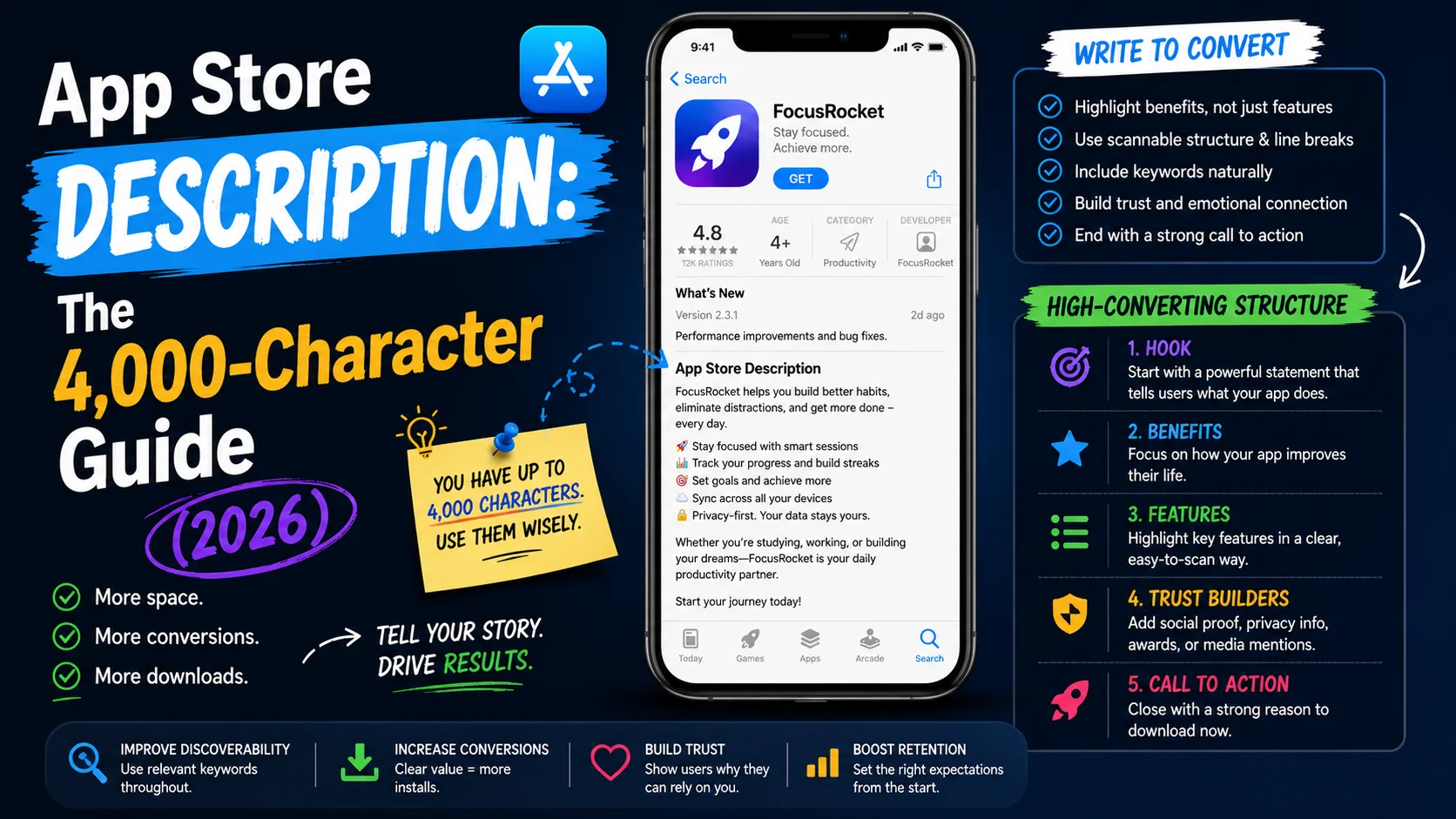
Apple gives you 4,000 characters for your app description, and unlike your title and subtitle, this field is almost entirely about conversion — not search ranking. Most indie developers either ignore it (one-paragraph descriptions that waste 3,800 characters) or stuff it with keywords that do nothing because Apple doesn't index it for search. Both miss the point. The description is where visitors who already tapped into your listing decide whether to install — and the first three lines do roughly 80% of the work. This is the operator-level guide to writing an App Store description in 2026 that actually converts: what each section does, the exact structure that consistently wins, and the mistakes that lose installs without anyone noticing.
What the description actually does
The description's job is different from every other field in your listing. Knowing the difference is the difference between writing well and writing pointlessly:
- App Store (iOS): The description is not indexed for search ranking. Stuffing keywords here does nothing for discoverability. Its only job is conversion — convincing visitors who already found you to tap "Get" or "Buy."
- Google Play: The full description (up to 4,000 characters) is indexed for search. Keywords woven naturally throughout affect rankings. The description does double duty: conversion + search.
This single difference shapes everything. On iOS, write for the reader. On Google Play, write for the reader and the algorithm together. Most ASO mistakes come from applying iOS thinking to Google Play or vice versa.
The first three lines do 80% of the work
On iOS, only the first three lines (roughly 170–200 characters) of your description are visible before the "more" tap. Most users never tap "more." This means the first three lines are not a "lead-in" — they're effectively the entire description for the majority of your visitors.
What those first three lines have to do:
- State what the app does in one sentence. Not "Welcome to the best app for…" — that's filler. "Tempo turns 5-minute walks into a daily workout streak" is concrete and complete.
- Name the user it's for. Specificity converts. "Built for runners who hate spreadsheets" outperforms "for everyone who wants to get fit" even though the second sounds broader.
- Hint at the primary benefit. "Hit your weekly mileage without manual logging" gives a reason to tap "Get" before they tap "more."
If your first three lines could describe any app in your category, they're doing nothing for you. Rewrite them until they could only describe yours.
The structure that consistently wins
After years of A/B testing across indie apps, a structure has emerged that works across categories. The pattern:
- Hook (first 3 lines, ~170 chars): What the app does, who it's for, the primary benefit. Above the "more" fold.
- Feature list (next 800–1,200 chars): 5–10 bullet points describing what users can actually do. Each one starts with a verb and names a concrete capability. No fluff, no superlatives.
- Use cases or audience section (~500–800 chars): Who specifically benefits and in what situations. This converts skeptics who aren't sure the app applies to them.
- Differentiation paragraph (~300–500 chars): Why this app vs. the obvious alternatives. Honest comparison beats vague claims. "Doesn't require a watch like Strava does" works; "the best running app ever" doesn't.
- Social proof if you have it (~200–400 chars): User numbers, ratings, press mentions, awards. If you have nothing yet, skip this section — empty claims hurt more than they help.
- Privacy and pricing transparency (~200–400 chars): What data you collect (or don't), what's free, what's paid. Transparency builds trust and reduces refund requests.
- Call to action and contact (~100–200 chars): One sentence telling them to download, plus a support email or website for follow-up.
Total: somewhere between 2,500 and 4,000 characters, depending on category complexity. Going under 1,500 characters consistently leaves conversion on the table.
Writing the feature list (the bulk of the description)
The feature list is where most descriptions either shine or collapse. Two patterns that work:
Verb-led bullets with concrete benefits:
- "Track daily habits with one tap"
- "Visualize weekly streaks in clean bar charts"
- "Set custom reminders that fit your schedule"
Section headers with mini-paragraphs underneath:
🎯 Track what matters
Pick the habits you want to build and check them off in seconds. No setup, no categories, no clutter.
Both patterns work. Choose based on your category — habit trackers, fitness apps, and productivity tools tend to use bullets; creative tools, photo editors, and games tend to use mini-paragraphs with light visual structure (emoji headers, line breaks).
What to avoid:
- Adjective stacks. "Beautiful, simple, elegant, intuitive, powerful" tells the reader nothing. Pick one or skip them all and let the features do the work.
- Generic feature names. "Cloud sync" doesn't mean anything. "Your data syncs across iPhone, iPad, and Mac automatically" tells someone what they get.
- Industry jargon. "AI-powered" and "machine learning" are noise unless you're selling to a technical audience. Most users want to know what the app does, not how it does it.
- Walls of text. Big paragraphs get skipped. Use line breaks generously; mobile readers scan, not read.
iOS vs Google Play: write them differently
The same description rarely works equally well on both stores because the rules are different:
For iOS:
- Pack the first 3 lines with conversion-focused copy, not keywords.
- Use generous formatting (line breaks, emoji headers, bullet points) for scannability.
- Don't worry about keyword density — it doesn't affect ranking.
- Save promotional text (a separate 170-character field) for time-sensitive announcements that don't require an app update to change.
For Google Play:
- Write naturally with your target keywords woven through the text. Density doesn't help, but presence does.
- The short description (80 characters) acts like an iOS subtitle — make it count.
- The full 4,000-character description is indexed; the more relevant content you include, the more search queries you can rank for.
- Repeat your primary keyword 2–4 times across the description naturally. Google's algorithm penalizes obvious stuffing.
The practical workflow: write the iOS description first (pure conversion focus), then adapt it for Google Play by weaving in keywords. Don't try to write one description that "works for both" — it'll do neither job well.
Common mistakes that lose installs
The patterns that consistently underperform across indie app descriptions:
- Burying the value below the "more" fold. "Welcome! Thanks for checking out our app! We hope you enjoy using it..." — by the time you've said something useful, the visitor is gone.
- Listing features without benefits. "Push notifications" doesn't sell anything. "Get reminded before your workout window closes" sells.
- Promising more than the app delivers. Mismatched expectations are the #1 driver of one-star reviews and refunds. Describe what's actually there, not what you wish was there.
- Ignoring formatting on mobile. A description that reads well on desktop often reads as one giant paragraph on mobile. Test on the actual App Store app, not your editor.
- Forgetting to update after major features. A description that hasn't been updated in 18 months while the app has tripled in functionality is leaving conversion on the table for every visitor.
- Including external links Apple removes. Apple often strips outbound URLs from descriptions during review. Mention your website in plain text if you must (support@yourapp.com), not as a clickable link.
How often to update the description
Unlike title and subtitle, the description can be updated without releasing a new app version on both iOS and Google Play. The cadence that works:
- Major feature releases: Update the description the same day. New features that aren't reflected in the description don't drive new installs.
- Seasonal pushes: If your app is relevant to a holiday, season, or annual event, swap in seasonally-relevant copy 2–3 weeks before peak demand.
- Quarterly review: Re-read the description in full and tighten anything that's drifted. Most descriptions accumulate vague language over time.
- After significant rating changes: If your rating drops after a release, the description is one of the levers that can rebuild trust. Add transparency about fixes and improvements.
- A/B testing: Apple's Custom Product Pages let you A/B test descriptions for different acquisition sources. If you have install volume above a few hundred per week, this is worth doing.
Localization: 40+ descriptions to maintain
The description, like other listing fields, can be localized across 40+ languages on the App Store. Direct translation rarely works:
- Length varies dramatically by language. German descriptions are typically 30% longer than English; Japanese can be 30% shorter. The 4,000-character limit is constant, but the meaning you can pack varies.
- Cultural framing differs. What sells in the US ("crush your goals") often falls flat in Japan or Germany. Native speakers catch this; machine translators don't.
- Search keywords differ. On Google Play especially, the keywords that drive installs in Spanish are not the literal translations of the English ones.
- Prioritize markets. Localizing 40 descriptions perfectly is busywork. Localize the top 3–5 languages well; leave the rest in English unless you have meaningful organic demand from those markets.
Frequently asked questions
Is the App Store description indexed for search ranking?
No. Only your app name, subtitle, and the 100-character keyword field affect search ranking on iOS. The description is purely a conversion field. Google Play is different — there, the description is indexed and affects search.
Can I update the description without submitting a new app version?
Yes, on both stores. Description, promotional text, and screenshots can all be updated independently of app version submissions. Title, subtitle, and the iOS keyword field require a new version.
What's the difference between description and promotional text?
Promotional text is a separate 170-character field on iOS that appears above your description. It's not indexed for search, can be updated anytime without a new version, and is the right place for time-sensitive announcements (sales, new features, partnerships). The description is your evergreen pitch.
Should I include my pricing in the description?
Yes, transparently. "Free with optional Pro upgrade at $4.99/month" reduces post-install confusion and refund requests. Hidden pricing surprises users and produces one-star reviews.
Can I link to external sites from the description?
Apple often strips outbound URLs during review. Mention your website or support email in plain text if you need to. Google Play allows links but de-prioritizes descriptions that look spammy.
Should I include user testimonials in the description?
Only if they're real and attributable. Generic anonymous "Love this app!" testimonials read as fake. Specific named quotes from real users or press mentions add credibility.
How long should the description be?
The 4,000-character limit is generous; most well-optimized descriptions land between 2,500 and 3,500 characters. Under 1,500 typically leaves conversion on the table. Over 3,800 risks reader fatigue.
Does emoji use help or hurt the description?
Used sparingly as section headers or visual breaks, emoji help scannability. Used heavily throughout body text, they look unprofessional and hurt credibility. One per section header is plenty.
Can I include competitor names in the description?
Trademarked competitor names violate Apple's guidelines and can get your app rejected or removed. Generic comparisons ("unlike other habit trackers") are fine; named comparisons ("better than Strava") are not.
The bottom line
The App Store description is the conversion field most indie apps treat as an afterthought. Visitors who tap into your listing are seconds away from installing or leaving — the first three lines decide which way they go, and the rest of the description either reinforces that decision or quietly walks it back. Write the first three lines to be the entire description. Use the remaining 3,800 characters to remove every objection a hesitant user might have. Update it whenever the app changes. The same listing traffic can produce dramatically different install rates depending on how this single field is written.
Writing the rest of your listing copy from scratch is a chore — but it doesn't have to be. Our ASO description generator handles the title, subtitle, and description in seconds, free and without signup. And once your listing copy converts, screenshots do the rest of the work: our guide on App Store screenshots that convert covers the visual side. For the supporting fields, the 100-character keyword guide and the title vs subtitle guide complete the ASO trifecta.
Related posts
Make your App Store screenshots free
LaunchShots is a free, in-browser screenshot maker. No signup, no watermark.
Open the app →
Comments (0)