Do App Store screenshot A/B tests actually work? (And how to run one)
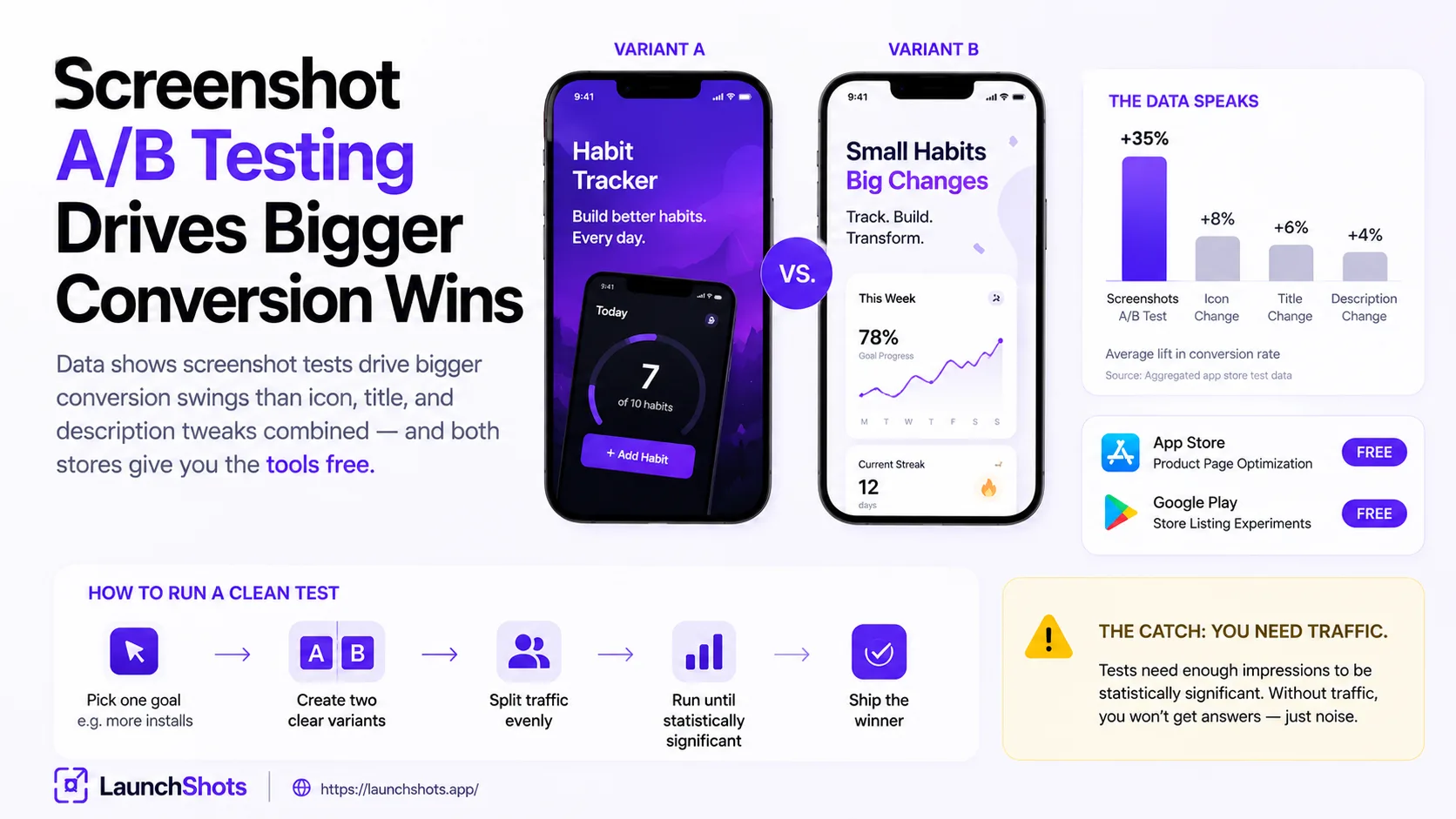
You've heard the advice: "test your screenshots." But A/B testing sounds like something big companies with analytics teams do, not a solo developer shipping their second app. So the honest question is — does testing your App Store screenshots actually move the needle, or is it a time sink that only matters at scale? The short answer: it's one of the highest-return things you can do to your listing, and both stores give you the tools for free. Here's what the data says and how to do it without overcomplicating your life.
Does it actually work? What the data shows
Yes — and the effect is bigger than most people expect. Screenshot creative is consistently the single highest-leverage asset on your product page. Analysis across more than a billion app store impressions has found that changing your screenshots drives larger conversion swings than tweaking your icon, title, and description combined. Changing just the first screenshot has been shown to move conversion rates by 15–30% in controlled tests.
The reason is mechanical, not magical: your first one to three screenshots appear inline in search results, before anyone taps into your full page. That first frame is doing the job of an ad creative, and roughly 60% of the install decision is made right there. Small changes to something that important compound — a 10% conversion lift on the same traffic is 10% more installs for zero extra ad spend, every month, indefinitely.
The free tools both stores give you
You don't need a third-party service to start. Both platforms have native A/B testing built in:
- Apple — Product Page Optimization (PPO). Run up to three treatment variants against your current page, split traffic evenly, and measure download conversion. Apple marks a variant "Performing Better" or "Performing Worse" once it reaches about 90% confidence. Tests can run up to 90 days.
- Google Play — Store Listing Experiments. Roughly the same idea, with finer traffic splits and the ability to scope a test to specific countries.
Both are free, built into App Store Connect and Play Console, and don't require touching your live listing until you have a winner.
How to run a test that gives you real answers
The mistake most people make is testing everything at once and learning nothing. A clean test follows a few rules:
- Change one variable at a time. Test your first screenshot's headline, or device-frame vs. no-frame, or a benefit-driven caption vs. a feature-driven one — but only one. If you change five things and conversion moves, you won't know which change did it.
- Start with your first screenshot. It's the highest-leverage element, so it's where a test pays off most. Don't waste your first experiment on screenshot number six.
- Let it run. Give it at least seven days, and ideally until the store reports a clear result. Stopping early on a small sample is how you fool yourself with noise.
- Respect significance. If the platform says a test may be inconclusive at your traffic level, believe it — run fewer variants or give it more time rather than acting on a coin-flip.
What's actually worth testing
Based on what consistently moves conversion, these are the experiments with the best odds of a real lift:
- First-screenshot headline. Outcome-driven ("Save an hour every day") vs. feature-driven ("Smart scheduling engine").
- Caption placement. Top-stacked, short headlines tend to outperform bottom captions — worth confirming for your app.
- Device frame vs. full-bleed. Some categories convert better with a clean phone frame, others with edge-to-edge UI.
- Screenshot order. Swapping which screen leads can change everything, since the first frame carries most of the weight.
- Color and contrast. A higher-contrast background or a bolder accent can lift legibility in the search thumbnail.
The catch: you need traffic
Here's the honest limitation. A/B testing needs enough visitors to reach statistical significance. If your app gets a handful of page views a day, a formal test will take forever or never conclude. For very low-traffic apps, you're better off applying known best practices first — strong first frame, benefit captions, high contrast, real app in a clean frame — and saving formal A/B tests for when you have the traffic to support them. Testing isn't a substitute for getting the fundamentals right; it's how you refine them once they're in place.
The takeaway
App Store screenshot A/B testing isn't hype — it's one of the most reliable, lowest-cost ways to get more installs from the traffic you already have, and the tools are free in both stores. Get your fundamentals right, then test your first screenshot, change one thing at a time, and let the data settle. Your instincts are a good starting point; the test tells you the truth.
Before you can test variants, you need to be able to produce them quickly — different headlines, frames, and layouts without redoing everything from scratch. That's what our free screenshot editor is for: build a set, duplicate it, change one variable, and export both versions in the exact store sizes — in your browser, no signup. And if you want the principles behind a strong first frame, start with our guide on screenshots that convert.
Related posts
Make your App Store screenshots free
LaunchShots is a free, in-browser screenshot maker. No signup, no watermark.
Open the app →
Comments (0)