Google Play Service Fees 2026: 15% Auto, 10% Subscriptions
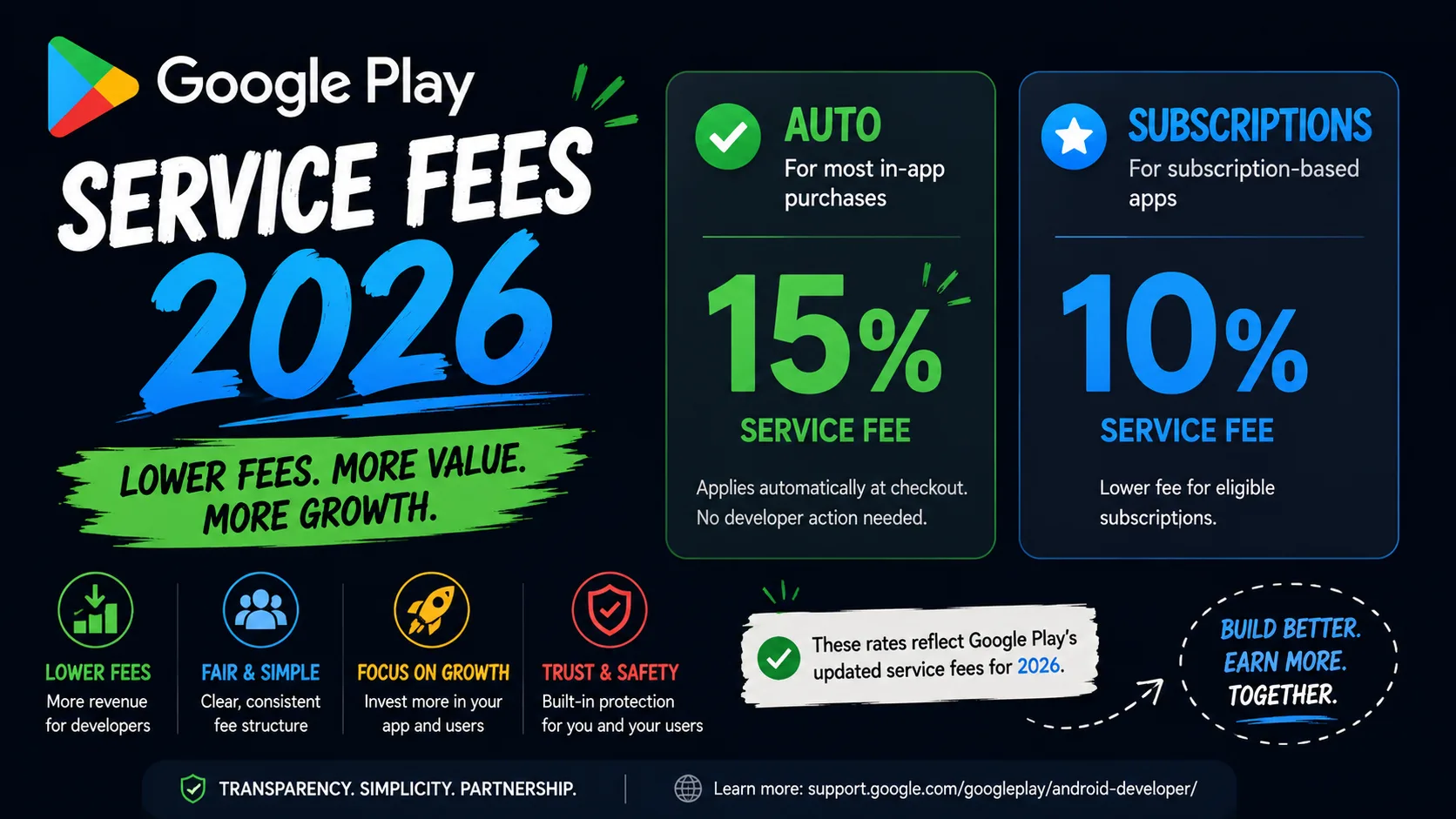
If you ship an Android app, Google Play's commission structure is probably better for you than you think — and 2026 is the year it gets significantly better. While Apple makes you opt in to its Small Business Program for the 15% rate, Google applies the reduced fee automatically to the first $1 million of your annual earnings. And in 2026, subscriptions get cut even further: Google is dropping the subscription service fee from 15% to 10% in the US, UK, and EEA by June 30, 2026, as part of its Epic Games settlement. For a subscription business doing $1M annually, that's the difference between paying Google $150,000 and paying $100,000 — a $50,000 swing with zero work on your end. Here's the complete operator-level guide to Google Play's service fees in 2026, every rate that applies, and how the structure compares to Apple's.
The basic structure: how Google Play fees actually work in 2026
Unlike Apple's opt-in Small Business Program, Google Play's reduced rate is automatic. Every developer pays:
- 15% on the first $1 million in earnings per calendar year, per Account Group.
- 30% on every dollar above $1 million for the rest of that calendar year.
- Counter resets to zero every January 1. The reduced rate isn't a one-shot — it applies fresh each year.
If your earnings stay under $1M annually (which Google says applies to roughly 99% of developers who pay any service fee), you pay 15% on everything. No application, no paperwork, no annual renewal. Google just applies it.
This is fundamentally different from Apple's model. Apple's Small Business Program is binary — once you cross $1M in proceeds, you lose the reduced rate for the rest of the year on all future sales. Google's structure is graduated — the first $1M is always 15%, even if you do $5M total. Higher earners benefit more from Google's structure than Apple's.
The 2026 subscription change: 15% → 10%
The biggest 2026 update is for apps with recurring revenue. As part of the March 2026 Epic Games settlement, Google announced subscription service fees are dropping from 15% to 10% in the US, UK, and EEA, rolling out by June 30, 2026.
This matters disproportionately for subscription-based apps — streaming services, fitness apps, productivity tools, dating platforms, anything with recurring monthly or annual revenue. Run the math on what 5 percentage points means at scale:
- $10K monthly subscription revenue: $500 more per month, $6,000 per year.
- $50K monthly subscription revenue: $2,500 more per month, $30,000 per year.
- $100K monthly subscription revenue: $5,000 more per month, $60,000 per year.
- $500K monthly subscription revenue: $25,000 more per month, $300,000 per year.
One important detail: this 10% rate applies to subscription transactions only. Paid app downloads and one-time in-app purchases stay at 15% under the standard structure. If your monetization mix is heavily subscription-based, 2026 is a quiet but significant raise.
What "earnings" actually means
Google's $1M threshold uses "earnings" — and developers often misread this. Earnings is the amount Google reports to you on Play Console, calculated as the gross transaction value minus taxes and refunds, before Google's service fee is deducted. It's not the same as what hits your bank account, and it's not the same as gross sales.
If you sold $1.2M in gross transactions, had $40K in refunds, and $80K in VAT/taxes, your earnings would be roughly $1.08M — meaning you'd cross the $1M threshold mid-year and pay 30% on the final $80K. Pull the actual earnings number from Play Console's financial reports before assuming you're under or over.
Account Groups: the threshold rule most devs miss
If you run multiple developer accounts, Google combines their earnings into a single "Account Group" for the $1M calculation. You can't split revenue across accounts to stay under the threshold — Google explicitly prohibits this, and the policy language makes clear that violations can trigger account-level review.
The mechanics: you designate one Primary Developer Account, then declare any Associated Developer Accounts (ADAs) you control. The combined earnings of the entire group count against the single $1M ceiling. If your group does $1.4M across three accounts, you've crossed the threshold even if no single account exceeded $500K.
One nuance: the 15% rate applies per ADA on the group's first $1M collectively. So if you have three ADAs and the group hits $1M halfway through the year, every account flips to 30% for the rest of the year — not just the one that earned the most.
Programs beyond the standard 15%
Google has additional fee programs that can push the rate even lower for specific app types:
- Play Media Experience Program: For apps delivering ebooks, music streaming, or video content. Service fees can drop as low as 10%. Requires integration with platforms like Android TV, Wear OS, or Google Cast.
- Apps Experience Program: Starting June 2026, drops the service fee to 15% on new installs (post-June 2026 onwards) for participating apps. Requires meeting specific quality and engagement criteria.
- Alternative billing in South Korea: When a developer uses an approved third-party billing system instead of Google Play's billing, the fee drops to 11% instead of the standard 15%.
- EEA external offer steering: Developers in the European Economic Area can direct users outside the app to promote digital offers, subject to program requirements.
Most indie developers won't qualify for or benefit from these niche programs — the standard 15% (or 10% on subscriptions in 2026) is the rate that matters. But if you're in media or building for the EEA, they're worth investigating.
How to enroll (or rather, confirm you're enrolled)
The short version: most developers don't need to do anything. The 15% rate is automatic. But there are two situations where active steps matter:
- You have multiple developer accounts. You need to declare your Account Group so Google can correctly aggregate earnings against the $1M threshold. Go to Play Console → Setup → Payments profile, then create an Account Group with your Primary Developer Account and list any Associated Developer Accounts.
- You're checking your status. In Play Console, your service fee rate is visible in the financial reports section. If you're seeing 30% on transactions under $1M in a calendar year, something is misconfigured — likely an issue with your Account Group setup or a transaction routed through legacy billing.
If you use a third-party subscription manager like RevenueCat or Adapty, double-check that your service fee setting is configured for the reduced rate. Many tools assume 30% by default for legacy reasons; updating this can clean up your revenue analytics.
Apple vs Google: side-by-side
If you ship on both stores, knowing how the two structures differ helps you plan revenue projections accurately:
- Enrollment: Apple requires opt-in via the Small Business Program. Google is automatic for all developers.
- Threshold treatment: Apple flips you to 30% on all future sales once you cross $1M in a year. Google charges 15% on the first $1M and 30% only on the excess.
- Subscriptions in 2026: Apple charges the Small Business rate (15%) if you're enrolled and under threshold, with a separate 15% rate kicking in after a customer's first year. Google is moving subscriptions to 10% by June 30, 2026 in major markets.
- Multi-account handling: Apple uses "Associated Developer Accounts" for the threshold; Google uses "Account Groups." Both prevent revenue splitting across accounts.
- Re-qualification: Apple requires re-qualification if you cross $1M and later drop back under. Google resets automatically every January.
In practical terms: at lower revenue levels (under $1M), the two stores are roughly equivalent at 15%. As you cross $1M, Google's graduated structure beats Apple's binary one. And for subscription-heavy apps in 2026, Google's 10% rate is the most favorable platform fee any major store has offered.
Common mistakes that cost developers money
The same Google Play fee mistakes show up over and over in indie dev communities:
- Assuming you're paying 30%. Many developers building under $1M in earnings still mentally budget at 30%, miscalculating their margins. The actual rate is 15% — and your pricing and growth math should reflect that.
- Not setting up Account Groups. If you have multiple developer accounts and haven't declared the Account Group, your earnings may not be aggregated correctly. This rarely benefits you and can trigger compliance reviews.
- Misconfigured RevenueCat or Adapty settings. Many third-party subscription platforms default to 30% in their reports unless you explicitly tell them you're in the reduced tier. Your analytics will look worse than reality.
- Ignoring the 2026 subscription cut. If you run a subscription business and haven't updated your revenue forecasts for the 10% rate, you're underestimating 2026 take-home by roughly 6%. For a $500K subscription business, that's $30K you didn't plan for.
- Treating Google and Apple identically. The threshold rules are different. If you do $1.5M total and assumed Apple-style binary cutoff applied to Google, you'd misforecast Google's revenue by tens of thousands.
Frequently asked questions
Do I need to apply for the 15% Google Play rate?
No. The reduced rate is automatic for all developers. You only need to configure your Account Group if you operate multiple developer accounts that should be aggregated together.
Does the 15% rate apply to free apps?
Free apps with no in-app purchases or subscriptions pay no service fee at all. The 15% (or 10% for subscriptions in 2026) only applies to revenue from paid downloads, in-app purchases, and subscriptions processed through Google Play's billing system.
What happens if I cross $1M mid-year?
Every dollar above $1M is charged at 30% for the rest of that calendar year. The first $1M still stays at 15%. On January 1, the counter resets, and you go back to 15% on the next $1M.
When does the 10% subscription rate start?
Google announced it as part of the March 2026 Epic Games settlement, with rollout completing by June 30, 2026 in the US, UK, and EEA. Other regions may follow.
Does the 10% rate apply to existing subscribers or only new ones?
Google's announcement indicates the new rate applies to subscription transactions broadly, not just new installs. Confirm specifics in Play Console once the rollout completes for your region.
How is "earnings" different from gross sales?
Earnings is gross transaction value minus taxes and refunds, before Google's service fee. It's the number Play Console uses to track the $1M threshold. Always pull this from Play Console rather than estimating from sales totals.
Can I get a lower rate than 15% on a non-subscription app?
Standard non-subscription transactions stay at 15% under the regular structure. The Play Media Experience Program can lower this for media apps that integrate with Google's platforms, but it's a niche path that most indie devs won't qualify for.
Does this affect alternative billing systems?
If you offer an alternative billing system (currently allowed in South Korea and the EEA under specific conditions), the service fee is reduced by an additional 4 percentage points. So a standard 15% becomes 11% on alternative-billing transactions.
The bottom line for indie developers
If you're under $1M in annual Google Play earnings — which covers most indie developers — you're already paying 15%, automatically. The key actions for 2026: confirm your Account Group is set up correctly if you have multiple developer accounts, update your revenue projections for the 10% subscription rate landing by mid-year, and verify your third-party analytics tools are configured for the reduced rate so your margins reflect reality.
If your app monetizes through subscriptions, 2026 is genuinely a windfall year — 5 percentage points lower than 2025, with no effort required from you. For indie developers, it's the rare moment when a platform fee change actually moves in your favor.
While you're optimizing the financial side, the asset side of your launch matters just as much. Our Apple Small Business Program guide covers the opt-in process for the App Store side, and the complete visual assets checklist covers every icon, screenshot, and feature graphic spec for both stores in 2026.
Related posts

Make your App Store screenshots free
LaunchShots is a free, in-browser screenshot maker. No signup, no watermark.
Open the app →
Comments (0)