App Privacy Nutrition Labels 2026: Complete iOS Guide
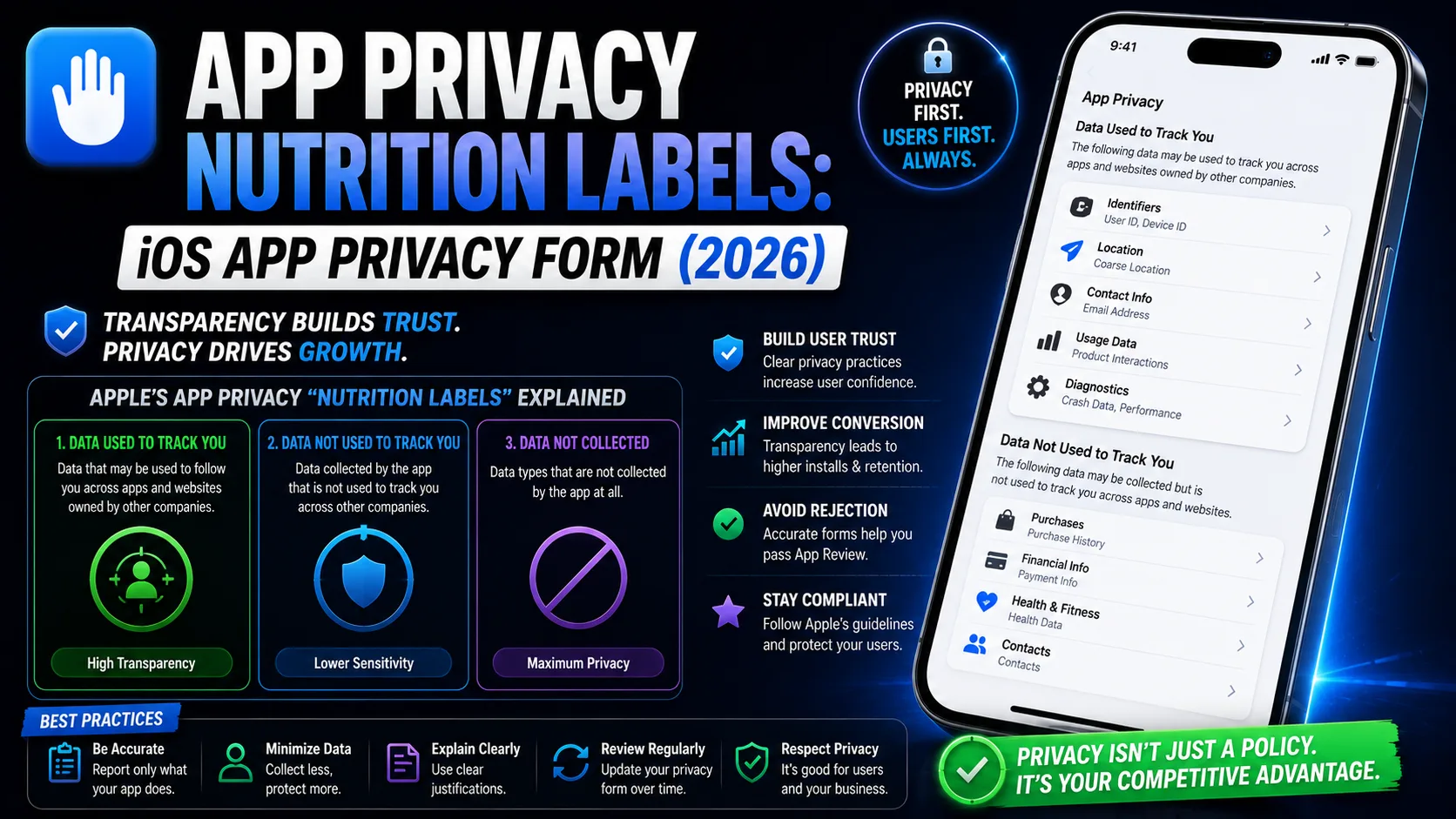
Apple's Privacy Nutrition Labels are the iOS equivalent of Google Play's Data Safety form — and they're enforced just as strictly. Every app submitted to the App Store since December 2020 must declare exactly what data it collects, how that data is used, whether it's linked to user identity, and whether it's used to track users across other apps and websites. The questionnaire has 14 data categories, 3 identity classifications, 6 usage purposes, and a strict requirement that your answers match your actual app behavior, your privacy policy, and (since 2024) the Privacy Manifest files of every third-party SDK in your bundle. Inconsistencies trigger rejection. Forgotten SDKs trigger post-launch enforcement. This is the operator-level guide to App Privacy Nutrition Labels in 2026: every section explained, every common rejection cause, the SDK Privacy Manifest mechanism, and the exact workflow to fill the form correctly the first time.
What App Privacy Nutrition Labels actually are
Privacy Nutrition Labels are the user-facing data disclosure section on every App Store product page. They appear above the screenshots, beneath the app title, in a standardized format that resembles food nutrition labels — hence the name. Apple introduced them in December 2020 and tightened the enforcement framework significantly through 2024–2026.
The properties that make them different from a privacy policy:
- Standardized format. Every app uses the same 14 categories and 3 identity classifications. Users can scan and compare apps quickly.
- Mandatory for every submission. Apps that collect no data still complete the questionnaire (declaring that fact). There's no opt-out.
- Cross-checked at review. Apple's review team compares your nutrition labels to your privacy policy, your app's actual behavior, and your bundle's Privacy Manifest declarations. Mismatches trigger rejection.
- Updated per submission. Every time you submit a new version, you reaffirm or update the labels. They're not set once and forgotten.
- Self-declared but enforced. Apple doesn't audit every claim, but they spot-check, and inaccurate labels trigger app removal under Guideline 5.1.1 — sometimes weeks or months after publication.
The shorthand: think of nutrition labels as the visible 30-second summary of your privacy policy, mechanically verified against your binary. They're not optional; they're not negotiable; and they're the single most common cause of "Invalid App Privacy" rejections on the App Store in 2026.
The 14 data categories Apple asks about
Every nutrition label questionnaire covers the same 14 categories. Each one has multiple subcategories:
- Contact Info: Name, email address, phone number, physical address, other user contact information.
- Health and Fitness: Health, medical, fitness, exercise data.
- Financial Info: Payment info, credit info, other financial info.
- Location: Precise location, coarse location. Apple notes that coarse location is the lower-resolution version — declare it even if your precise location is "immediately coarsened" before processing.
- Sensitive Info: Racial/ethnic data, sexual orientation, pregnancy data, disability information, religious beliefs, political affiliations, trade union memberships, genetic information, biometric data.
- Contacts: The user's address book contacts.
- User Content: Emails or text messages (both SMS and non-SMS), photos or videos, audio data, gameplay content, customer support data, other user content.
- Browsing History: Information about content the user has viewed that is not part of your app.
- Search History: Search queries within your app.
- Identifiers: User ID, device ID (including IDFA/Advertising Identifier).
- Purchases: Purchase history.
- Usage Data: Product interaction, advertising data, other usage data.
- Diagnostics: Crash data, performance data, other diagnostic data.
- Other Data: Anything that doesn't fit the above.
For each data type your app collects, Apple asks four follow-up questions:
- What is this data used for? Six possible purposes: Third-Party Advertising, Developer's Advertising or Marketing, Analytics, Product Personalization, App Functionality, Other Purposes.
- Is this data linked to the user's identity? "Linked" means tied to the user's account, email, or device ID. "Not Linked" means anonymized before storage.
- Is this data used to track the user? Tracking = linking your app's data to data from other companies' apps, websites, or offline properties for advertising or measurement purposes. Triggers the ATT (App Tracking Transparency) requirement.
- Optional disclosure exception? Apple allows omission only if data meets all of: collected only for app functionality or analytics, never used for tracking, never linked to identity beyond a session, and not sent to third parties. Few SDK integrations qualify.
Realistic time investment: 30–60 minutes for a focused first submission, with your privacy policy and SDK list open in another tab.
The three identity classifications (and why "Tracking" matters most)
For each data type, you must classify it into one of three buckets. They appear as separate sections on your product page:
- Data Used to Track You: The most stringent category. Includes anything tied to advertising IDs (IDFA), shared with third-party advertisers, or used for cross-app/cross-website tracking. Apps with this declaration must also implement the ATT prompt — required since iOS 14.5 for any tracking. The single highest-impact label on conversion: users see "Used to Track You" and many will skip your app entirely.
- Data Linked to You: Data tied to the user's identity (account, email, device ID) but not shared for cross-app tracking. Less alarming to users but still indicates persistent identity binding.
- Data Not Linked to You: Anonymized data — collected, but not tied back to user identity. The least alarming, but Apple verifies the anonymization claim during review.
The classification matters because users see these as the top-line summary of your privacy posture. "Data Used to Track You — Diagnostics, Identifiers, Usage Data" on your product page is a conversion killer for privacy-conscious users. "Data Not Linked to You — Diagnostics" reads as much safer.
If you can architect your analytics and ads to avoid tracking declarations (server-side analytics with anonymization, contextual ads instead of behavioral), you'll see meaningful conversion lift. This isn't just compliance — it's product strategy.
The six usage purposes
For each declared data type, you pick from six possible usage purposes. They cascade in stringency:
- Third-Party Advertising: Data shared with ad networks, attribution platforms, or advertising SDKs (AdMob, Unity Ads, Meta Audience Network, attribution SDKs like AppsFlyer, Adjust, Singular). Triggers ATT. Most stringent.
- Developer's Advertising or Marketing: Data used for your own marketing campaigns or in-app promotions. Less stringent than third-party but still meaningful.
- Analytics: Data used to measure user behavior, app performance, conversion rates. Firebase Analytics, Mixpanel, Amplitude all fall here.
- Product Personalization: Data used to tailor app behavior to the user. Recommendation engines, customized content feeds.
- App Functionality: Data essential for the app to work. Authentication tokens, in-app purchase records, basic crash logs for service stability.
- Other Purposes: Anything else. Use sparingly — Apple may ask for clarification.
One data type can have multiple purposes. Firebase Analytics collecting a "user_event" might serve both Analytics and Product Personalization simultaneously. Declare all applicable purposes for each data type.
Privacy Manifests: the SDK declaration system
Apple introduced Privacy Manifests in 2024 as a structured way for SDK developers to declare their data collection inside their bundles. As of late 2024, Apple requires Privacy Manifest files for many common SDKs and notable APIs (the "Required Reason API" list, which now includes file timestamp APIs, system boot time APIs, disk space APIs, active keyboard APIs, and user defaults APIs).
What this means in practice:
- SDK providers ship Privacy Manifest files. Firebase, RevenueCat, Adapty, AppsFlyer, Sentry, Crashlytics, and most major SDKs now include
PrivacyInfo.xcprivacyfiles in their bundles. These declare what the SDK collects and which Required Reason APIs it uses. - Xcode aggregates the manifests at build time. Build → Generate Privacy Report on your archive in Xcode produces a PDF that lists every data type collected by your app and its SDKs. Use this as the source of truth for your nutrition label answers.
- Apple cross-checks at upload. If a third-party SDK in your bundle declares "Crashes" data collection but your nutrition labels don't include Diagnostics, the upload may fail validation or be flagged at review.
- Missing Privacy Manifests for required SDKs trigger rejection. Apple maintains a list of "commonly used SDKs" that must include a Privacy Manifest. Submitting with old SDK versions lacking these manifests will fail.
The practical workflow:
- Update all SDKs to versions published after May 2024. Older versions usually lack Privacy Manifests.
- Run "Generate Privacy Report" in Xcode after archiving. Review the PDF.
- Use the report as your nutrition label checklist. If the report lists "Diagnostics" collected by your SDKs, declare Diagnostics in your nutrition labels.
- Compare against last submission's report. If anything changed between versions, update labels accordingly.
This system was Apple's response to "developers don't know what their SDKs collect." It works — but only if you actually open the report.
The single most common rejection: forgotten SDKs
Apple is explicit on this point: data collected by third-party partners — including SDKs you've added to your app — counts as data your app collects. The SDKs most commonly forgotten by indie iOS developers:
- Firebase Analytics: Collects Identifiers (device ID), Usage Data (product interaction), Diagnostics. Often used in Analytics and Product Personalization purposes.
- Firebase Crashlytics: Collects Diagnostics (crash data), Identifiers (device ID).
- Firebase Cloud Messaging: Collects Identifiers (device token).
- Google AdMob: Collects Identifiers (IDFA), Usage Data, sometimes Location. Triggers Third-Party Advertising and likely Tracking declarations.
- Unity Ads: Same categories as AdMob — Identifiers, Usage Data, sometimes Location. Tracking-implicated.
- Meta Audience Network / Facebook SDK: Identifiers, Usage Data, sometimes Contact Info (Facebook ID).
- AppsFlyer, Adjust, Singular (attribution SDKs): Identifiers, Usage Data, Purchase data. Tracking-implicated.
- RevenueCat / Adapty / Qonversion (subscription SDKs): Identifiers, Purchases, Financial Info.
- Sentry / Bugsnag (error monitoring): Diagnostics, sometimes Identifiers (if you set user context).
- Mixpanel / Amplitude / Segment (product analytics): Identifiers, Usage Data, custom Other Data.
- OneSignal / Pusher (push notifications): Identifiers (device tokens), Usage Data.
- HealthKit integrations: Health and Fitness data.
The workflow that catches most indie developers' SDK gaps: open your Podfile or Package.swift, list every dependency, look up each SDK's official Privacy Nutrition Label mapping page, and declare what they collect. Most major SDK providers publish these mappings — Firebase has a comprehensive one, AppsFlyer publishes per-product mappings, RevenueCat documents their collection scope.
iOS vs Google Play: key disclosure differences
If you've completed Google Play's Data Safety form, the iOS Privacy Nutrition Labels share concepts but differ in mechanics. Key differences:
- Categories: 14 (iOS) vs 14 (Android). Almost identical in count but slightly different naming. iOS has "Identifiers" and "Sensitive Info"; Google merges these into other categories.
- Identity classification: 3 buckets on iOS, more granular on Android. iOS focuses on "Tracking" as the high-impact label; Google focuses on "Shared with third parties" with more nuance.
- ATT prompt: iOS-only. If you classify any data as "Used to Track You," you must implement the ATT prompt. No equivalent on Android.
- Privacy Manifests: iOS-only. The SDK-level declaration system is unique to Apple. Google relies on developer self-attestation without manifest cross-checks.
- Update cadence: per-submission (iOS) vs independent (Android). iOS labels update when you submit a new version. Google Play's Data Safety form can be updated independently of releases.
- Visibility: top of product page (iOS), separate Data Safety section (Android). iOS labels are more prominent.
For the Google Play equivalent disclosure work, our Data Safety form guide covers the Android side in depth.
The App Tracking Transparency requirement
If your nutrition labels declare any "Data Used to Track You," you must implement App Tracking Transparency (ATT). Required since iOS 14.5. The mechanics:
- Add NSUserTrackingUsageDescription to your Info.plist. A short string explaining why you want to track. Users see it in the prompt.
- Request authorization at runtime.
ATTrackingManager.requestTrackingAuthorization(completionHandler:). Apple recommends asking just before tracking actually begins, not at app launch. - Respect the user's response. If they deny, you must not access IDFA, must not link user data with third-party datasets, must not enable behavioral ads.
- Don't try to manipulate the prompt. Apple's Guideline 5.1.1(iv) prohibits "altering a user's ATT response by only respecting their response to other permission requests." Common rejection reason for apps using consent management platforms to bypass ATT.
Practical impact: only 25–30% of users authorize tracking when asked. If your business model depends on tracking, this is a real revenue hit — and a strong argument for architecting your app to avoid tracking entirely (server-side analytics, contextual ads).
How to fill the form correctly the first time
The workflow that consistently produces accepted Privacy Nutrition Labels on first submission:
- Step 1: List every SDK in your app. Open
PodfileorPackage.swift. Write down every dependency, including indirect ones (transitive dependencies that Cocoapods/SPM pulls in). - Step 2: Update all SDKs to versions with Privacy Manifests. Anything published before May 2024 may lack manifests. Update first; declare later.
- Step 3: Archive in Xcode, then Generate Privacy Report. Window → Organizer → select your archive → Generate Privacy Report. Save the PDF.
- Step 4: Map the report to nutrition label categories. Each data type listed in the report corresponds to a category in the App Store Connect questionnaire. Cross-reference systematically.
- Step 5: Write or generate your privacy policy. The policy must mention each data type, each SDK, the identity classification, and ATT framework usage. Our privacy policy generator creates an App Store-compliant policy that matches the nutrition label taxonomy.
- Step 6: Fill the App Store Connect form with your privacy policy and Privacy Report open. Cross-check every declaration against both.
- Step 7: Submit and watch for review feedback. Most issues come back as Resolution Center messages within 24–48 hours.
- Step 8: Update labels every time SDKs change. Adding Firebase Analytics in a later update requires updating the labels on the next submission.
Done this way, the form takes 30–60 minutes the first time and 10–15 minutes for subsequent updates. Done backward — guessing first, then patching when rejected — it can take days.
Common mistakes that get apps rejected
Patterns that consistently cause "Invalid App Privacy" or "Privacy Nutrition Label" rejections:
- Declaring "no data collected" when analytics or ad SDKs are present. Firebase Analytics → you collect data. AdMob → you collect data. Declaring "no" with these SDKs in your bundle is the #1 rejection cause.
- Missing tracking classification for ad SDKs. AdMob, Meta Audience Network, attribution SDKs are tracking. Apple cross-checks via Privacy Manifest.
- Mismatch with privacy policy. Policy says "We use Firebase Analytics"; labels don't declare Diagnostics or Usage Data. Reviewers catch this manually.
- Missing ATT prompt when tracking is declared. If labels say "Used to Track You" and your app never shows ATT, it's a rejection — and a tightening enforcement focus in 2026.
- Using outdated SDK versions without Privacy Manifests. Apple's "commonly used SDKs" list now requires manifests. Update before submitting.
- Wrong purpose categorization. Firebase Analytics is Analytics, not just App Functionality. Wrong categorization is a soft rejection (clarification request) but adds days to review.
- Declaring Coarse Location while collecting Precise. Apple checks. If your Info.plist requests "When in Use" location authorization and your code reads precise lat/long, declare Precise Location, not Coarse.
- Skipping the ATT description. Empty
NSUserTrackingUsageDescription= rejection if any tracking is declared. - Not updating labels for a metadata-only submission. Even submissions that don't change code require label review. Forgetting this is a missed step.
- Inconsistent labels across app versions. If version 1.0 declared Diagnostics and version 1.1 doesn't (with no code change), Apple flags it.
What to do if your labels get rejected
The rejection email cites "Privacy" issues, usually with reference to Guideline 5.1.1 (Data Collection and Storage). The recovery flow:
- Read the rejection carefully. Apple usually identifies the specific data type or SDK causing the issue.
- Generate a fresh Privacy Report in Xcode. Compare against your declarations. Find the mismatch.
- Update your privacy policy if needed. The policy must mention what the labels declare.
- Fix the labels in App Store Connect. App Information → App Privacy → Update declarations.
- Reply in Resolution Center. Explain what you fixed. Apple's reviewers read these.
- Resubmit. Updated labels typically re-review faster than the initial rejection — 24–72 hours.
For more on the rejection appeal process broadly, our App Store rejection appeals guide covers the Resolution Center and App Review Board workflows in detail.
How long Privacy review takes in 2026
Real timelines from 2026 submissions:
- First-time privacy review (new app): Part of the overall 2–5 day review cycle. Apple often flags privacy issues first because automated checks run before manual review.
- Updates with changed labels: 24–72 hours, faster for trivial declarations changes.
- Rejected and resubmitted: 24–72 hours for re-review.
- Post-publication audit: Apple periodically re-scans approved apps. Mismatches detected during these audits result in app removal threats with 30-day cure windows.
Plan privacy work as a 2-week buffer in your launch timeline. Submitting in the final week before your launch date is real schedule risk if privacy issues come back.
Frequently asked questions
Are Privacy Nutrition Labels mandatory?
Yes. Every app submitted to the App Store must complete the privacy questionnaire, including apps that collect no data (which declare exactly that). There's no opt-out.
Do Privacy Nutrition Labels replace a privacy policy?
No. You need both. Labels are the visible summary on your product page; the privacy policy is the legal document at a URL you provide. The two must match.
What's the difference between "Linked to You" and "Used to Track You"?
"Linked" means tied to user identity within your app and your services. "Tracking" means shared with third parties for cross-app/cross-website advertising or measurement. Tracking is the highest-impact classification and triggers the ATT prompt requirement.
What's a Privacy Manifest?
A structured XML file (PrivacyInfo.xcprivacy) inside SDK bundles declaring what data the SDK collects and which Required Reason APIs it uses. Apple introduced these in 2024 for the major SDK list and uses them to cross-check developer declarations.
What's the App Tracking Transparency (ATT) prompt?
A system-level dialog that asks users for permission to track them across apps and websites. Required since iOS 14.5 for any app declaring "Data Used to Track You" in nutrition labels. Required even for first-party tracking via IDFA.
What happens if my privacy labels don't match my actual app behavior?
Initial submission: rejection with "Invalid App Privacy" notice. Post-publication: Apple's audits may flag your app for removal under Guideline 5.1.1 with a 30-day cure window. Both are real risks.
Can I update Privacy Nutrition Labels without a new app version?
The labels are tied to your app's metadata, which can be updated without uploading a new binary in some cases. For substantive changes (declaring new data types, changing tracking status), updating with the next version submission is cleaner.
Do I need to disclose data processed only on device?
No — if the data stays entirely on the device and is never transmitted anywhere. Apple's "Collect" definition refers to transmitting data off the device. On-device processing is exempt, but if you derive anything from the data and send it off-device, the resulting data needs disclosure.
How do I know what data my SDKs collect?
Three sources: the SDK provider's published Privacy Nutrition Label mapping (most major providers have these), the Privacy Manifest file inside the SDK bundle, and Xcode's "Generate Privacy Report" feature on your archive.
Do iOS Privacy Nutrition Labels and Google Play Data Safety forms share answers?
No. They're separate systems with overlapping concepts. You complete each one independently in its respective console. For Google Play's equivalent, see our Data Safety form guide.
The bottom line
App Privacy Nutrition Labels are unforgiving and getting stricter every year. The single most preventable cause of rejection is forgotten third-party SDKs — Firebase Analytics, AdMob, Crashlytics, attribution SDKs all collect data even when you forget they're there. The second most preventable cause is mismatched privacy policies that don't reflect your label declarations. Approach the labels as a 30–60 minute audit of your Podfile dependencies and your Privacy Report PDF, declare honestly across all 14 categories, classify tracking accurately to avoid post-launch enforcement, and implement ATT correctly if you do track. Done well, the labels are a one-time setup that scales with your SDK choices. Done carelessly, they're a 2-week launch delay every time you submit — and a potential removal threat months after publication.
The Privacy Nutrition Labels are one piece of a larger App Store submission process. Our App Store Connect setup guide covers the full submission flow from $99 enrollment to first release. The privacy policy generator creates an App Store-compliant privacy policy that matches the same taxonomy as the nutrition labels, free in seconds. For the Google Play equivalent, the Data Safety form guide covers the Android side in depth.
Related posts
Make your App Store screenshots free
LaunchShots is a free, in-browser screenshot maker. No signup, no watermark.
Open the app →
Comments (0)