Flutter In-App Subscriptions: RevenueCat vs in_app_purchase
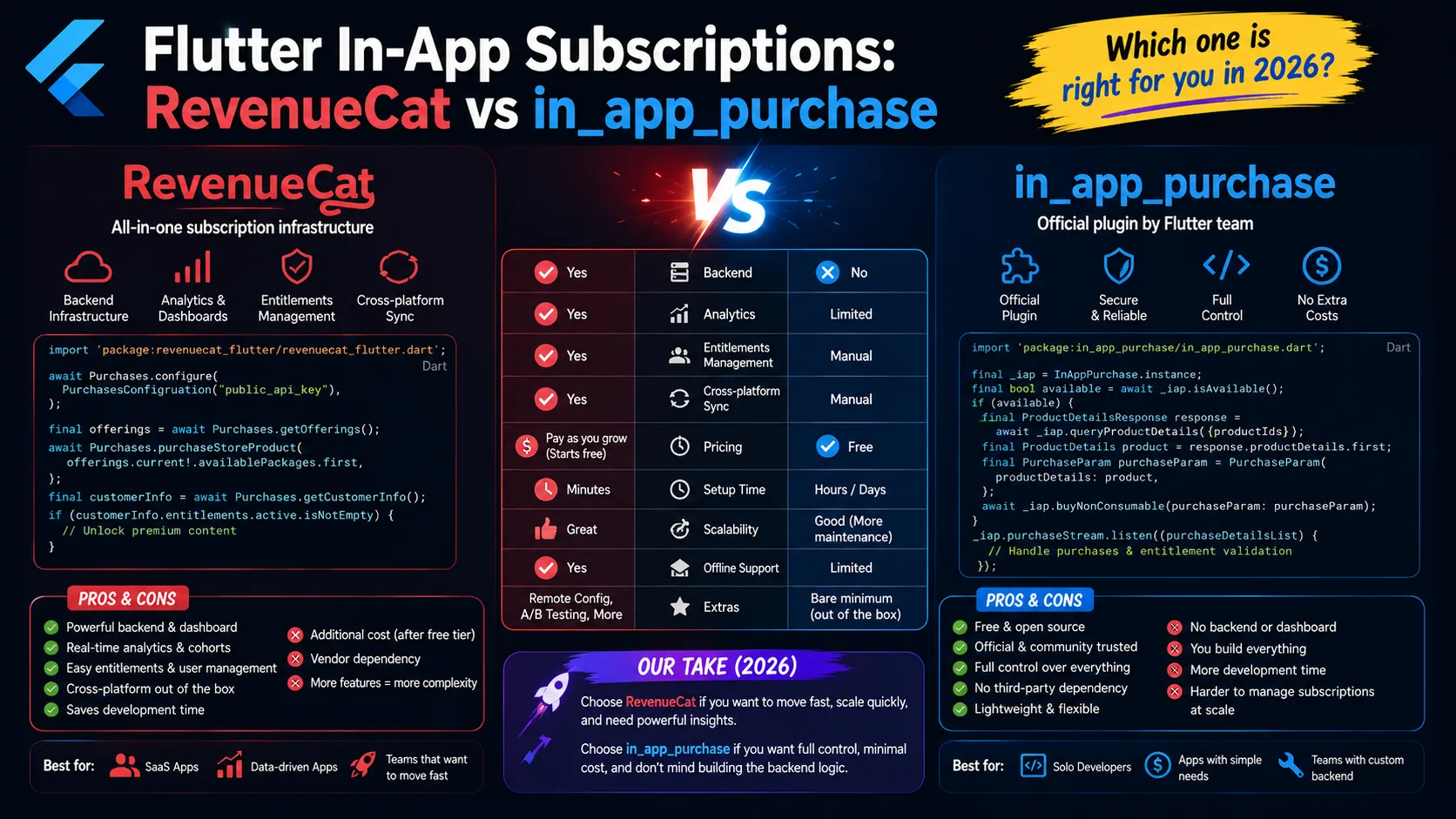
Picking the wrong subscription stack for your Flutter app is one of the most expensive mistakes you can make early. Choose poorly and you'll either pay a percentage of revenue you didn't have to, or burn a month of engineering time rebuilding receipt validation that should have taken an afternoon. The two real options in 2026 are the official in_app_purchase package maintained by the Flutter team, and purchases_flutter from RevenueCat. They solve overlapping problems in very different ways, and the right choice depends on revenue scale, how much backend code you want to own, and what you actually need beyond a working "buy" button. This is the operator-level comparison for indie Flutter developers in 2026 — what each package gives you, what each costs at real revenue levels, and the exact scenarios where each one is the right call.
What each package actually does
Both packages let your Flutter app sell in-app purchases and subscriptions on iOS and Android. That's where the similarity ends. Under the hood, they're solving very different problems:
- in_app_purchase is a thin wrapper around Apple StoreKit and Google Play Billing. It hands your Flutter code a unified API for triggering purchases and listening for transactions, but everything past the purchase event — receipt validation, server-side subscription status tracking, analytics, webhooks, cross-platform user matching — is your problem to solve. It's official, free, and minimal.
- purchases_flutter (RevenueCat) wraps the same StoreKit and Google Play Billing APIs, but routes every transaction through RevenueCat's backend, which handles receipt validation, subscription state tracking, cross-platform user identity, analytics, webhooks, and a dashboard. You write less code; you give up direct ownership of the data pipeline.
The choice between them is mostly a "build vs. buy" decision at the infrastructure layer, not a feature-set comparison. Both let users subscribe. The difference is in what happens after the subscribe button is tapped.
What you actually have to build with in_app_purchase
The official package gets you 30% of the way to a production subscription system. The remaining 70% is on you. The realistic build list:
- Receipt validation server. Apple and Google return signed receipts that you can't trust on the client (jailbroken devices forge them). You need a backend endpoint that takes the receipt, calls Apple's
verifyReceiptAPI or Google'sandroidpublisherAPI, and confirms validity. Realistic build time: 1–3 days if you've done it before, 1–2 weeks the first time. - Subscription state database. You need to store who's subscribed, what tier they're on, when their renewal date is, whether they're in a grace period, and whether their entitlement is currently active. A simple PostgreSQL table works fine, but you have to design and maintain it.
- Webhook receivers for Apple and Google. Apple's App Store Server Notifications (V2) and Google's Real-time Developer Notifications (RTDN) push subscription events — renewals, cancellations, grace periods, refunds, billing retries — to a webhook endpoint you provide. You write the receiver, parse the events, update your database, and handle every edge case. Apple has roughly 18 event types in V2; Google has 13. Realistic build time: 3–7 days for solid coverage.
- Cross-platform user identity. A user who subscribes on iPhone and signs in on Android needs to see their subscription active in both places. You build this — authentication, identity mapping, and entitlement resolution across platforms. Not trivial.
- Refund and chargeback handling. When Apple or Google issue a refund, you need to revoke entitlement. The webhook tells you; your code has to act on it.
- Analytics and reporting. MRR, churn rate, trial-to-paid conversion, cohort retention — none of these are computed for you. You either build the queries yourself or pay for an analytics tool that ingests your subscription events.
None of this is impossible. Plenty of apps run on in_app_purchase plus a custom backend successfully. But it's real engineering work — easily 3–6 weeks of focused effort for a solo indie developer building it from scratch — and every edge case you miss is a refund request or a confused support email later.
What purchases_flutter gives you out of the box
RevenueCat handles the entire stack above. What you actually write in your Flutter app is much smaller:
- Configure once in
main():Purchases.setLogLevel(LogLevel.debug); await Purchases.configure(PurchasesConfiguration("your_api_key"));— that's it. - Fetch offerings:
final offerings = await Purchases.getOfferings();— returns the products you configured in RevenueCat's dashboard, already filtered for the current user's platform and locale. - Make a purchase:
await Purchases.purchasePackage(package);— handles the entire purchase flow, including receipt validation. - Check entitlement:
final customerInfo = await Purchases.getCustomerInfo(); final isPremium = customerInfo.entitlements.active.containsKey("premium");— works identically on iOS and Android, with the user's status synced server-side.
What you don't write: the receipt validation server, the subscription state database, the webhook receivers, the cross-platform identity mapping, the refund handling, or the analytics queries. RevenueCat owns all of it. You get a dashboard with MRR, churn, conversion rates, A/B test results, and revenue charts — none of which you had to query for yourself.
The trade-off: your subscription data lives on RevenueCat's servers. If RevenueCat goes down (rare but possible), your purchase flow degrades. If you ever want to migrate off, you're moving a year of subscriber history out of someone else's system.
Pricing: what each one actually costs in 2026
Cost is the most common deciding factor, and the math depends entirely on your revenue level:
- in_app_purchase package: Free. No fees beyond what Apple and Google already take (15% under the Small Business Program, 30% above $1M proceeds). You pay in engineering time, not in revenue percentage.
- RevenueCat free tier: Free up to $2,500 in Monthly Tracked Revenue (MTR). For an indie app generating under $30K/year in subscription revenue, RevenueCat is genuinely free.
- RevenueCat Starter plan: Above $2,500 MTR, RevenueCat charges 1% of MTR. On $10,000/month in subscription revenue, that's $100/month — on top of Apple's 15% commission.
- RevenueCat Pro plan: $119/month base plus 0.5% of MTR. Unlocks A/B testing, paywall builder, advanced analytics, and priority support. Cost-effective above roughly $25K MTR.
Real-world math at different scales:
- $2,000/month MTR (early indie): RevenueCat is free. in_app_purchase is also free but you've spent 3–6 weeks building infrastructure. RevenueCat wins on opportunity cost alone.
- $10,000/month MTR (growing indie): RevenueCat Starter costs $100/month (1%). in_app_purchase is still free but your custom backend has maintenance overhead, edge case bugs, and missing analytics. RevenueCat is usually still worth it.
- $50,000/month MTR (established): RevenueCat Pro costs $119 + $250 = $369/month. in_app_purchase plus a custom backend with mature analytics might be cheaper at this scale, but the tooling lift (paywall A/B tests, churn analysis, web subscriptions) is significant.
- $200,000+/month MTR (significant scale): The 1% fee starts to be real money — $2,000/month on $200K MTR. At this scale, building in-house often makes financial sense, but most large RevenueCat customers stay because migration cost outweighs the fee.
The break-even point where building yourself genuinely beats RevenueCat is usually somewhere between $50K and $200K MTR, depending on how much engineering capacity you have and how sophisticated your needs are. Below that, the package fee is dramatically cheaper than the engineering time to replace it.
Side-by-side feature comparison
What each package gives you, line by line:
- Cross-platform purchase API: Both ✅
- Receipt validation: in_app_purchase ❌ (you build), purchases_flutter ✅ (server-side, included)
- Subscription state tracking: in_app_purchase ❌ (you build), purchases_flutter ✅
- App Store Server Notifications + Google RTDN: in_app_purchase ❌ (you handle), purchases_flutter ✅ (handled)
- Cross-platform user identity: in_app_purchase ❌ (you build), purchases_flutter ✅ (via App User IDs)
- MRR, churn, conversion dashboards: in_app_purchase ❌, purchases_flutter ✅
- Paywall A/B testing: in_app_purchase ❌, purchases_flutter ✅ (Pro tier)
- Native paywall UI builder: in_app_purchase ❌, purchases_flutter ✅
- Web subscriptions (browser checkout): in_app_purchase ❌, purchases_flutter ✅ (RevenueCat Web Billing)
- Webhooks to your backend: in_app_purchase ❌ (you set up), purchases_flutter ✅
- Integration with Mixpanel, Amplitude, Segment, etc.: in_app_purchase ❌, purchases_flutter ✅
- Cost: in_app_purchase is free; purchases_flutter is free up to $2.5K MTR then 1% (or 0.5% on Pro)
When in_app_purchase is the right call
Despite the trade-offs, the official package is the better choice in specific scenarios:
- You only sell one-time IAPs, not subscriptions. Without recurring billing complexity, the engineering work to handle one-time purchases on your own backend is much smaller. You probably don't need RevenueCat.
- You have backend infrastructure already. If you already run a backend with a user database, authentication, and webhooks, adding receipt validation is incremental. The cost of "build it yourself" is lower for you than for someone starting fresh.
- You have strict data residency or compliance requirements. Some enterprise contracts require subscription data to live in specific jurisdictions or on specific infrastructure. Third-party services like RevenueCat can complicate that compliance posture.
- You're at significant scale and the 1% fee is meaningful. Above $200K+ MTR, the math starts shifting. You also have the engineering team to maintain custom infrastructure properly.
- You're learning and don't mind the work. Building receipt validation from scratch teaches you how StoreKit and Google Play Billing actually work. That knowledge has long-term value, even if RevenueCat would have been faster.
When purchases_flutter is the right call
For most indie Flutter developers in 2026, RevenueCat is the default choice for clear reasons:
- You're solo or a small team. Engineering time is your scarcest resource. RevenueCat removes 3–6 weeks of work from your launch timeline.
- You're building a subscription business, not a one-time IAP business. Subscription complexity (renewals, grace periods, billing retries, refunds, plan changes, family sharing, promo codes) is where RevenueCat earns its keep.
- You want analytics from day one. Knowing your trial-to-paid conversion rate the day you launch is genuinely useful. Building that yourself from raw events takes weeks.
- You ship on both iOS and Android. Cross-platform subscription state is harder than it looks. RevenueCat handles it; on in_app_purchase, you'll spend real time on identity matching and entitlement resolution.
- You're under $100K MTR. The 1% fee is small in absolute dollars and you get tooling that would cost you weeks to replicate. The math overwhelmingly favors RevenueCat.
- You want to A/B test paywalls or pricing. RevenueCat's paywall A/B testing on Pro is genuinely sophisticated. Building it yourself is a multi-month project.
Code comparison: what each looks like in Flutter
The Flutter integration footprint is dramatically different.
RevenueCat (purchases_flutter):
Add to pubspec.yaml: purchases_flutter: ^9.0.0
In main.dart:
await Purchases.configure(PurchasesConfiguration("your_api_key"));
Fetching products and triggering a purchase:
final offerings = await Purchases.getOfferings();
final package = offerings.current?.availablePackages.first;
await Purchases.purchasePackage(package!);
Checking entitlement:
final info = await Purchases.getCustomerInfo();
final isPremium = info.entitlements.active.containsKey("premium");
That's roughly the entire integration. Receipt validation, subscription state, cross-platform identity — all handled.
in_app_purchase package:
Add to pubspec.yaml: in_app_purchase: ^3.2.0
Plus you write: a stream listener for transactions, server-side receipt validation logic, a backend endpoint to receive Apple/Google webhooks, a database to track subscription state, code to resolve entitlement on app startup, refund handling, and cross-platform user identity matching.
The client-side Flutter code is similar in length. The full system is dramatically larger.
The hidden costs nobody mentions
The naive comparison ("RevenueCat is 1% — just build it yourself!") misses several real costs of the DIY path:
- Edge cases you didn't think of. Family sharing transfers. Subscription pauses. Billing retries that recover after 14 days. Refunds that arrive 60 days post-purchase. Each one is its own implementation; each one is a bug if you skip it.
- Server maintenance. Your receipt validation server has uptime requirements. If it goes down during a purchase, the user paid but didn't get entitlement. You're now writing failover logic.
- Apple and Google API changes. StoreKit 2 (iOS 15+) changed the API significantly. Google's Real-time Developer Notifications V2 changed. Every major OS version brings something. RevenueCat absorbs these; you don't.
- Support cost. Users who paid but didn't get entitlement send support emails. Without RevenueCat's dashboard to look up customer status, debugging takes 10× as long.
- Analytics gap. Without revenue analytics from day one, you're flying blind on pricing experiments, churn analysis, and trial optimization. That's not just a tool gap — it's a strategy gap.
None of these are insurmountable. They're just real costs that don't show up in a "1% is too much" calculation.
Frequently asked questions
Can I migrate from in_app_purchase to RevenueCat later?
Yes, but it's significant work. RevenueCat needs your existing subscriber data imported (or you accept that existing subscribers are tracked from migration day forward). Most indie devs who start on in_app_purchase and switch report 1–2 weeks of migration work.
Can I use both in the same app?
Technically yes, but it's not recommended. The two packages compete for the same StoreKit and Play Billing connections. Pick one and commit.
Is RevenueCat actually open source?
The Flutter SDK (purchases_flutter) is open source. The backend (where receipt validation, analytics, and subscription state live) is RevenueCat's proprietary infrastructure. You can read the SDK code; you can't self-host the backend.
Does RevenueCat work with Apple's StoreKit 2?
Yes. RevenueCat's iOS SDK uses StoreKit 2 where available and falls back to StoreKit 1 on older iOS versions. You don't have to think about it.
What happens if RevenueCat goes down?
RevenueCat caches entitlement status locally, so users with active subscriptions can still access premium features even if RevenueCat's API is unreachable. New purchases would fail during an outage. RevenueCat's uptime has been excellent historically (99.95%+), but it's not zero risk.
Do I still need a server with RevenueCat?
No, for the subscription layer. RevenueCat is the backend. You only need your own server for whatever else your app does (user accounts, content delivery, etc.). Many indie apps run fully serverless with RevenueCat handling the entire payment infrastructure.
Can I use RevenueCat for one-time IAPs only, not subscriptions?
Yes, RevenueCat supports both. For one-time-IAP-only apps, the benefit is smaller (less complexity to manage), but the analytics and webhook integrations may still be worth it. Below the $2,500 MTR free tier, there's no cost to try.
How does Flutter web purchases work?
RevenueCat Web Billing supports web checkout flows that you can integrate alongside native IAP. The in_app_purchase package doesn't support web; you'd need a separate web payment flow (Stripe, Paddle) that you'd then reconcile with your subscription state yourself.
What testing setup do I need?
Both require sandbox testing accounts on iOS (App Store Connect sandbox testers) and Android (license tested users in Play Console). RevenueCat additionally has a dashboard for inspecting sandbox transactions in real time, which speeds up debugging considerably.
The bottom line
For solo indie Flutter developers in 2026, RevenueCat (purchases_flutter) is the default choice. It removes 3–6 weeks of backend work from your launch, gives you analytics from day one, and costs nothing until you're earning real revenue. The 1% fee above $2,500 MTR is a small price compared to the engineering time it saves, and the dashboard alone is worth the cost for most early-stage apps.
The official in_app_purchase package is the right call when you have existing backend infrastructure, you're only selling one-time IAPs (not subscriptions), you have strict data residency requirements, or you're at significant scale where the 1% fee becomes meaningful. For everyone else, the build-vs-buy math overwhelmingly favors RevenueCat.
Once your subscription stack is sorted, the next decision is what to charge — and on which side of Apple's commission rules you sit. Our Apple Small Business Program guide covers the 15% commission rate and how to enroll, and the Google Play service fee guide covers the equivalent on Android — including the new 10% rate on subscriptions in 2026 markets.
Related posts
Make your App Store screenshots free
LaunchShots is a free, in-browser screenshot maker. No signup, no watermark.
Open the app →
Comments (0)