App Store & Play Store Screenshot Sizes (2026 Guide)
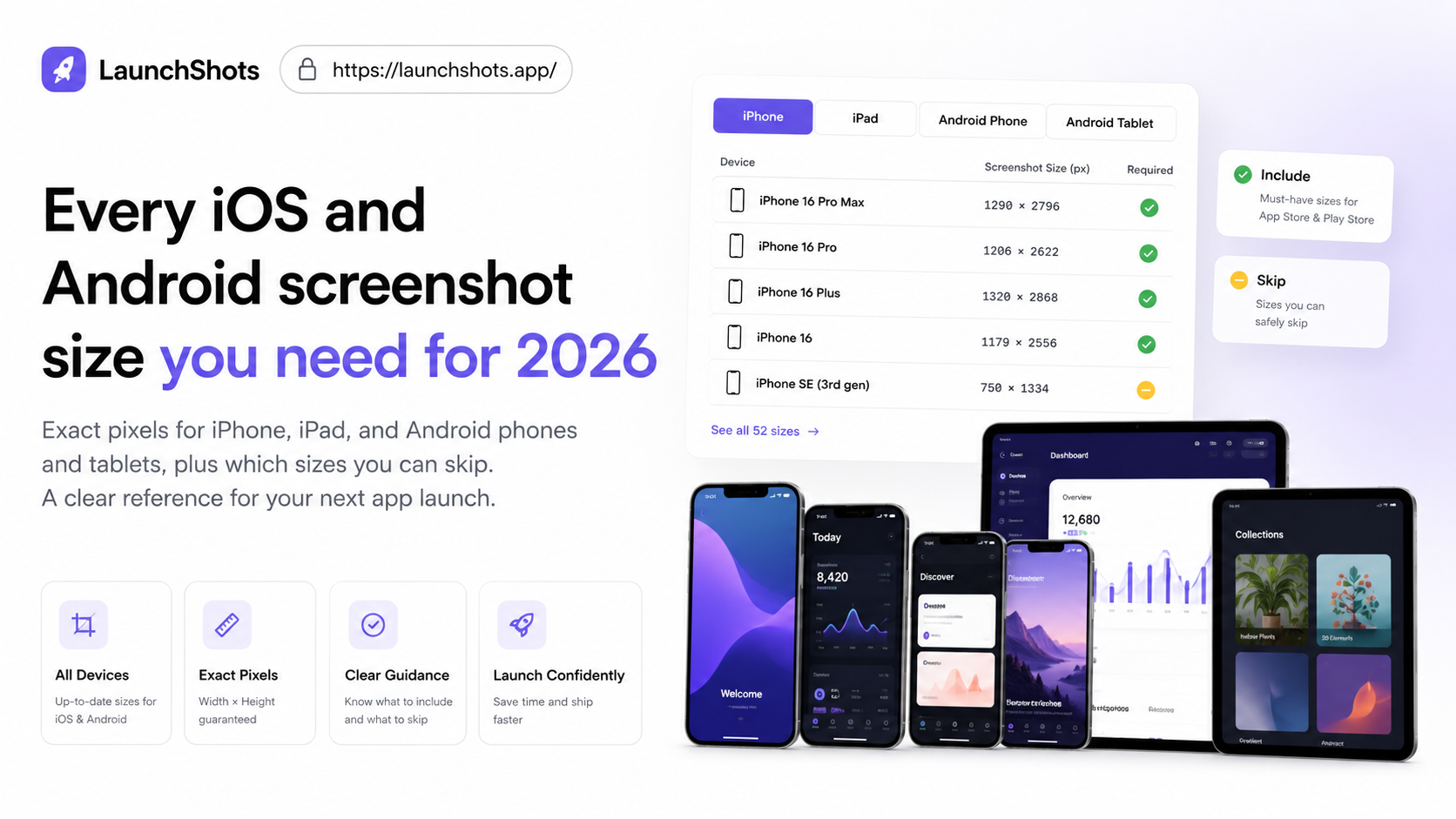
If you're about to publish an app, the screenshot size requirements are one of the most confusing parts — Apple and Google each have their own rules, and they change every few years. This is a clear, up-to-date reference for 2026. Bookmark it; you'll come back to it on every launch.
The short version
For most apps in 2026, you really only need two source sizes:
- iOS: 1290 × 2796 px (iPhone 6.7″). Apple scales this down to smaller iPhones automatically.
- Android: 1080 × 1920 px or larger, in a 9:16 ratio.
If you only remember those two, you'll be fine for most submissions. The details below cover every case.
iOS — App Store screenshot sizes
Apple requires screenshots for the largest iPhone display, and you can optionally provide them for iPad. The key sizes for 2026:
- iPhone 6.9″ (15 Pro Max, 16 Pro Max): 1320 × 2868 px
- iPhone 6.7″ (14 Pro Max, 15 Plus): 1290 × 2796 px
- iPhone 6.5″ (11 Pro Max, XS Max): 1284 × 2778 px
- iPhone 5.5″ (8 Plus): 1242 × 2208 px
- iPad Pro 12.9″ (also 13″): 2048 × 2732 px
- iPad Pro 11″: 1668 × 2388 px
You can upload up to 10 screenshots per device size, per localization. In practice you only need to provide the largest iPhone size — Apple uses it for the smaller models too. You only need iPad screenshots if your app actually supports iPad.
Android — Google Play screenshot sizes
Google Play is more flexible on exact pixels but stricter on count and ratio:
- Phone: minimum 320 px, maximum 3840 px on any side. A common, safe choice is 1080 × 1920 px (9:16).
- 7″ tablet: same rules, sized for the larger screen.
- 10″ tablet: same rules again, e.g. 1600 × 2560 px.
- Each side of the image must be between 320 px and 3840 px, and the longer side can't be more than twice the shorter side.
You need at least 2 screenshots to publish, and you can upload up to 8 per type. Google also requires a separate feature graphic at 1024 × 500 px — that's not a screenshot, but it's mandatory for your listing.
Portrait vs landscape
Most apps use portrait screenshots, since that's how phones are held. If your app is landscape-first (a game, a video editor), you can submit landscape screenshots — just keep the orientation consistent and use the same pixel counts, swapped.
Do I need every size?
No — and this is where people overthink it. Both stores down-scale from your largest provided size. So a practical 2026 workflow is:
- Design once at 1290 × 2796 (iPhone 6.7″) for iOS.
- Design once at 1080 × 1920 for Android.
- Add iPad / tablet versions only if your app supports those devices.
That covers the vast majority of submissions without making 20 separate files.
A few tips that actually move the needle
- The first two screenshots matter most. They're what shows in search results before anyone taps through. Lead with your strongest feature.
- Add a short caption to each screenshot. A raw UI screenshot converts far worse than one with a clear, benefit-driven headline above it.
- Stay consistent. Same fonts, same background style, same caption position across all screenshots — it reads as polished and trustworthy.
- Localize. If you support multiple languages, translated captions noticeably lift conversion in those regions.
The easy way to make them
You don't need Photoshop or Figma for any of this. LaunchShots handles every size above — iPhone, iPad, Android phone and tablet, plus the 1024 × 500 Play feature graphic — right in your browser. Drop in your raw screenshot, add a caption, pick a device frame, and export at the exact pixel size each store wants. It's free, there's no signup, and it does all the resizing for you.
Sizes do shift over time as new devices launch, so if anything here looks out of date, let me know on the feedback board and I'll update it.
Related posts
Make your App Store screenshots free
LaunchShots is a free, in-browser screenshot maker. No signup, no watermark.
Open the app →
Comments (0)